# Connect MCP clients
Source: https://docs.pysquirrels.com/guides/mcp-clients
Learn how to connect MCP-supported AI tools (such as Claude Desktop, Claude Code, or Cursor) to your Squirrels project
Every Squirrels project has an MCP server running at `/mcp` automatically. Thus, AI tools that support the Model Context Protocol can be used to ask questions about the datasets configured in a Squirrels project.
To make it easy for anyone to follow along, we will use the following MCP server URL for a [mortgage analytics Squirrels project](https://mortgage-squirrels-example.duckdns.org/) that is publicly accessible.
```text theme={null}
https://mortgage-squirrels-example.duckdns.org/mcp
```
You can replace this URL with the MCP server URL for your own Squirrels project when working with this guide (such as `http://localhost:4465/mcp`).
## MCP clients
Choose which AI tool you want to use to interact with your Squirrels project.
**Prerequisites:**
* [Claude Desktop](https://claude.com/download) installed
* Node.js (>= v18.0.0) and npm: Download from [nodejs.org](https://nodejs.org/)
* A [Claude.ai](https://claude.ai) account (the free plan works!)
**Steps:**
1. Open **Claude Desktop**.
2. Click your name in the lower left corner, then click **Settings**.
3. Click **Developer** under "Desktop app".
4. Click the **Edit Config** button. This opens the file location of `claude_desktop_config.json`.
5. Open `claude_desktop_config.json` in a text editor, and paste in the following:
```json theme={null}
{
"mcpServers": {
"mortgage-analytics": {
"command": "npx",
"args": [
"-y", "mcp-remote",
"https://mortgage-squirrels-example.duckdns.org/mcp"
]
}
}
}
```
6. **Save** the file and **exit Claude Desktop** (this is different than closing the window).
* To exit Claude Desktop on Windows, click the menu icon on the top left corner and then click File -> Exit
7. Open **Claude Desktop** again. You should now see the Squirrels project enabled by clicking the "search and tools" icon below the chat input.
8. Ask questions about the datasets in the Squirrels project. See the section below for example prompts.
**Prerequisites:**
* [Claude Code](https://code.claude.com/docs/en/overview) (CLI) installed
* Either:
* A [Claude.ai](https://claude.ai/) account with Pro plan or higher, or
* A [Claude Console](https://console.anthropic.com/) account with a credit balance
**Steps:**
1. Add the MCP server to Claude Code with name "mortgage-analytics" and URL `https://mortgage-squirrels-example.duckdns.org/mcp`.
```bash theme={null}
claude mcp add --transport http mortgage-analytics https://mortgage-squirrels-example.duckdns.org/mcp
```
2. Use the following commands to confirm details about the MCP server.
```bash theme={null}
# List all configured servers
claude mcp list
# Get details about the MCP server you just added
claude mcp get mortgage-analytics
```
3. Start Claude Code by running `claude` in the terminal. You can check the server status by typing `/mcp` in the chat input.
```bash theme={null}
# Start Claude Code
claude
# Check server status (within Claude Code)
/mcp
```
4. Ask questions about the datasets in the Squirrels project. See the section below for example prompts.
**Prerequisites:**
* [Cursor](https://cursor.com/download) (IDE) installed
* A [Cursor](https://cursor.com/) account
**Steps:**
1. Open **Cursor**.
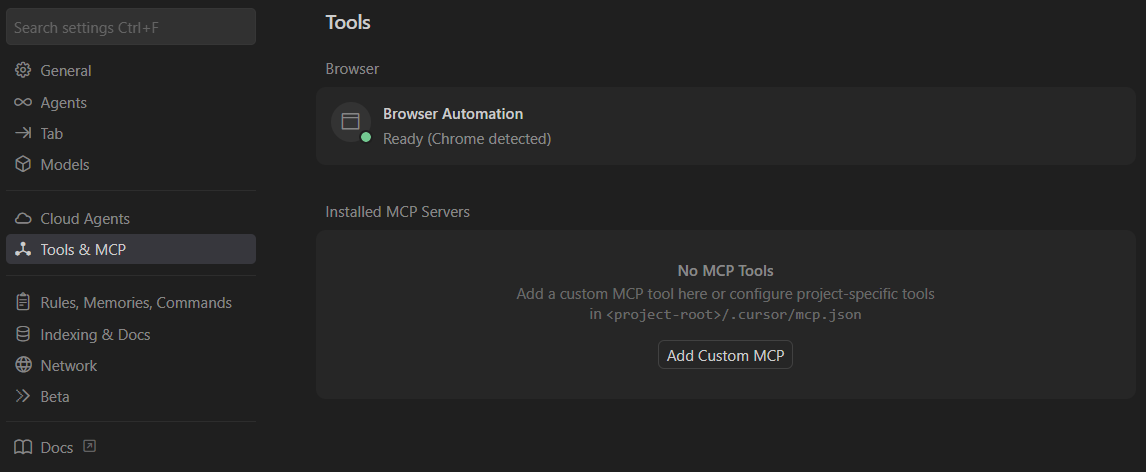
2. Go to File -> Preferences -> **Cursor Settings**.
3. Click on **Tools & MCP** in the left panel.
4. Click the **Add Custom MCP** button. This should open a `mcp.json` file.
5. In the `mcp.json` file, paste the following and save.
```json theme={null}
{
"mcpServers": {
"mortgage-analytics": {
"url": "https://mortgage-squirrels-example.duckdns.org/mcp",
"headers": {}
}
}
}
```
6. Press `Ctrl+I` to open the AI agent chat interface. Use `Ctrl+T` if you need to start a new chat.
7. Ask questions about the datasets in the Squirrels project. See the section below for example prompts.
**Prerequisites:**
* [VS Code](https://code.visualstudio.com/) (IDE) installed
* VS Code extensions: [GitHub Copilot](https://marketplace.visualstudio.com/items?itemName=GitHub.copilot) and [GitHub Copilot Chat](https://marketplace.visualstudio.com/items?itemName=GitHub.copilot-chat) installed
* A [GitHub](https://github.com/) account
**Steps:**
1. Open **VS Code**.
2. Create a `.vscode` folder in your project's root directory if it doesn't exist.
3. Create and open the `mcp.json` file in the `.vscode` folder.
4. In the `mcp.json` file, paste the following and save.
```json theme={null}
{
"servers": {
"mortgage-analytics": {
"url": "https://mortgage-squirrels-example.duckdns.org/mcp",
"headers": {}
}
}
}
```
5. Click **Start** on the MCP server.
6. Press `Ctrl+Shift+I` to open the AI agent chat interface. Use `Ctrl+N` if you need to start a new chat.
7. Ask questions about the datasets in the Squirrels project. See the section below for example prompts.
## Example prompts
The following are sample prompts that can be used for any Squirrels project when interacting with an AI chat agent:
```text wrap theme={null}
What datasets do you have access to?
```
```text wrap theme={null}
What tools do you have access to?
```
The following are sample prompts specific to the mortgage analytics Squirrels project:
```text wrap theme={null}
Suppose I have a 500K loan amount at 5% mortgage rate for 20 years remaining. What would be the monthly mortgage payment?
```
```text wrap theme={null}
Suppose I have a 500K loan amount at 5% mortgage rate for 20 years remaining. Should I pay off the full 500K now, or keep the mortgage and invest it in the stock market instead? Run 1000 simulation trials to answer.
```
# Home
Source: https://docs.pysquirrels.com/index
Build powerful dataset APIs with Squirrels
Squirrels
The modern API framework for data analytics.
Comes with built-in MCP server. Use it to provide AI agents with data analytics capabilities on your data.
Get started
Terminal
{"# Start from an empty folder"}
{"cd my-squirrels-project"}
{"# Initialize a new project"}
{"pip install squirrels"}
{"sqrl init --use-defaults"}
{"sqrl build"}
{"# Run the API server"}
{"sqrl run"}
Getting started
Learn about Squirrels features and capabilities.
Make your first Squirrels project in minutes.
Follow a step-by-step guide to build your first custom application.
Documentation context for AI
MCP server to search the latest documentation on Squirrels.
LLM-optimized documentation index.
Complete LLM-optimized documentation.
# Introduction
Source: https://docs.pysquirrels.com/intro
Welcome to Squirrels - The data analytics API framework for the AI era
## Why use Squirrels?
Squirrels is a low-code API server framework for building data analytics APIs.
Want to serve well-described datasets to AI agents? Squirrels has you covered! Simply create a Squirrels project with a few data models and parameters. Most of the work is just writing SQL and YAML files. Then, through a built-in MCP server, the framework exposes the tools that AI agents can use to interact with your data dynamically.
No need to reinvent the wheel for building agent tools, serving dataset metadata, and creating token-efficient responses for tabular data!
## Highlights
* 🚀 **Low-Code REST API Development**: Create data analytics APIs without extensive backend engineering, empowering data engineers to build production-ready services.
* 🤖 **AI-Ready Architecture**: Built-in MCP server for serving dataset metadata and results to AI agents.
* 🔌 **Multi-Database Support**: Connect to multiple databases or data warehouses within a single project and combine data across sources.
* 📊 **Flexible Data Modeling**: Write data models that can reference other data models using Jinja-templated SQL or Python.
* ⚙️ **Interactive Parameters**: Create dynamic datasets and dashboards that respond to user inputs and selections.
* 🔒 **Built-in Security**: Complete user management system with access controls, authentication, and dataset permissions.
* 💻 **Simple Developer Experience**: Quick setup with CLI commands `pip install squirrels` and `sqrl init`.
## Getting started
Start here if you are new to Squirrels! Follow these guides to learn how to use Squirrels quickly:
Create a new working Squirrels project from scratch quickly
Follow a step-by-step tutorial to build your first custom Squirrels application
## Join the community
Got any questions or feedback? Feel free to send an email to [support@pysquirrels.com](mailto:support@pysquirrels.com).
Or come join us on our [Discord server](https://discord.gg/AXYn9rxTgP)!
# Quickstart
Source: https://docs.pysquirrels.com/quickstart
Get started with Squirrels in minutes
export const currMinorVersion = "0.5";
## Installing Squirrels
Create an empty project directory (e.g. `squirrels-tutorial`) and open it with your favorite IDE. Also, open the terminal in the same directory.
Then, follow the instructions below based on your preferred package manager.
If you are already familiar with using Python virtual environments, see "uv (concise)" or "pip (concise)". Otherwise, see "uv (for Python beginners)".
**1. Install uv (if you don't have it yet):**
Install uv by following the official [uv installation guide](https://docs.astral.sh/uv/getting-started/installation/).
Since uv installs Python versions for you, you do not need to install Python yourself.
**2. Initialize your project folder:**
```bash theme={null}
uv init -p 3.13
```
This generates the files needed to sets up a Python project with Python 3.13 in the currect folder. If you wish to use a different Python version, note that only versions ≥ 3.10 are supported.
Feel free to delete the generated "main.py" file as that will not be needed.
**3. Add Squirrels to your project:**
```bash theme={null}
uv add squirrels
```
This command adds Squirrels as a library dependency in `pyproject.toml`, installs Python if needed, creates the virtual environment, and installs Squirrels into the virtual environment.
To create the virtual environment and install existing dependencies without adding new ones, you can simply run:
```bash theme={null}
uv sync
```
**4. Verify the installation:**
```bash theme={null}
uv run sqrl --version
```
Commands typed after `uv run` are run within the virtual environment.
Ensure this displays a version that starts with {currMinorVersion}.
To avoid typing `uv run` before your commands, you can activate the virtual environment with one of the following commands based on your operating system.
```bash Windows theme={null}
.venv\Scripts\activate
```
```bash macOS/Linux theme={null}
source .venv/bin/activate
```
Then, you can run `sqrl --version` instead of `uv run sqrl --version`.
For the rest of this guide, we will omit the `uv run` part of any command that starts with `sqrl`.
Use Python ≥ 3.10 in a virtual environment. Run:
```bash theme={null}
uv add squirrels
```
Verify the installation with:
```bash theme={null}
sqrl --version
```
Ensure this displays a version that starts with {currMinorVersion}.
As of November 4, 2025, Python 3.14 is still new, and some Squirrels dependencies may not support it. If installation fails with Python 3.14, try an earlier Python version.
Use Python ≥ 3.10 in a virtual environment. Run:
```bash theme={null}
pip install squirrels
```
Verify the installation with:
```bash theme={null}
sqrl --version
```
Ensure this displays a version that starts with {currMinorVersion}.
As of November 4, 2025, Python 3.14 is still new, and some Squirrels dependencies may not support it. If installation fails with Python 3.14, try an earlier Python version.
## Create a new project
Run the following to generate a working Squirrels project in the current folder.
```bash theme={null}
sqrl init --use-defaults
```
If you're an experienced Squirrels developer and wish to customize the files included in your Squirrels project, you may run this instead.
```bash theme={null}
sqrl init
```
This provides input prompts for you to answer before the project is set up. Command line options can also be used in place of prompts. See the `sqrl init` command reference for more details.
## Run the project
First, pre-build any static data models that the Squirrels project rely on by running `sqrl build`.
```bash theme={null}
sqrl build
```
This will create the static data models in a "local data lake" using [DuckLake](https://ducklake.select/). We call this the "virtual data lake" or "vdl".
Next, open the `.env` file and set the `SQRL_SECRET__ADMIN_PASSWORD` environment variable to something of your choice. We will use this password to log in as the admin user later.
Then, activate the API server by running `sqrl run`.
```bash theme={null}
sqrl run
```
This should print something like the following in the terminal:
```
══════════════════════════════════════════════════
👋 WELCOME TO SQUIRRELS!
══════════════════════════════════════════════════
🖥️ Application UI
└─ Squirrels Studio: http://127.0.0.1:4465/project/sample-expenses/v1/studio
└─ (this redirects to studio: http://127.0.0.1:4465)
🔌 MCP Server URLs
├─ Option 1: http://127.0.0.1:4465/project/sample-expenses/v1/mcp
└─ Option 2: http://127.0.0.1:4465/mcp
📖 API Documentation
├─ Swagger UI: http://127.0.0.1:4465/project/sample-expenses/v1/docs
├─ ReDoc UI: http://127.0.0.1:4465/project/sample-expenses/v1/redoc
└─ OpenAPI Spec: http://127.0.0.1:4465/project/sample-expenses/v1/openapi.json
──────────────────────────────────────────────────
✨ Server is running! Press CTRL+C to stop.
──────────────────────────────────────────────────
INFO: Started server process [36480]
INFO: Waiting for application startup.
INFO: Application startup complete.
INFO: Uvicorn running on http://127.0.0.1:4465 (Press CTRL+C to quit)
```
You may open either of the "API Docs" links to navigate the APIs that are generated automatically for your Squirrels project. The API docs with Swagger allows you to test the APIs directly in the browser.
You can open the "Application UI" link to access Squirrels Studio and interact with it in various ways such as exploring available datasets / dashboards, querying data models, and exploring data lineage.
You must log in as an admin user to query data models and explore data lineage. Use the username "admin" and the admin password you set earlier to log in. To see the data lineage for example, change the "Explore" dropdown to "Data Lineage".
If you're logged in as an admin user, you can also add new users to your Squirrels project by clicking "Menu" > "Manage Users".
You can also logout and click "Explore as Guest" to interact with your Squirrels project as a guest user. You may notice that the datasets, parameters, and explorers you have access to are now different.
You can also build the virtual data lake and run the API server in one command by running `sqrl run --build`.
Outside of deployment pipelines, avoid doing builds unnecessarily if there are no changes to the data models.
If you [install the DuckDB CLI](https://duckdb.org/docs/installation/), you can run `sqrl duckdb` to open a query console to explore the virtual data lake and run SQL queries in the terminal.
```bash theme={null}
sqrl duckdb
```
In the query console, you can run `SHOW TABLES;` to see the tables in the database for instance.
If you have installed the DuckDB CLI but `sqrl duckdb` still complains that the DuckDB CLI cannot be found, try restarting your terminal or IDE before running the command again.
In addition to the CLI interface, you can run the following to explore the virtual data lake in a web browser:
```bash theme={null}
sqrl duckdb --ui
```
The UI allows you to run queries in notebooks. Be sure to select "vdl" as the attached database to access tables in the virtual data lake.
## Next steps
* Explore the codebase of the project to get a feel for the files and folders involved in a typical Squirrels project
* Learn more about creating your own Squirrels project by following [this tutorial](/tutorial)
# sqrl build
Source: https://docs.pysquirrels.com/references/cli/build
Build the Virtual Data Lake (VDL) for the project
The `build` command executes buildtime models and seeds to create or update the project's Virtual Data Lake (VDL).
## Usage
```bash wrap theme={null}
sqrl build [options]
```
## Options
In addition to the [global options](/references/cli/index#global-options), this command supports the following options:
| Option | Description |
| --------------------------- | ------------------------------------------ |
| `-f`, `--full-refresh` | Drop all tables before building |
| `-s`, `--select MODEL_NAME` | Build a single static model instead of all |
## Examples
Build all models:
```bash theme={null}
sqrl build
```
Build from scratch:
```bash theme={null}
sqrl build --full-refresh
```
Build a single static model:
```bash theme={null}
sqrl build --select build_example
```
# sqrl compile
Source: https://docs.pysquirrels.com/references/cli/compile
Render SQL into target/compile (optionally run runtime models)
The `compile` command renders model SQL into `./target/compile/`. It can also run runtime models to generate CSV outputs when requested.
## Usage
```bash wrap theme={null}
sqrl compile [options]
```
## Options
In addition to the [global options](/references/cli/index#global-options), this command supports the following options:
| Option | Description |
| -------------------------------------- | ----------------------------------------------------------------------------- |
| `-y`, `--yes` | Disable prompts and assume defaults for unspecified settings |
| `-c`, `--clear` | Clear the `target/compile/` folder before compiling |
| `--buildtime-only` | Compile only buildtime models (mutually exclusive with `--runtime-only`) |
| `--runtime-only` | Compile only runtime models (mutually exclusive with `--buildtime-only`) |
| `-t TEST_SET`, `--test-set TEST_SET` | Selection test set to use (runtime models only) |
| `-T`, `--all-test-sets` | Compile for all selection test sets (runtime models only) |
| `-s MODEL_NAME`, `--select MODEL_NAME` | Compile a single model instead of all models |
| `-r`, `--runquery` | Run runtime models and write CSV outputs (not applicable to buildtime models) |
## Examples
Compile all models with prompts:
```bash theme={null}
sqrl compile
```
Compile non-interactively and clear previous outputs:
```bash theme={null}
sqrl compile -y --clear
```
Compile only runtime models for the `default` test set:
```bash theme={null}
sqrl compile --runtime-only --test-set default
```
Compile runtime models for all test sets:
```bash theme={null}
sqrl compile --runtime-only --all-test-sets
```
Compile a single model:
```bash theme={null}
sqrl compile --select build_example
```
Run runtime models and write CSV outputs:
```bash theme={null}
sqrl compile --runtime-only --runquery
```
## Notes
* If `--yes` is not provided, the command may prompt for settings interactively
* `--runquery`, `--test-set`, and `--all-test-sets` apply only to runtime models
* `--buildtime-only` and `--runtime-only` are mutually exclusive
# sqrl deps
Source: https://docs.pysquirrels.com/references/cli/deps
Load external packages defined in squirrels.yml
The `deps` command downloads and loads all packages specified in `squirrels.yml` (typically from git).
## Usage
```bash wrap theme={null}
sqrl deps
```
## Options
This command has no command-specific options. It supports the [global options](/references/cli/index#global-options).
## Examples
Load packages:
```bash theme={null}
sqrl deps
```
# sqrl duckdb
Source: https://docs.pysquirrels.com/references/cli/duckdb
Open DuckDB CLI (optionally with UI) initialized for the project
The `duckdb` command launches the DuckDB command-line tool.
## Usage
```bash wrap theme={null}
sqrl duckdb [options]
```
## Options
In addition to the [global options](/references/cli/index#global-options), this command supports:
| Option | Description |
| ------ | -------------------------- |
| `--ui` | Launch the local DuckDB UI |
## Examples
Open DuckDB CLI:
```bash theme={null}
sqrl duckdb
```
Open the local DuckDB UI:
```bash theme={null}
sqrl duckdb --ui
```
## Notes
* Exit the DuckDB CLI with `.exit`
* If a `duckdb_init.sql` file exists, it will be written to `target/duckdb_init.sql` (with additional DuckDB commands) and loaded.
* The DuckDB CLI must be installed for this command to work. If the DuckDB CLI is not installed, install it from `https://duckdb.org/install`
# sqrl get-file
Source: https://docs.pysquirrels.com/references/cli/get-file
Copy sample files and assets into your project
The `get-file` command copies a sample file or asset into your project. If a file with the same name already exists, a timestamp suffix is added to avoid overwriting.
## Usage
```bash wrap theme={null}
sqrl get-file {file_name} [options]
```
## Positional arguments
| Argument | Description |
| ----------- | ------------------------------------------------------------- |
| `file_name` | The sample file or asset to copy (see supported values below) |
## Supported file\_name values
| file\_name | Description |
| -------------------- | -------------------------------------------------------- |
| `.env` | Create sample `.env` and `.env.example` files |
| `.gitignore` | Creates a sample `.gitignore` |
| `squirrels.yml` | Creates a sample project manifest |
| `user.py` | Creates a sample user model file |
| `connections.py` | Creates a sample connections file (python) |
| `parameters.py` | Creates a sample parameters file (python) |
| `context.py` | Creates a sample context helpers file |
| `macros_example.sql` | Creates sample Jinja SQL macros |
| `sources.yml` | Creates sample model source definitions |
| `build_example` | Creates a sample build (static) model file |
| `dbview_example` | Creates a sample dbview (runtime SQL) model file |
| `federate_example` | Creates a sample federate (runtime) model file |
| `dashboard_example` | Creates a sample dashboard file |
| `expenses.db` | Creates a sample SQLite database (expenses) |
| `weather.db` | Creates a sample SQLite database (weather) |
| `seed_categories` | Creates sample CSV and YAML files for categories seed |
| `seed_subcategories` | Creates sample CSV and YAML files for subcategories seed |
## Options by file
Some `file_name` values accept additional options which are all optional:
* `squirrels.yml`
* `--no-connections`: Exclude the connections section
* `--parameters`: Include the parameters section
* `--dashboards`: Include the dashboards section
* `build_example`
* `--format {sql,py}`: Create model as SQL (default) or Python file
* `federate_example`
* `--format {sql,py}`: Create model as SQL (default) or Python file
## Examples
Copy sample environment files:
```bash theme={null}
sqrl get-file .env
```
Copy a sample manifest including parameters and dashboards sections:
```bash theme={null}
sqrl get-file squirrels.yml --parameters --dashboards
```
Copy a sample build model as Python:
```bash theme={null}
sqrl get-file build_example --format py
```
Copy the expenses sample database:
```bash theme={null}
sqrl get-file expenses.db
```
## Notes
* Existing files are not overwritten; a timestamp is appended to the copied filename if needed
# Overview
Source: https://docs.pysquirrels.com/references/cli/index
Understand available CLI commands and the global CLI options
Squirrels provides a command-line interface (CLI) for managing, testing, and running your project. The CLI is accessed through the `sqrl` command.
## Usage format
```bash wrap theme={null}
sqrl [command] [positional-arguments] [options]
```
## Available commands
| Command | Description |
| ------------------------------------ | ------------------------------------------------------- |
| [new](/references/cli/new) | Create a new squirrels project |
| [init](/references/cli/init) | Create a new squirrels project in the current directory |
| [get-file](/references/cli/get-file) | Get a sample file for the squirrels project |
| [deps](/references/cli/deps) | Load all packages specified in squirrels.yml |
| [build](/references/cli/build) | Build the virtual data environment |
| [compile](/references/cli/compile) | Create rendered SQL files |
| [run](/references/cli/run) | Run the API server |
| [duckdb](/references/cli/duckdb) | Run the duckdb command line tool |
## Global options
All commands support the following common options:
| Option | Description |
| ---------------------------------- | ----------------------------------------------------------------------------------------------------- |
| `-h` or `--help` | Show help message of the command and exit |
| `--log-level {DEBUG,INFO,WARNING}` | Level of logging to use. Default is from SQRL\_LOGGING\_\_LOG\_LEVEL environment variable or INFO. |
| `--log-format {text,json}` | Format of the log records. Default is from SQRL\_LOGGING\_\_LOG\_FORMAT environment variable or text. |
| `--log-to-file` | Enable logging to file(s) in the "logs/" folder with rotation and retention policies. |
## Getting help
To see help for any command, use the `-h` or `--help` option:
```bash theme={null}
sqrl -h # Show general help
sqrl -h # Show help for specific command
```
## Check the version
To check the version of squirrels, use `sqrl --version` or `sqrl -V`:
```bash theme={null}
sqrl --version
```
# sqrl init
Source: https://docs.pysquirrels.com/references/cli/init
Initialize a new Squirrels project in the current directory
The `init` command creates a new Squirrels project in the current directory. It is an alias for `sqrl new --curr-dir`.
## Usage
```bash wrap theme={null}
sqrl init [options]
```
## Options
In addition to the [global options](/references/cli/index#global-options), this command supports the following options:
| Option | Description |
| --------------------------------- | --------------------------------------------------------------------------- |
| `--use-defaults` | Use default values for unspecified options instead of prompting for input |
| `--connections {yml,py}` | Configure database connections as yaml (default) or python |
| `--parameters {py,yml}` | Configure parameters as python (default) or yaml |
| `--build {sql,py}` | Create build model as sql (default) or python file |
| `--federate {sql,py}` | Create federated model as sql (default) or python file |
| `--dashboard {y,n}` | Include (y) or exclude (n, default) a sample dashboard file |
| `--admin-password ADMIN_PASSWORD` | The password for the admin user. By default, a random password is generated |
## Examples
Initialize a project in the current directory, answering prompts:
```bash theme={null}
sqrl init
```
Use default settings (skip all prompts):
```bash theme={null}
sqrl init --use-defaults
```
Equivalent to:
```bash theme={null}
sqrl new --curr-dir
```
## Notes
* If no options are specified, the command will prompt for input
* The `--use-defaults` option can be used to skip all prompts
* The generated `.env` file contains sensitive information and should not be committed to version control
# sqrl new
Source: https://docs.pysquirrels.com/references/cli/new
Create a new Squirrels project
The `new` command creates a new Squirrels project with a basic structure and sample files.
## Usage
```bash wrap theme={null}
sqrl new {name} [options]
```
## Positional arguments
| Argument | Description |
| -------- | ---------------------------------------------------------------------------------------- |
| `name` | The name of the project folder to create. Optional (and ignored) if `--curr-dir` is used |
## Options
In addition to the [global options](/references/cli/index#global-options), this command supports the following options:
| Option | Description |
| --------------------------------- | -------------------------------------------------------------------------------------------------------- |
| `--curr-dir` | Create the project in the current directory |
| `--use-defaults` | Use default values for unspecified options (except project folder `name`) instead of prompting for input |
| `--connections {yml,py}` | Configure database connections as yaml (default) or python |
| `--parameters {py,yml}` | Configure parameters as python (default) or yaml |
| `--build {sql,py}` | Create build model as sql (default) or python file |
| `--federate {sql,py}` | Create federated model as sql (default) or python file |
| `--dashboard {y,n}` | Include (y) or exclude (n, default) a sample dashboard file |
| `--admin-password ADMIN_PASSWORD` | The password for the admin user. By default, a random password is generated |
## Examples
Create a new project folder named "my-project" and answer input prompts for setup:
```bash theme={null}
sqrl new my-project
```
Create a project in the current directory (the following are equivalent):
```bash theme={null}
sqrl new --curr-dir
```
```bash theme={null}
sqrl new .
```
```bash theme={null}
sqrl init
```
Create a new project folder named "my-project" with Python-based parameters and SQL-based build model:
```bash theme={null}
sqrl new my-project --parameters py --build sql
```
Create a project folder named "my-project" using default settings instead of prompting for input:
```bash theme={null}
sqrl new my-project --use-defaults
```
## Notes
* If no options are specified, the command will prompt for input
* The `--use-defaults` option can be used to skip all prompts
* The generated `.env` file contains sensitive information and should not be committed to version control
# sqrl run
Source: https://docs.pysquirrels.com/references/cli/run
Start the API server for your project
The `run` command starts the API server that serves your datasets, dashboards, and routes.
## Usage
```bash wrap theme={null}
sqrl run [options]
```
## Options
In addition to the [global options](/references/cli/index#global-options), this command supports the following options:
| Option | Description |
| ------------- | --------------------------------------------------------------------- |
| `--build` | Build the VDL first (without full refresh) before starting the server |
| `--no-cache` | Do not cache any API results |
| `--host HOST` | Host interface to bind to (default: `127.0.0.1`) |
| `--port PORT` | Port to bind to (default: `4465`) |
## Examples
Start the server:
```bash theme={null}
sqrl run
```
Build first, then start:
```bash theme={null}
sqrl run --build
```
Run on all interfaces and a custom port:
```bash theme={null}
sqrl run --host 0.0.0.0 --port 8080
```
## Notes
* The `--build` option can be useful for deployment processes. Outside of deployment, avoid using it if there are no changes to the sources, seeds, or build models.
* Use the following [environment variable settings](/references/environment-variables) to control the caching behavior.
* `SQRL_PARAMETERS__CACHE_SIZE`
* `SQRL_PARAMETERS__CACHE_TTL_MINUTES`
* `SQRL_DATASETS__CACHE_SIZE`
* `SQRL_DATASETS__CACHE_TTL_MINUTES`
* `SQRL_DASHBOARDS__CACHE_SIZE`
* `SQRL_DASHBOARDS__CACHE_TTL_MINUTES`
# AuthProviderArgs
Source: https://docs.pysquirrels.com/references/python/arguments/authproviderargs
Arguments for the auth provider decorator function
`AuthProviderArgs` is the class type of the optional `sqrl` argument for the auth provider function, which runs at server startup time.
See reference for the [provider](/references/python/auth/provider) decorator function for more information.
The class can be imported from the `squirrels.arguments` or `squirrels` module.
## Properties
Path to the Squirrels project directory.
A copy of project variables as a dictionary.
A copy of environment variables as a dictionary.
# BuildModelArgs
Source: https://docs.pysquirrels.com/references/python/arguments/buildmodelargs
Arguments for build model functions
`BuildModelArgs` is the class type of the `sqrl` argument for the main function of "build models" (i.e. data models in the `models/builds/` folder), which runs at build time.
The class can be imported from the `squirrels.arguments` or `squirrels` module.
## Properties
Path to the Squirrels project directory.
A copy of project variables as a dictionary.
A copy of environment variables as a dictionary.
A copy of the connections dictionary which maps connection keys to SQLAlchemy Engines or other objects.
The set of dependent data model names.
## Methods
### ref()
Returns the result of a dependent model as a polars LazyFrame.
```python theme={null}
def ref(self, model: str) -> polars.LazyFrame:
```
The model name to reference.
A polars LazyFrame of the dependent model's result.
### run\_external\_sql()
Runs a SQL query against an external database.
```python theme={null}
def run_external_sql(
self, connection_name: str, sql_query: str
) -> polars.DataFrame:
```
The connection name for the database.
The SQL query to execute.
A polars DataFrame of the query result.
### run\_sql\_on\_dataframes()
Uses a dictionary of dataframes to execute a SQL query in an embedded DuckDB database.
```python theme={null}
def run_sql_on_dataframes(
self, sql_query: str, *, dataframes: dict[str, polars.LazyFrame] | None = None
) -> polars.DataFrame:
```
The SQL query to run.
Dictionary of table names to LazyFrames.
A polars DataFrame of the query result
# ConnectionsArgs
Source: https://docs.pysquirrels.com/references/python/arguments/connectionsargs
Arguments for connection configuration
`ConnectionsArgs` is the class type of the `sqrl` argument for the connections configuration function (i.e. the `main` function in the `pyconfigs/connections.py` file), which runs at server startup time.
The class can be imported from the `squirrels.arguments` or `squirrels` module.
## Properties
Path to the Squirrels project directory.
A copy of project variables as a dictionary.
A copy of environment variables as a dictionary.
# ContextArgs
Source: https://docs.pysquirrels.com/references/python/arguments/contextargs
Arguments for context configuration
`ContextArgs` is the class type of the `sqrl` argument for the context configuration function (i.e. the `main` function in the `pyconfigs/context.py` file), which runs every time an API request is made.
The class can be imported from the `squirrels.arguments` or `squirrels` module.
## Properties
Path to the Squirrels project directory.
A copy of project variables as a dictionary.
A copy of environment variables as a dictionary.
The current authenticated user.
A copy of the parameters dictionary.
A copy of the configurables dictionary (values set by application).
## Methods
### set\_placeholder()
Sets a placeholder value for use in SQL queries.
```python theme={null}
def set_placeholder(self, placeholder: str, value: TextValue | Any) -> str:
```
The name of the placeholder.
The value of the placeholder.
An empty string (because this function is also available to call from Jinja).
### param\_exists()
Checks whether a given parameter exists and contains options.
```python theme={null}
def param_exists(self, param_name: str) -> bool:
```
The name of the parameter.
True if the parameter exists and is enabled, False otherwise.
# DashboardArgs
Source: https://docs.pysquirrels.com/references/python/arguments/dashboardargs
Arguments for dashboard generation functions
`DashboardArgs` is the class type of the `sqrl` argument for dashboard functions (i.e. the main function in dashboard files in the `dashboards/` folder), which runs when an API request is made to the dashboard.
The class can be imported from the `squirrels.arguments` or `squirrels` module.
## Properties
Path to the Squirrels project directory.
A copy of project variables as a dictionary.
A copy of environment variables as a dictionary.
## Methods
### dataset()
Async method to get a dataset as a polars DataFrame given the dataset name.
```python theme={null}
async def dataset(
self, name: str, *, fixed_parameters: dict[str, Any] = {}
) -> polars.DataFrame:
```
The dataset name.
Parameters to set for this dataset.
A polars DataFrame of the dataset result.
# ModelArgs
Source: https://docs.pysquirrels.com/references/python/arguments/modelargs
Arguments for model execution functions
`ModelArgs` is the class type of the `sqrl` argument for the main function of "federate models" (i.e. data models in the `models/federates/` folder), which runs when an API request is made to a dataset that uses the federate model.
The class can be imported from the `squirrels.arguments` or `squirrels` module.
## Properties
Path to the Squirrels project directory.
A copy of project variables as a dictionary.
A copy of environment variables as a dictionary.
The current authenticated user.
A copy of the parameters dictionary.
A copy of the configurables dictionary.
A copy of the connections dictionary.
The set of dependent data model names.
A copy of the context variables dictionary.
## Methods
### set\_placeholder()
Sets a placeholder value for use in SQL queries.
```python theme={null}
def set_placeholder(self, placeholder: str, value: TextValue | Any) -> str:
```
The name of the placeholder.
The value of the placeholder.
An empty string (because this function is also available to call from Jinja).
### param\_exists()
Checks whether a given parameter exists and contains options.
```python theme={null}
def param_exists(self, param_name: str) -> bool:
```
The name of the parameter.
True if the parameter exists and is enabled, False otherwise.
### ref()
Returns the result of a dependent model as a polars LazyFrame.
```python theme={null}
def ref(self, model: str) -> polars.LazyFrame:
```
The model name to reference.
A polars LazyFrame of the dependent model's result.
### run\_external\_sql()
Runs a SQL query against an external database.
```python theme={null}
def run_external_sql(
self, connection_name: str, sql_query: str, **kwargs
) -> polars.DataFrame:
```
The connection name for the database.
The SQL query to execute.
A polars DataFrame of the query result.
### run\_sql\_on\_dataframes()
Uses a dictionary of dataframes to execute a SQL query in an embedded DuckDB database.
```python theme={null}
def run_sql_on_dataframes(
self, sql_query: str, *, dataframes: dict[str, polars.LazyFrame] | None = None,
**kwargs
) -> polars.DataFrame:
```
The SQL query to run.
Dictionary of table names to LazyFrames.
A polars DataFrame of the query result.
### is\_placeholder()
Checks whether a name is a valid placeholder.
```python theme={null}
def is_placeholder(self, placeholder: str) -> bool:
```
The name to check.
True if the name is a valid placeholder, False otherwise.
### get\_placeholder\_value()
Gets the value of a placeholder. Use with caution to avoid SQL injection.
```python theme={null}
def get_placeholder_value(self, placeholder: str) -> Any | None:
```
The name of the placeholder.
The value of the placeholder or None if the placeholder does not exist.
# ParametersArgs
Source: https://docs.pysquirrels.com/references/python/arguments/parametersargs
Arguments for parameter configuration
`ParametersArgs` is the class type of the `sqrl` argument for the parameters configuration function (i.e. the `main` function in the `pyconfigs/parameters.py` file), which runs at server startup time.
The class can be imported from the `squirrels.arguments` or `squirrels` module.
## Properties
Path to the Squirrels project directory.
A copy of project variables as a dictionary.
A copy of environment variables as a dictionary.
# CustomUserFields
Source: https://docs.pysquirrels.com/references/python/auth/customuserfields
Base class for custom user fields
Extend this class to add custom user fields to registered users in `pyconfigs/user.py`. The derived class must also be named `CustomUserFields`.
This class can be imported from the `squirrels.auth` or the `squirrels` module.
## Example
```python theme={null}
from squirrels import auth
class CustomUserFields(auth.CustomUserFields):
department: str = "general"
employee_id: int | None = None
```
Always set a default value for each custom field. Use `None` if default is null.
Failure to do so will result in a validation error.
## Supported field types
Each new field in the derived class must be of one of the following types:
* `str` - String values
* `int` - Integer values
* `float` - Float values
* `bool` - Boolean values
* `typing.Literal` - Literal types
Add `| None` after the type to make it nullable.
# provider
Source: https://docs.pysquirrels.com/references/python/auth/provider
Decorator to register an authentication provider
Decorator function to register an OAuth authentication provider.
The decorated function must:
* accept an argument `sqrl` of type [AuthProviderArgs](/references/python/arguments/AuthProviderArgs)
* return a [ProviderConfigs](/references/python/auth/ProviderConfigs) object
This function can be imported from the `squirrels.auth` or the `squirrels` module.
## Arguments
The name of the provider (must be unique, e.g., 'google')
The display label of the provider (e.g., 'Google')
The URL of the icon for the provider
## Example
```python highlight={3-6} theme={null}
from squirrels import auth, arguments as args
@auth.provider(
name="google", label="Google",
icon="https://www.google.com/favicon.ico"
)
def google_auth_provider(sqrl: args.AuthProviderArgs) -> auth.ProviderConfigs:
def get_user(user_info: dict) -> auth.RegisteredUser:
# Convert OAuth user info to RegisteredUser
pass
provider_configs = auth.ProviderConfigs(
client_id=sqrl.env_vars["GOOGLE_CLIENT_ID"],
client_secret=sqrl.env_vars["GOOGLE_CLIENT_SECRET"],
server_url="https://accounts.google.com",
client_kwargs={"scope": "openid email profile"},
get_user=get_sqrl_user
)
return provider_configs
```
# ProviderConfigs
Source: https://docs.pysquirrels.com/references/python/auth/providerconfigs
Configuration for OAuth authentication providers
Configuration class for setting up OAuth authentication providers.
This class can be imported from the `squirrels.auth` or the `squirrels` module.
## Constructor
Creates a `ProviderConfigs` object.
```python theme={null}
def __init__(
self, *, client_id: str, client_secret: str, server_url: str,
server_metadata_path: str = "/.well-known/openid-configuration",
client_kwargs: dict = {},
get_user: Callable[[dict], RegisteredUser]
) -> None:
```
OAuth client ID
OAuth client secret
URL of the OAuth server
Path to the OAuth server metadata
Additional keyword arguments for the OAuth client
Function to convert OAuth user info to [RegisteredUser](/references/python/auth/RegisteredUser)
## Example
```python highlight={12-18} theme={null}
from squirrels import auth, arguments as args
@auth.provider(
name="google", label="Google",
icon="https://www.google.com/favicon.ico"
)
def google_auth_provider(sqrl: args.AuthProviderArgs) -> auth.ProviderConfigs:
def get_user(user_info: dict) -> auth.RegisteredUser:
# Convert OAuth user info to RegisteredUser
pass
provider_configs = auth.ProviderConfigs(
client_id=sqrl.env_vars["GOOGLE_CLIENT_ID"],
client_secret=sqrl.env_vars["GOOGLE_CLIENT_SECRET"],
server_url="https://accounts.google.com",
client_kwargs={"scope": "openid email profile"},
get_user=get_sqrl_user
)
return provider_configs
```
# RegisteredUser
Source: https://docs.pysquirrels.com/references/python/auth/registereduser
Represents a registered user in the system
Class representing a user that must be authenticated by logging in.
This is often used to define the user returned by the `get_user` function of the [ProviderConfigs](/references/python/auth/ProviderConfigs) class.
This class can be imported from the `squirrels.auth` or the `squirrels` module.
## Constructor
Creates a `RegisteredUser` object.
```python theme={null}
def __init__(
self, *, username: str, access_level: Literal['admin', 'member'],
custom_fields: CustomUserFields
) -> None:
```
The unique username of the user
The access level of the user
Custom fields associated with the user
## Example
```python highlight={10-14} theme={null}
from squirrels import auth, arguments as args
@auth.provider(
name="google", label="Google",
icon="https://www.google.com/favicon.ico"
)
def google_auth_provider(sqrl: args.AuthProviderArgs) -> auth.ProviderConfigs:
def get_sqrl_user(claims: dict) -> auth.RegisteredUser:
custom_fields = auth.CustomUserFields() # or the derived class
return auth.RegisteredUser(
username=claims["email"],
access_level="member",
custom_fields=custom_fields
)
provider_configs = auth.ProviderConfigs(
client_id=sqrl.env_vars["GOOGLE_CLIENT_ID"],
client_secret=sqrl.env_vars["GOOGLE_CLIENT_SECRET"],
server_url="https://accounts.google.com",
client_kwargs={"scope": "openid email profile"},
get_user=get_sqrl_user
)
return provider_configs
```
# ConnectionProperties
Source: https://docs.pysquirrels.com/references/python/connections/connectionproperties
Properties for database connections
A class for holding the properties of a database connection. The class is usually created in the `pyconfigs/connections.py` file.
This class can be imported from the `squirrels.connections` or the `squirrels` module.
## Constructor
Creates a `ConnectionProperties` object.
```python theme={null}
def __init__(
self, *, type: ConnectionTypeEnum = ConnectionTypeEnum.SQLALCHEMY,
uri: str, label: str | None = None,
sa_create_engine_args: dict[str, Any] = {}
) -> None:
```
The type of connection as [ConnectionTypeEnum](/references/python/connections/ConnectionTypeEnum).
The `ConnectionTypeEnum.ADBC` and `ConnectionTypeEnum.CONNECTORX` connection types do not support placeholders in the SQL query.
The URI for the connection.
Optional label for the connection. If the label is not provided, the connection name will be used as the label.
Additional arguments to pass to SQLAlchemy's create\_engine function. Only used if the connection type is `ConnectionTypeEnum.SQLALCHEMY`.
## Examples
Below is an example of a `pyconfigs/connections.py` file that uses `ConnectionProperties` to define a SQLite database connection.
```python highlight={13-17} theme={null}
from typing import Any
from squirrels import arguments as args, connections as cn
def main(connections: dict[str, cn.ConnectionProperties | Any], sqrl: args.ConnectionsArgs) -> None:
"""
Define sqlalchemy engines by adding them to the "connections" dictionary
"""
## SQLAlchemy URL for a connection engine
conn_str: str = "sqlite://{project_path}/path/to/database.db"
## Assigning names to connection engines
connections["default"] = cn.ConnectionProperties(
label="SQLite Database",
type=cn.ConnectionTypeEnum.SQLALCHEMY,
uri=conn_str.format(project_path=sqrl.project_path)
)
```
The following are additional examples of creating `ConnectionProperties` objects.
### SQLAlchemy connection with engine arguments
```python theme={null}
# Connection with custom SQLAlchemy engine settings
postgres_conn = ConnectionProperties(
uri="postgresql://user:password@localhost:5432/mydb",
label="Production Database",
sa_create_engine_args={
"pool_size": 10,
"pool_pre_ping": True
}
)
```
### DuckDB connection
```python theme={null}
# DuckDB native connection
duckdb_conn = ConnectionProperties(
type=ConnectionTypeEnum.DUCKDB,
uri="/path/to/database.duckdb",
label="DuckDB database"
)
# You can also connect to other databases using DuckDB
# such as PostgreSQL, MySQL, and SQLite.
postgres_conn = ConnectionProperties(
type=ConnectionTypeEnum.DUCKDB,
uri="postgresql://username@hostname/dbname",
label="PostgreSQL database"
)
sqlite_conn = ConnectionProperties(
type=ConnectionTypeEnum.DUCKDB,
uri="sqlite:/path/to/database.db",
label="SQLite database"
)
```
### ADBC connection
```python theme={null}
# Arrow Database Connectivity connection
adbc_conn = ConnectionProperties(
type=ConnectionTypeEnum.ADBC,
uri="postgresql://user:password@localhost:5432/mydb",
label="High Performance ADBC"
)
```
### ConnectorX connection
```python theme={null}
# Fast data loading with ConnectorX
cx_conn = ConnectionProperties(
type=ConnectionTypeEnum.CONNECTORX,
uri="postgresql://user:password@localhost:5432/mydb",
label="Fast Loading Connection"
)
```
# ConnectionTypeEnum
Source: https://docs.pysquirrels.com/references/python/connections/connectiontypeenum
Enum for connection types
Enumeration of supported connection types in Squirrels.
For example usage, see [ConnectionProperties](/references/python/connections/ConnectionProperties).
This enum can be imported from the `squirrels.connections` or the `squirrels` module.
## Enum values
SQLAlchemy-based connections using standard database drivers. This is the default connection type and supports the widest range of databases.
Supports placeholders in SQL queries, using `:param_name` syntax for named parameters.
Native DuckDB connections for fast analytical queries. Use this for DuckDB databases and also for connecting to PostgreSQL, MySQL, and SQLite through DuckDB's connectors.
Supports placeholders in SQL queries, using `$param_name` syntax for named parameters.
ConnectorX-based connections for fast data loading from databases. Optimized for bulk data transfers but does not support placeholders in SQL queries.
Arrow Database Connectivity (ADBC) connections for high-performance data transfer using Apache Arrow. Does not support placeholders in SQL queries.
# HtmlDashboard
Source: https://docs.pysquirrels.com/references/python/dashboards/htmldashboard
Dashboard in HTML format
Instantiate a dashboard from an HTML string inside a Python dashboard file.
This class can be imported from the `squirrels.dashboards` or the `squirrels` module.
## Constructor
Creates a `HtmlDashboard` object.
```python theme={null}
def __init__(self, content: io.StringIO | str) -> None:
```
The content of the dashboard as an HTML string.
## Example
Here's an example of creating an HTML dashboard with Plotly:
```python theme={null}
from squirrels.dashboards import HtmlDashboard
from squirrels.arguments import DashboardArgs
import plotly.express as px
async def main(sqrl: DashboardArgs) -> HtmlDashboard:
# Get dataset
df = await sqrl.dataset("sales_data")
# Create interactive plotly chart
fig = px.line(
df.to_pandas(),
x='date',
y='revenue',
title='Sales Revenue Over Time'
)
# Convert to HTML
html_content = fig.to_html(include_plotlyjs='cdn')
# Return as HtmlDashboard
return HtmlDashboard(content=html_content)
```
# PngDashboard
Source: https://docs.pysquirrels.com/references/python/dashboards/pngdashboard
Dashboard in PNG format
Instantiate a dashboard in PNG format from a matplotlib figure or bytes inside a Python dashboard file.
This class can be imported from the `squirrels.dashboards` or the `squirrels` module.
## Constructor
Creates a `PngDashboard` object.
```python theme={null}
def __init__(
self, content: matplotlib.figure.Figure | io.BytesIO | bytes
) -> None:
```
The content of the dashboard as a matplotlib figure or a png image as bytes.
## Example
Here's an example of creating a PNG dashboard using matplotlib:
```python theme={null}
from squirrels.dashboards import PngDashboard
from squirrels.arguments import DashboardArgs
import matplotlib.pyplot as plt
import polars as pl
async def main(sqrl: DashboardArgs) -> PngDashboard:
# Get dataset
df = await sqrl.dataset("sales_data")
# Create matplotlib figure
fig, ax = plt.subplots(figsize=(10, 6))
# Plot data
pandas_df = df.to_pandas()
pandas_df.plot(x='date', y='revenue', ax=ax)
ax.set_title('Sales Revenue Over Time')
ax.set_xlabel('Date')
ax.set_ylabel('Revenue ($)')
# Return as PngDashboard
return PngDashboard(content=fig)
```
# DateDataSource
Source: https://docs.pysquirrels.com/references/python/data_sources/datedatasource
Lookup table for date parameter options
Data source class for populating date parameter options from a database table or query.
This class can be imported from the `squirrels.data_sources` or the `squirrels` module.
## Constructor
Creates a `DateDataSource` object.
```python theme={null}
def __init__(
self, table_or_query: str, default_date_col: str,
*, min_date_col: str | None = None, max_date_col: str | None = None,
date_format: str = '%Y-%m-%d', id_col: str | None = None,
source: SourceEnum = SourceEnum.CONNECTION,
user_group_col: str | None = None, parent_id_col: str | None = None,
connection: str | None = None
) -> None:
```
Either the name of the table to use, or a SQL query to run. If using a SQL query, it must start with "SELECT" (ignoring case and leading whitespaces) followed by a whitespace.
The available tables are based on the `source` argument. If the source is `SourceEnum.CONNECTION`, then the SQL syntax is based on the underlying database from the `connection` argument. Otherwise, the SQL syntax is DuckDB SQL.
The column name for the default date.
The column name for the minimum date. If None, then there is no minimum date constraint.
The column name for the maximum date. If None, then there is no maximum date constraint.
Format of the dates in the columns. Uses Python's `strftime` format codes (e.g., `%Y-%m-%d` for ISO format, `%m/%d/%Y` for US format).
The source to fetch data from as a [SourceEnum](/references/python/data_sources/sourceenum) value.
The column name of the user group for option visibility. If None, all users will see all options.
The column name of the parent option id for cascading.
If None, then this parameter has no parent and its options will not be cascaded.
Name of the connection to use. Only used if the source is `SourceEnum.CONNECTION`. Connection must be defined in `squirrels.yml` or the `connections.py` file.
If None, uses the default connection (specified by `SQRL_CONNECTIONS__DEFAULT_NAME_USED` environment variable or 'default').
## Examples
A `DateDataSource` object is created in the `pyconfigs/parameters.py` file. It must be created in a function decorated with the `create_from_source` factory method from [DateParameter](/references/python/parameters/dateparameter).
### Usage example in parameters.py
```python highlight="9-19" theme={null}
from squirrels import parameters as p, data_sources as ds
@p.DateParameter.create_from_source(
name="report_date",
label="Report Date",
description="Date to generate the report for"
)
def report_date_source():
return ds.DateDataSource(
table_or_query="""
SELECT
CURRENT_DATE AS default_date,
CURRENT_DATE - INTERVAL '1 year' AS min_date,
CURRENT_DATE AS max_date
""",
default_date_col="default_date",
min_date_col="min_date",
max_date_col="max_date"
)
```
In addition, the following are some additional examples for creating a `DateDataSource` object.
### Using a table from a specific connection
This example uses a table called "fiscal\_calendar" from the "analytics\_db" connection.
```python highlight="2,6" theme={null}
ds.DateDataSource(
table_or_query="fiscal_calendar",
default_date_col="reporting_date",
min_date_col="period_start",
max_date_col="period_end",
connection="analytics_db"
)
```
The connection must either be defined in `squirrels.yml` or the `connections.py` file.
### Using seeds as the data source
This example uses a seed file called "date\_config".
```python highlight="2,4" theme={null}
ds.DateDataSource(
table_or_query="date_config",
default_date_col="default_date",
source=ds.SourceEnum.SEEDS
)
```
### Using a custom date format
This example demonstrates using a different date format for the dates stored in the database.
```python highlight="6" theme={null}
ds.DateRangeDataSource(
table_or_query="""
SELECT '01/31/2025' AS default_date
""",
default_date_col="default_date",
date_format="%m/%d/%Y"
)
```
### Enabling cascading effects with a parent parameter
In this example, the default, minimum, and maximum dates are determined by the selected value of another parameter called "region".
```python highlight="5,13" theme={null}
@p.DateParameter.create_from_source(
name="availability_date",
label="Availability Date",
description="The date of availability for the selected region",
parent_name="region"
)
def report_date_source():
return ds.DateDataSource(
table_or_query="regional_availability",
default_date_col="availability_date",
min_date_col="earliest_date",
max_date_col="latest_date",
parent_id_col="region_id" # Cascades based on region selection
)
```
# DateRangeDataSource
Source: https://docs.pysquirrels.com/references/python/data_sources/daterangedatasource
Lookup table for date range parameter options
Data source class for populating date range parameter options from a database table or query.
This class can be imported from the `squirrels.data_sources` or the `squirrels` module.
## Constructor
Creates a `DateRangeDataSource` object.
```python theme={null}
def __init__(
self, table_or_query: str, default_start_date_col: str,
default_end_date_col: str,
*, date_format: str = '%Y-%m-%d', min_date_col: str | None = None,
max_date_col: str | None = None, id_col: str | None = None,
source: SourceEnum = SourceEnum.CONNECTION, user_group_col: str | None = None,
parent_id_col: str | None = None, connection: str | None = None
) -> None:
```
Either the name of the table to use, or a SQL query to run. If using a SQL query, it must start with "SELECT" (ignoring case and leading whitespaces) followed by a whitespace.
The available tables are based on the `source` argument. If the source is `SourceEnum.CONNECTION`, then the SQL syntax is based on the underlying database from the `connection` argument. Otherwise, the SQL syntax is DuckDB SQL.
The column name for the default start date.
The column name for the default end date.
The column name for the minimum date. If None, then there is no minimum date constraint.
The column name for the maximum date. If None, then there is no maximum date constraint.
Format of the dates in the columns. Uses Python's `strftime` format codes (e.g., `%Y-%m-%d` for ISO format, `%m/%d/%Y` for US format).
The source to fetch data from as a [SourceEnum](/references/python/data_sources/sourceenum) value.
The column name of the user group for option visibility. If None, all users will see all options.
The column name of the parent option id for cascading.
If None, then this parameter has no parent and its options will not be cascaded.
Name of the connection to use. Only used if the source is `SourceEnum.CONNECTION`. Connection must be defined in `squirrels.yml` or the `connections.py` file.
If None, uses the default connection (specified by `SQRL_CONNECTIONS__DEFAULT_NAME_USED` environment variable or 'default').
## Examples
A `DateRangeDataSource` object is created in the `pyconfigs/parameters.py` file. It must be created in a function decorated with the `create_from_source` factory method from [DateRangeParameter](/references/python/parameters/daterangeparameter).
### Usage example in parameters.py
```python highlight="9-21" theme={null}
from squirrels import parameters as p, data_sources as ds
@p.DateRangeParameter.create_from_source(
name="reporting_period",
label="Reporting Period",
description="Date range for the report"
)
def reporting_period_source():
return ds.DateRangeDataSource(
table_or_query="""
SELECT
CURRENT_DATE - INTERVAL '30 days' AS default_start,
CURRENT_DATE AS default_end,
CURRENT_DATE - INTERVAL '1 year' AS min_date,
CURRENT_DATE AS max_date
""",
default_start_date_col="default_start",
default_end_date_col="default_end",
min_date_col="min_date",
max_date_col="max_date"
)
```
In addition, the following are some additional examples for creating a `DateRangeDataSource` object.
### Using a table from a specific connection
This example uses a table called "fiscal\_periods" from the "analytics\_db" connection.
```python highlight="2,7" theme={null}
ds.DateRangeDataSource(
table_or_query="fiscal_periods",
default_start_date_col="period_start",
default_end_date_col="period_end",
min_date_col="fiscal_year_start",
max_date_col="fiscal_year_end",
connection="analytics_db"
)
```
The connection must either be defined in `squirrels.yml` or the `connections.py` file.
### Using seeds as the data source
This example uses a seed file called "date\_range\_config".
```python highlight="2,5" theme={null}
ds.DateRangeDataSource(
table_or_query="date_range_config",
default_start_date_col="start_date",
default_end_date_col="end_date",
source=ds.SourceEnum.SEEDS
)
```
### Using a custom date format
This example demonstrates using a different date format for the dates stored in the database.
```python highlight="9" theme={null}
ds.DateRangeDataSource(
table_or_query="""
SELECT
'01/01/2025' AS start_date,
'12/31/2025' AS end_date
""",
default_start_date_col="start_date",
default_end_date_col="end_date",
date_format="%m/%d/%Y"
)
```
### Enabling cascading effects with a parent parameter
In this example, the date range is determined by the selected value of another parameter called "quarter".
```python highlight="5,14" theme={null}
@p.DateRangeParameter.create_from_source(
name="analysis_period",
label="Analysis Period",
description="The date range for the selected quarter",
parent_name="quarter"
)
def analysis_period_source():
return ds.DateRangeDataSource(
table_or_query="quarterly_periods",
default_start_date_col="quarter_start_date",
default_end_date_col="quarter_end_date",
min_date_col="year_start_date",
max_date_col="year_end_date",
parent_id_col="quarter_id" # Cascades based on quarter selection
)
```
# NumberDataSource
Source: https://docs.pysquirrels.com/references/python/data_sources/numberdatasource
Lookup table for number parameter options
Data source class for populating number parameter options from a database table or query.
This class can be imported from the `squirrels.data_sources` or the `squirrels` module.
## Constructor
Creates a `NumberDataSource` object.
```python theme={null}
def __init__(
self, table_or_query: str, min_value_col: str, max_value_col: str,
*, increment_col: str | None = None, default_value_col: str | None = None,
id_col: str | None = None, source: SourceEnum = SourceEnum.CONNECTION,
user_group_col: str | None = None, parent_id_col: str | None = None,
connection: str | None = None
) -> None:
```
Either the name of the table to use, or a SQL query to run. If using a SQL query, it must start with "SELECT" (ignoring case and leading whitespaces) followed by a whitespace.
The available tables are based on the `source` argument. If the source is `SourceEnum.CONNECTION`, then the SQL syntax is based on the underlying database from the `connection` argument. Otherwise, the SQL syntax is DuckDB SQL.
The column name for the minimum value.
The column name for the maximum value.
The column name for the increment/step value. If None, defaults to 1.
The column name for the default value. If None, defaults to the minimum value.
The source to fetch data from as a [SourceEnum](/references/python/data_sources/sourceenum) value.
The column name of the user group for option visibility. If None, all users will see all options.
The column name of the parent option id for cascading.
If None, then this parameter has no parent and its options will not be cascaded.
Name of the connection to use. Only used if the source is `SourceEnum.CONNECTION`. Connection must be defined in `squirrels.yml` or the `connections.py` file.
If None, uses the default connection (specified by `SQRL_CONNECTIONS__DEFAULT_NAME_USED` environment variable or 'default').
## Examples
A `NumberDataSource` object is created in the `pyconfigs/parameters.py` file. It must be created in a function decorated with the `create_from_source` factory method from [NumberParameter](/references/python/parameters/numberparameter).
### Usage example in parameters.py
```python highlight="9-21" theme={null}
from squirrels import parameters as p, data_sources as ds
@p.NumberParameter.create_from_source(
name="top_n",
label="Top N Records",
description="Number of top records to display"
)
def top_n_source():
return ds.NumberDataSource(
table_or_query="""
SELECT
1 AS min_val,
100 AS max_val,
5 AS increment,
10 AS default_val
""",
min_value_col="min_val",
max_value_col="max_val",
increment_col="increment",
default_value_col="default_val"
)
```
In addition, the following are some additional examples for creating a `NumberDataSource` object.
### Using a table from a specific connection
This example uses a table called "parameter\_configs" from the "config\_db" connection.
```python highlight="2,6" theme={null}
ds.NumberDataSource(
table_or_query="parameter_configs",
min_value_col="min_threshold",
max_value_col="max_threshold",
default_value_col="default_threshold",
connection="config_db"
)
```
The connection must either be defined in `squirrels.yml` or the `connections.py` file.
### Using seeds as the data source
This example uses a seed file called "number\_config".
```python highlight="2,5" theme={null}
ds.NumberDataSource(
table_or_query="number_config",
min_value_col="min_value",
max_value_col="max_value",
source=ds.SourceEnum.SEEDS
)
```
### Enabling cascading effects with a parent parameter
In this example, the minimum, maximum, and default values are determined by the selected value of another parameter called "metric\_type".
```python highlight="5,14" theme={null}
@p.NumberParameter.create_from_source(
name="threshold_value",
label="Threshold Value",
description="The threshold for the selected metric",
parent_name="metric_type"
)
def threshold_value_source():
return ds.NumberDataSource(
table_or_query="metric_thresholds",
min_value_col="min_threshold",
max_value_col="max_threshold",
increment_col="step_size",
default_value_col="default_threshold",
parent_id_col="metric_type_id" # Cascades based on metric_type selection
)
```
# NumberRangeDataSource
Source: https://docs.pysquirrels.com/references/python/data_sources/numberrangedatasource
Lookup table for number range parameter options
Data source class for populating number range parameter options from a database table or query.
This class can be imported from the `squirrels.data_sources` or the `squirrels` module.
## Constructor
Creates a `NumberRangeDataSource` object.
```python theme={null}
def __init__(
self, table_or_query: str, min_value_col: str, max_value_col: str,
*, increment_col: str | None = None, default_lower_value_col: str | None = None,
default_upper_value_col: str | None = None, id_col: str | None = None,
source: SourceEnum = SourceEnum.CONNECTION, user_group_col: str | None = None,
parent_id_col: str | None = None, connection: str | None = None
) -> None:
```
Either the name of the table to use, or a SQL query to run. If using a SQL query, it must start with "SELECT" (ignoring case and leading whitespaces) followed by a whitespace.
The available tables are based on the `source` argument. If the source is `SourceEnum.CONNECTION`, then the SQL syntax is based on the underlying database from the `connection` argument. Otherwise, the SQL syntax is DuckDB SQL.
The column name for the minimum value constraint.
The column name for the maximum value constraint.
The column name for the increment/step value. If None, defaults to 1.
The column name for the default lower value of the range. If None, defaults to the minimum value.
The column name for the default upper value of the range. If None, defaults to the maximum value.
The source to fetch data from as a [SourceEnum](/references/python/data_sources/sourceenum) value.
The column name of the user group for option visibility. If None, all users will see all options.
The column name of the parent option id for cascading.
If None, then this parameter has no parent and its options will not be cascaded.
Name of the connection to use. Only used if the source is `SourceEnum.CONNECTION`. Connection must be defined in `squirrels.yml` or the `connections.py` file.
If None, uses the default connection (specified by `SQRL_CONNECTIONS__DEFAULT_NAME_USED` environment variable or 'default').
## Examples
A `NumberRangeDataSource` object is created in the `pyconfigs/parameters.py` file. It must be created in a function decorated with the `create_from_source` factory method from [NumberRangeParameter](/references/python/parameters/numberrangeparameter).
### Usage example in parameters.py
```python highlight="9-23" theme={null}
from squirrels import parameters as p, data_sources as ds
@p.NumberRangeParameter.create_from_source(
name="price_range",
label="Price Range",
description="Filter products by price range"
)
def price_range_source():
return ds.NumberRangeDataSource(
table_or_query="""
SELECT
0 AS min_price,
1000 AS max_price,
10 AS price_step,
100 AS default_lower,
500 AS default_upper
""",
min_value_col="min_price",
max_value_col="max_price",
increment_col="price_step",
default_lower_value_col="default_lower",
default_upper_value_col="default_upper"
)
```
In addition, the following are some additional examples for creating a `NumberRangeDataSource` object.
### Using a table from a specific connection
This example uses a table called "range\_configs" from the "config\_db" connection.
```python highlight="2,7" theme={null}
ds.NumberRangeDataSource(
table_or_query="range_configs",
min_value_col="min_value",
max_value_col="max_value",
default_lower_value_col="default_min",
default_upper_value_col="default_max",
connection="config_db"
)
```
The connection must either be defined in `squirrels.yml` or the `connections.py` file.
### Using seeds as the data source
This example uses a seed file called "number\_range\_config".
```python highlight="2,7" theme={null}
ds.NumberRangeDataSource(
table_or_query="number_range_config",
min_value_col="minimum",
max_value_col="maximum",
default_lower_value_col="lower_default",
default_upper_value_col="upper_default",
source=ds.SourceEnum.SEEDS
)
```
### Enabling cascading effects with a parent parameter
In this example, the range constraints and defaults are determined by the selected value of another parameter called "product\_category".
```python highlight="5,15" theme={null}
@p.NumberRangeParameter.create_from_source(
name="quantity_range",
label="Quantity Range",
description="The quantity range for the selected category",
parent_name="product_category"
)
def quantity_range_source():
return ds.NumberRangeDataSource(
table_or_query="category_quantity_ranges",
min_value_col="min_quantity",
max_value_col="max_quantity",
increment_col="quantity_increment",
default_lower_value_col="default_min_qty",
default_upper_value_col="default_max_qty",
parent_id_col="category_id" # Cascades based on category selection
)
```
# SelectDataSource
Source: https://docs.pysquirrels.com/references/python/data_sources/selectdatasource
Lookup table for select parameter options
Data source class for populating select parameter options from a database table or query.
This class can be imported from the `squirrels.data_sources` or the `squirrels` module.
## Constructor
Creates a `SelectDataSource` object.
```python theme={null}
def __init__(
self, table_or_query: str, id_col: str, options_col: str,
*, order_by_col: str | None = None, is_default_col: str | None = None,
custom_cols: dict[str, str] = {}, source: SourceEnum = SourceEnum.CONNECTION,
user_group_col: str | None = None, parent_id_col: str | None = None,
connection: str | None = None
) -> None:
```
Either the name of the table to use, or a SQL query to run. If using a SQL query, it must start with "SELECT" (ignoring case and leading whitespaces) followed by a whitespace.
The available tables are based on the `source` argument. If the source is `SourceEnum.CONNECTION`, then the SQL syntax is based on the underlying database from the `connection` argument. Otherwise, the SQL syntax is DuckDB SQL.
The column name for the option ID. Each row represents a selectable option.
The column name for the display text of each option.
The column name to order the options by. If None, orders by `id_col`.
The column name that indicates which options are selected by default. Should contain 1 for default options and 0 otherwise. If None, no options are selected by default.
If more than one option has a value of 1 in this column, then the first option with a value of 1 will be selected.
Dictionary mapping custom field names to column names. Unlike the `custom_fields` argument in [SelectParameterOption](/references/python/parameter_options/selectparameteroption), the dictionary value is the column name storing the custom field values instead of the custom field values themselves.
The source to fetch data from as a [SourceEnum](/references/python/data_sources/sourceenum) value.
The column name of the user group for option visibility. If None, all users will see all options.
The column name of the parent option id for cascading.
If None, then this parameter has no parent and its options will not be cascaded.
Name of the connection to use. Only used if the source is `SourceEnum.CONNECTION`. Connection must be defined in `squirrels.yml` or the `connections.py` file.
If None, uses the default connection (specified by `SQRL_CONNECTIONS__DEFAULT_NAME_USED` environment variable or 'default').
## Examples
A `SelectDataSource` object is created in the `pyconfigs/parameters.py` file. It must be created in a function decorated with the `create_from_source` factory method from [SingleSelectParameter](/references/python/parameters/singleselectparameter) or [MultiSelectParameter](/references/python/parameters/multiselectparameter).
### Usage example in parameters.py
```python highlight="9-20" theme={null}
from squirrels import parameters as p, data_sources as ds
@p.SingleSelectParameter.create_from_source(
name="product_category",
label="Product Category",
description="Select a product category"
)
def product_category_source():
return ds.SelectDataSource(
table_or_query="""
SELECT
category_id AS id,
category_name AS name,
sort_order
FROM product_categories
""",
id_col="id",
options_col="name",
order_by_col="sort_order"
)
```
In addition, the following are some additional examples for creating a `SelectDataSource` object.
### Using a table from a specific connection
This example uses a table called "departments" from the "hr\_db" connection.
```python highlight="2,5" theme={null}
ds.SelectDataSource(
table_or_query="departments",
id_col="dept_id",
options_col="dept_name",
connection="hr_db"
)
```
The connection must either be defined in `squirrels.yml` or the `connections.py` file.
### Using seeds as the data source
This example uses a seed file called "status\_codes".
```python highlight="2,5" theme={null}
ds.SelectDataSource(
table_or_query="status_codes",
id_col="status_id",
options_col="status_label",
source=ds.SourceEnum.SEEDS
)
```
### Setting default selected options
This example marks certain options as selected by default using a column that contains 1 or 0.
```python highlight="6,11" theme={null}
ds.SelectDataSource(
table_or_query="""
SELECT
region_id,
region_name,
(CASE WHEN is_top_choice = 'y' THEN 1 ELSE 0 END) AS is_default
FROM regions
""",
id_col="region_id",
options_col="region_name",
is_default_col="is_default"
)
```
### Adding custom fields to options
This example creates the following custom fields on each parameter option:
* `code` (from column `country_code`)
* `population` (from column `population_count`)
* `continent` (from column `continent_name`)
```python highlight="5-9" theme={null}
ds.SelectDataSource(
table_or_query="countries",
id_col="country_id",
options_col="country_name",
custom_cols={
"code": "country_code",
"population": "population_count",
"continent": "continent_name"
}
)
```
### Enabling cascading effects with a parent parameter
In this example, the available product options are filtered based on the selected value of another parameter called "product\_category".
```python highlight="5,20" theme={null}
@p.SingleSelectParameter.create_from_source(
name="product",
label="Product",
description="Select a product from the chosen category",
parent_name="product_category"
)
def product_source():
return ds.SelectDataSource(
table_or_query="""
SELECT
product_id,
product_name,
category_id,
price
FROM products
ORDER BY product_name
""",
id_col="product_id",
options_col="product_name",
parent_id_col="category_id" # Cascades based on category selection
)
```
# SourceEnum
Source: https://docs.pysquirrels.com/references/python/data_sources/sourceenum
Enum for data source types
Enumeration of data source types for parameter options.
## Enum values
Data from an external database connection.
Data from CSV seed files.
Data from the Virtual Data Lake (built models).
# TextDataSource
Source: https://docs.pysquirrels.com/references/python/data_sources/textdatasource
Lookup table for text parameter options
Data source class for populating text parameter options from a database table or query.
This class can be imported from the `squirrels.data_sources` or the `squirrels` module.
## Constructor
Creates a `TextDataSource` object.
```python theme={null}
def __init__(
self, table_or_query: str, default_text_col: str,
*, id_col: str | None = None, source: SourceEnum = SourceEnum.CONNECTION,
user_group_col: str | None = None, parent_id_col: str | None = None,
connection: str | None = None
) -> None:
```
Either the name of the table to use, or a SQL query to run. If using a SQL query, it must start with "SELECT" (ignoring case and leading whitespaces) followed by a whitespace.
The available tables are based on the `source` argument. If the source is `SourceEnum.CONNECTION`, then the SQL syntax is based on the underlying database from the `connection` argument. Otherwise, the SQL syntax is DuckDB SQL.
The column name for the default text value.
The source to fetch data from as a [SourceEnum](/references/python/data_sources/sourceenum) value.
The column name of the user group for option visibility. If None, all users will see all options.
The column name of the parent option id for cascading.
If None, then this parameter has no parent and its options will not be cascaded.
Name of the connection to use. Only used if the source is `SourceEnum.CONNECTION`. Connection must be defined in `squirrels.yml` or the `connections.py` file.
If None, uses the default connection (specified by `SQRL_CONNECTIONS__DEFAULT_NAME_USED` environment variable or 'default').
## Examples
A `TextDataSource` object is created in the `pyconfigs/parameters.py` file. It must be created in a function decorated with the `create_from_source` factory method from [TextParameter](/references/python/parameters/textparameter).
### Usage example in parameters.py
```python highlight="9-14" theme={null}
from squirrels import parameters as p, data_sources as ds
@p.TextParameter.create_from_source(
name="search_query",
label="Search Query",
description="Enter search terms"
)
def search_query_source():
return ds.TextDataSource(
table_or_query="""
SELECT 'product' AS default_search
""",
default_text_col="default_search"
)
```
In addition, the following are some additional examples for creating a `TextDataSource` object.
### Using a table from a specific connection
This example uses a table called "default\_values" from the "config\_db" connection.
```python highlight="2,4" theme={null}
ds.TextDataSource(
table_or_query="default_values",
default_text_col="search_term",
connection="config_db"
)
```
The connection must either be defined in `squirrels.yml` or the `connections.py` file.
### Using seeds as the data source
This example uses a seed file called "text\_defaults".
```python highlight="2,4" theme={null}
ds.TextDataSource(
table_or_query="text_defaults",
default_text_col="default_value",
source=ds.SourceEnum.SEEDS
)
```
### Enabling cascading effects with a parent parameter
In this example, the default text value is determined by the selected value of another parameter called "template\_type".
```python highlight="5,16" theme={null}
@p.TextParameter.create_from_source(
name="message_template",
label="Message Template",
description="The default message template for the selected type",
parent_name="template_type"
)
def message_template_source():
return ds.TextDataSource(
table_or_query="""
SELECT
template_type_id,
default_message
FROM message_templates
""",
default_text_col="default_message",
parent_id_col="template_type_id" # Cascades based on template_type selection
)
```
# Overview
Source: https://docs.pysquirrels.com/references/python/index
Understand the Python classes and functions available in Squirrels
## Welcome to the Python reference
This section is to help you understand the Python classes and functions available in Squirrels.
If you are looking to understand how to use a specific class or function imported from the `squirrels` package, you can either browse for it in the left sidebar or use the search bar at the top of the page.
## Looking for the CLI reference?
Check out the [CLI reference](/references/cli/index) for more information on the CLI commands and options.
# DateParameterOption
Source: https://docs.pysquirrels.com/references/python/parameter_options/dateparameteroption
Parameter option for date widgets
Parameter option for date parameters that can vary based on selection of another parameter.
This class can be imported from the `squirrels.parameter_options` or the `squirrels` module.
## Constructor
Creates a `DateParameterOption` object. Typically used in `pyconfigs/parameters.py`.
```python theme={null}
def __init__(
self, default_date: str | date,
*, min_date: str | date | None = None, max_date: str | date | None = None,
date_format: str = '%Y-%m-%d', user_groups: Iterable[Any] | str = frozenset(),
parent_option_ids: Iterable[str] | str = frozenset()
) -> None:
```
Default date for this option. Can be provided as a string (parsed using `date_format` argument) or as a `datetime.date` object.
Minimum date constraint. Can be provided as a string (parsed using `date_format` argument), a `datetime.date` object, or None. If None, no minimum date constraint applies.
Maximum date constraint. Can be provided as a string (parsed using `date_format` argument), a `datetime.date` object, or None. If None, no maximum date constraint applies.
Format of the date string when dates are provided as strings. Uses Python's `strftime` format codes (e.g., `%Y-%m-%d` for ISO format, `%m/%d/%Y` for US format).
User group(s) this option is visible for. Only applies if `user_attribute` is provided to the factory method `create_with_options` associated to the [DateParameter](/references/python/parameters/dateparameter).
Parent option id(s) that must be selected for this option to be visible. Only applies if `parent_name` is provided to the factory method `create_with_options` associated to the [DateParameter](/references/python/parameters/dateparameter).
## Examples
A `DateParameterOption` object is created in the `pyconfigs/parameters.py` file. It must be created in a function decorated with the `create_with_options` factory method from [DateParameter](/references/python/parameters/dateparameter).
### Usage example in parameters.py
```python highlight="11-15" theme={null}
from squirrels import parameters as p, parameter_options as po
from datetime import date
@p.DateParameter.create_with_options(
name="report_date",
label="Report Date",
description="Date for the report"
)
def report_date_options():
return [
po.DateParameterOption(
default_date=date(2024, 1, 1),
min_date=date(2020, 1, 1),
max_date=date(2024, 12, 31)
)
]
```
In addition, the following are some additional examples for creating a `DateParameterOption` object.
### Using string dates with custom format
This example shows how to specify dates as strings with a custom date format instead of using `datetime.date` objects.
```python highlight="5" theme={null}
po.DateParameterOption(
default_date="01/15/2024",
min_date="01/01/2020",
max_date="12/31/2024",
date_format="%m/%d/%Y" # US date format
)
```
### Setting up cascading parameters with varying date ranges
This example shows how to create date options that change their constraints based on the selection of a parent parameter (e.g., different fiscal years with different date ranges).
```python highlight="18,26,32" theme={null}
# Parent parameter for fiscal year
@p.SingleSelectParameter.create_with_options(
name="fiscal_year",
label="Fiscal Year",
description="Fiscal year for the report"
)
def fiscal_year_options():
return [
po.SelectParameterOption(id="fy2023", label="FY 2023"),
po.SelectParameterOption(id="fy2024", label="FY 2024"),
]
# Child date parameter with ranges that vary by fiscal year
@p.DateParameter.create_with_options(
name="report_date",
label="Report Date",
description="Date within the selected fiscal year",
parent_name="fiscal_year" # Name of the parent parameter above
)
def report_date_options():
return [
po.DateParameterOption(
default_date="2023-01-01",
min_date="2023-01-01",
max_date="2023-12-31",
parent_option_ids="fy2023" # Only applies when "fy2023" is selected
),
po.DateParameterOption(
default_date="2024-01-01",
min_date="2024-01-01",
max_date="2024-12-31",
parent_option_ids="fy2024" # Only applies when "fy2024" is selected
)
]
```
### Restricting date ranges by user groups
This example shows how to provide different date range constraints based on user access levels using the `user_groups` parameter.
```python highlight="5,12,17" theme={null}
@p.DateParameter.create_with_options(
name="transaction_date",
label="Transaction Date",
description="Date to query transactions",
user_attribute="access_level"
)
def transaction_date_options():
return [
po.DateParameterOption(
default_date=date.today(),
min_date=date(2025, 1, 1), # Recent data only
user_groups=["guest"] # Guests can only see recent dates
),
po.DateParameterOption(
default_date=date.today(),
min_date=date(2020, 1, 1), # Can see back to 2020
user_groups=["admin", "member"] # Members and admins see full history
)
]
```
If custom user fields are defined in `pyconfigs/user.py`, then they can be used to restrict date constraints as well. To do so, the `user_attribute` argument must be prefixed with `custom_fields.`.
```python highlight="5,12,17" theme={null}
@p.DateParameter.create_with_options(
name="analysis_date",
label="Analysis Date",
description="Date for analysis",
user_attribute="custom_fields.department"
)
def analysis_date_options():
return [
po.DateParameterOption(
default_date=date.today(),
min_date=date(2024, 6, 1), # Recent data only
user_groups=["sales"] # Sales team sees only recent dates
),
po.DateParameterOption(
default_date=date.today(),
min_date=date(2020, 1, 1), # Historical data access
user_groups=["analytics"] # Analytics team sees full history
)
]
```
# DateRangeParameterOption
Source: https://docs.pysquirrels.com/references/python/parameter_options/daterangeparameteroption
Parameter option for date range widgets
Parameter option for date range parameters that can vary based on selection of another parameter.
This class can be imported from the `squirrels.parameter_options` or the `squirrels` module.
## Constructor
Creates a `DateRangeParameterOption` object. Typically used in `pyconfigs/parameters.py`.
```python theme={null}
def __init__(
self, default_start_date: str | date, default_end_date: str | date,
*, min_date: str | date | None = None, max_date: str | date | None = None,
date_format: str = '%Y-%m-%d', user_groups: Iterable[Any] | str = frozenset(),
parent_option_ids: Iterable[str] | str = frozenset()
) -> None:
```
Default start date for this option. Can be provided as a string (parsed using `date_format` argument) or as a `datetime.date` object.
Default end date for this option. Can be provided as a string (parsed using `date_format` argument) or as a `datetime.date` object.
Minimum date constraint for both start and end dates. Can be provided as a string (parsed using `date_format` argument), a `datetime.date` object, or None. If None, no minimum date constraint applies.
Maximum date constraint for both start and end dates. Can be provided as a string (parsed using `date_format` argument), a `datetime.date` object, or None. If None, no maximum date constraint applies.
Format of the date string when dates are provided as strings. Uses Python's `strftime` format codes (e.g., `%Y-%m-%d` for ISO format, `%m/%d/%Y` for US format).
User group(s) this option is visible for. Only applies if `user_attribute` is provided to the factory method `create_with_options` associated to the [DateRangeParameter](/references/python/parameters/daterangeparameter).
Parent option id(s) that must be selected for this option to be visible. Only applies if `parent_name` is provided to the factory method `create_with_options` associated to the [DateRangeParameter](/references/python/parameters/daterangeparameter).
## Examples
A `DateRangeParameterOption` object is created in the `pyconfigs/parameters.py` file. It must be created in a function decorated with the `create_with_options` factory method from [DateRangeParameter](/references/python/parameters/daterangeparameter).
### Usage example in parameters.py
```python highlight="11-16" theme={null}
from squirrels import parameters as p, parameter_options as po
from datetime import date
@p.DateRangeParameter.create_with_options(
name="date_range",
label="Date Range",
description="Date range for the report"
)
def date_range_options():
return [
po.DateRangeParameterOption(
default_start_date=date(2024, 1, 1),
default_end_date=date(2024, 12, 31),
min_date=date(2020, 1, 1),
max_date=date(2024, 12, 31)
)
]
```
In addition, the following are some additional examples for creating a `DateRangeParameterOption` object.
### Using string dates with custom format
This example shows how to specify dates as strings with a custom date format instead of using `datetime.date` objects.
```python highlight="6" theme={null}
po.DateRangeParameterOption(
default_start_date="01/01/2024",
default_end_date="12/31/2024",
min_date="01/01/2020",
max_date="12/31/2024",
date_format="%m/%d/%Y" # US date format
)
```
### Setting up cascading parameters with varying date ranges
This example shows how to create date range options that change their constraints based on the selection of a parent parameter (e.g., different fiscal years with different date ranges).
```python highlight="18,27,34" theme={null}
# Parent parameter for fiscal year
@p.SingleSelectParameter.create_with_options(
name="fiscal_year",
label="Fiscal Year",
description="Fiscal year for the report"
)
def fiscal_year_options():
return [
po.SelectParameterOption(id="fy2023", label="FY 2023"),
po.SelectParameterOption(id="fy2024", label="FY 2024"),
]
# Child date range parameter with ranges that vary by fiscal year
@p.DateRangeParameter.create_with_options(
name="date_range",
label="Date Range",
description="Date range within the selected fiscal year",
parent_name="fiscal_year" # Name of the parent parameter above
)
def date_range_options():
return [
po.DateRangeParameterOption(
default_start_date="2023-01-01",
default_end_date="2023-12-31",
min_date="2023-01-01",
max_date="2023-12-31",
parent_option_ids="fy2023" # Only applies when "fy2023" is selected
),
po.DateRangeParameterOption(
default_start_date="2024-01-01",
default_end_date="2024-12-31",
min_date="2024-01-01",
max_date="2024-12-31",
parent_option_ids="fy2024" # Only applies when "fy2024" is selected
)
]
```
### Restricting date ranges by user groups
This example shows how to provide different date range constraints based on user access levels using the `user_groups` parameter.
```python highlight="5,13,19" theme={null}
@p.DateRangeParameter.create_with_options(
name="analysis_period",
label="Analysis Period",
description="Period to analyze transactions",
user_attribute="access_level"
)
def analysis_period_options():
return [
po.DateRangeParameterOption(
default_start_date=date(2025, 1, 1),
default_end_date=date(2025, 7, 1),
min_date=date(2025, 1, 1), # Recent data only
user_groups=["guest"] # Guests can only see recent dates
),
po.DateRangeParameterOption(
default_start_date=date(2024, 1, 1),
default_end_date=date(2025, 7, 1),
min_date=date(2020, 1, 1), # Can see back to 2020
user_groups=["admin", "member"] # Members and admins see full history
)
]
```
If custom user fields are defined in `pyconfigs/user.py`, then they can be used to restrict date range constraints as well. To do so, the `user_attribute` argument must be prefixed with `custom_fields.`.
```python highlight="5,13,19" theme={null}
@p.DateRangeParameter.create_with_options(
name="reporting_period",
label="Reporting Period",
description="Period for reporting",
user_attribute="custom_fields.department"
)
def reporting_period_options():
return [
po.DateRangeParameterOption(
default_start_date=date(2024, 10, 1),
default_end_date=date(2025, 7, 1),
min_date=date(2024, 6, 1), # Recent data only
user_groups=["sales"] # Sales team sees only recent dates
),
po.DateRangeParameterOption(
default_start_date=date(2024, 1, 1),
default_end_date=date(2025, 7, 1),
min_date=date(2020, 1, 1), # Historical data access
user_groups=["analytics"] # Analytics team sees full history
)
]
```
# NumberParameterOption
Source: https://docs.pysquirrels.com/references/python/parameter_options/numberparameteroption
Parameter option for number widgets
Parameter option for number parameters that can vary based on selection of another parameter.
This class can be imported from the `squirrels.parameter_options` or the `squirrels` module.
## Constructor
Creates a `NumberParameterOption` object. Typically used in `pyconfigs/parameters.py`.
```python theme={null}
def __init__(
self, min_value: decimal.Decimal | int | float | str,
max_value: decimal.Decimal | int | float | str,
*, increment: decimal.Decimal | int | float | str = 1,
default_value: decimal.Decimal | int | float | str | None = None,
user_groups: Iterable[Any] | str = frozenset(),
parent_option_ids: Iterable[str] | str = frozenset()
) -> None:
```
Minimum selectable value. Can be provided as a Decimal, int, float, or string representation of a number.
Maximum selectable value. Can be provided as a Decimal, int, float, or string representation of a number.
Must be greater than or equal to `min_value`.
Increment or step value for the number input. Must fit evenly between `min_value` and `max_value`. Can be provided as a Decimal, int, float, or string representation of a number.
Must fit evenly between `min_value` and `max_value`. Increment must be specified if the difference is not divisible by 1.
Default value for this option. Must be selectable based on `min_value`, `max_value`, and `increment`. Can be provided as a Decimal, int, float, string representation of a number, or None. If None, defaults to `min_value`.
User group(s) this option is visible for. Only applies if `user_attribute` is provided to the factory method `create_with_options` associated to the [NumberParameter](/references/python/parameters/numberparameter).
Parent option id(s) that must be selected for this option to be visible. Only applies if `parent_name` is provided to the factory method `create_with_options` associated to the [NumberParameter](/references/python/parameters/numberparameter).
## Examples
A `NumberParameterOption` object is created in the `pyconfigs/parameters.py` file. It must be created in a function decorated with the `create_with_options` factory method from [NumberParameter](/references/python/parameters/numberparameter).
### Usage example in parameters.py
```python highlight="10-14" theme={null}
from squirrels import parameters as p, parameter_options as po
@p.NumberParameter.create_with_options(
name="threshold",
label="Threshold",
description="Threshold value for filtering"
)
def threshold_options():
return [
po.NumberParameterOption(
min_value=0,
max_value=1000,
default_value=100
)
]
```
In addition, the following are some additional examples for creating a `NumberParameterOption` object.
### Setting up cascading parameters with varying number ranges
This example shows how to create number options that change their constraints based on the selection of a parent parameter (e.g., different budget categories with different value ranges).
```python highlight="18,26,32" theme={null}
# Parent parameter for budget category
@p.SingleSelectParameter.create_with_options(
name="budget_category",
label="Budget Category",
description="Category of budget"
)
def budget_category_options():
return [
po.SelectParameterOption(id="small", label="Small Projects"),
po.SelectParameterOption(id="large", label="Large Projects"),
]
# Child number parameter with ranges that vary by category
@p.NumberParameter.create_with_options(
name="budget_amount",
label="Budget Amount",
description="Budget amount based on category",
parent_name="budget_category" # Name of the parent parameter above
)
def budget_amount_options():
return [
po.NumberParameterOption(
min_value=1000,
max_value=10000,
default_value=5000,
parent_option_ids="small" # Only applies when "small" is selected
),
po.NumberParameterOption(
min_value=25000,
max_value=500000,
default_value=50000,
parent_option_ids="large" # Only applies when "large" is selected
)
]
```
### Restricting value ranges by user groups
This example shows how to provide different value constraints based on user access levels using the `user_groups` parameter.
```python highlight="5,13,19" theme={null}
@p.NumberParameter.create_with_options(
name="discount_percentage",
label="Discount Percentage",
description="Discount percentage to apply",
user_attribute="access_level"
)
def discount_percentage_options():
return [
po.NumberParameterOption(
min_value=0,
max_value=10,
default_value=5,
user_groups=["member"] # Members can apply up to 10% discount
),
po.NumberParameterOption(
min_value=0,
max_value=50,
default_value=10,
user_groups=["admin"] # Admins can apply up to 50%
)
]
```
If custom user fields are defined in `pyconfigs/user.py`, then they can be used to restrict value constraints as well. To do so, the `user_attribute` argument must be prefixed with `custom_fields.`.
```python highlight="5,13,19" theme={null}
@p.NumberParameter.create_with_options(
name="credit_limit",
label="Credit Limit",
description="Maximum credit limit",
user_attribute="custom_fields.role"
)
def credit_limit_options():
return [
po.NumberParameterOption(
min_value=100,
max_value=5000,
default_value=1000,
user_groups=["sales_rep"] # Sales reps have standard limits
),
po.NumberParameterOption(
min_value=100,
max_value=100000,
default_value=10000,
user_groups=["sales_director"] # Directors have higher limits
)
]
```
# NumberRangeParameterOption
Source: https://docs.pysquirrels.com/references/python/parameter_options/numberrangeparameteroption
Parameter option for number range widgets
Parameter option for number range parameters that can vary based on selection of another parameter.
This class can be imported from the `squirrels.parameter_options` or the `squirrels` module.
## Constructor
Creates a `NumberRangeParameterOption` object. Typically used in `pyconfigs/parameters.py`.
```python theme={null}
def __init__(
self, min_value: decimal.Decimal | int | float | str,
max_value: decimal.Decimal | int | float | str,
*, increment: decimal.Decimal | int | float | str = 1,
default_lower_value: decimal.Decimal | int | float | str | None = None,
default_upper_value: decimal.Decimal | int | float | str | None = None,
user_groups: Iterable[Any] | str = frozenset(),
parent_option_ids: Iterable[str] | str = frozenset()
) -> None:
```
Minimum selectable value for both lower and upper values. Can be provided as a Decimal, int, float, or string representation of a number.
Maximum selectable value for both lower and upper values. Can be provided as a Decimal, int, float, or string representation of a number.
Must be greater than or equal to `min_value`.
Increment or step value for the number range input. Must fit evenly between `min_value` and `max_value`. Can be provided as a Decimal, int, float, or string representation of a number.
Must fit evenly between `min_value` and `max_value`. Increment must be specified if the difference is not divisible by 1.
Default lower value for this option. Must be selectable based on `min_value`, `max_value`, and `increment`. Can be provided as a Decimal, int, float, string representation of a number, or None. If None, defaults to `min_value`.
Default upper value for this option. Must be selectable based on `min_value`, `max_value`, and `increment`. Can be provided as a Decimal, int, float, string representation of a number, or None. If None, defaults to `max_value`.
Must be greater than or equal to `default_lower_value`.
User group(s) this option is visible for. Only applies if `user_attribute` is provided to the factory method `create_with_options` associated to the [NumberRangeParameter](/references/python/parameters/numberrangeparameter).
Parent option id(s) that must be selected for this option to be visible. Only applies if `parent_name` is provided to the factory method `create_with_options` associated to the [NumberRangeParameter](/references/python/parameters/numberrangeparameter).
## Examples
A `NumberRangeParameterOption` object is created in the `pyconfigs/parameters.py` file. It must be created in a function decorated with the `create_with_options` factory method from [NumberRangeParameter](/references/python/parameters/numberrangeparameter).
### Usage example in parameters.py
```python highlight="10-15" theme={null}
from squirrels import parameters as p, parameter_options as po
@p.NumberRangeParameter.create_with_options(
name="price_range",
label="Price Range",
description="Price range for filtering products"
)
def price_range_options():
return [
po.NumberRangeParameterOption(
min_value=0,
max_value=1000,
default_lower_value=0,
default_upper_value=100
)
]
```
In addition, the following are some additional examples for creating a `NumberRangeParameterOption` object.
### Setting up cascading parameters with varying number ranges
This example shows how to create number range options that change their constraints based on the selection of a parent parameter (e.g., different product categories with different price ranges).
```python highlight="18,28,36" theme={null}
# Parent parameter for product category
@p.SingleSelectParameter.create_with_options(
name="product_category",
label="Product Category",
description="Category of products"
)
def product_category_options():
return [
po.SelectParameterOption(id="electronics", label="Electronics"),
po.SelectParameterOption(id="furniture", label="Furniture"),
]
# Child number range parameter with ranges that vary by category
@p.NumberRangeParameter.create_with_options(
name="price_range",
label="Price Range",
description="Price range based on product category",
parent_name="product_category" # Name of the parent parameter above
)
def price_range_options():
return [
po.NumberRangeParameterOption(
min_value=0,
max_value=2000,
increment=10,
default_lower_value=50,
default_upper_value=500,
parent_option_ids="electronics" # Only applies when "electronics" is selected
),
po.NumberRangeParameterOption(
min_value=0,
max_value=10000,
increment=10,
default_lower_value=100,
default_upper_value=1000,
parent_option_ids="furniture" # Only applies when "furniture" is selected
)
]
```
### Restricting value ranges by user groups
This example shows how to provide different value range constraints based on user access levels using the `user_groups` parameter.
```python highlight="5,15,23" theme={null}
@p.NumberRangeParameter.create_with_options(
name="salary_range",
label="Salary Range",
description="Salary range for search",
user_attribute="access_level"
)
def salary_range_options():
return [
po.NumberRangeParameterOption(
min_value=20000,
max_value=80000,
increment=1000,
default_lower_value=30000,
default_upper_value=60000,
user_groups=["member"] # Members see limited salary range
),
po.NumberRangeParameterOption(
min_value=20000,
max_value=500000,
increment=1000,
default_lower_value=30000,
default_upper_value=100000,
user_groups=["admin"] # Admins see full salary range
)
]
```
If custom user fields are defined in `pyconfigs/user.py`, then they can be used to restrict value range constraints as well. To do so, the `user_attribute` argument must be prefixed with `custom_fields.`.
```python highlight="5,14,21" theme={null}
@p.NumberRangeParameter.create_with_options(
name="commission_range",
label="Commission Range",
description="Commission range as percentage",
user_attribute="custom_fields.department"
)
def commission_range_options():
return [
po.NumberRangeParameterOption(
min_value=0,
max_value=10,
default_lower_value=1,
default_upper_value=5,
user_groups=["sales"] # Sales team sees standard commission range
),
po.NumberRangeParameterOption(
min_value=0,
max_value=50,
default_lower_value=0,
default_upper_value=15,
user_groups=["executive"] # Executives see full commission range
)
]
```
# SelectParameterOption
Source: https://docs.pysquirrels.com/references/python/parameter_options/selectparameteroption
Parameter option for select widgets
Parameter option for single-select and multi-select parameters.
This class can be imported from the `squirrels.parameter_options` or the `squirrels` module.
## Constructor
Creates a `SelectParameterOption` object. Typically used in `pyconfigs/parameters.py`.
```python theme={null}
def __init__(
self, id: str, label: str,
*, is_default: bool = False, user_groups: Iterable[Any] | str = frozenset(),
parent_option_ids: Iterable[str] | str = frozenset(),
custom_fields: dict[str, Any] = {}, **kwargs
) -> None:
```
Unique identifier for this option. In production, this should never be changed.
Human readable label shown as a dropdown option.
True if this is a default option.
If more than one parameter option of a single-select parameter has this set to True, then the first option will be chosen for the default.
User group(s) this option is visible for. Only applies if `user_attribute` is provided to the factory method `create_with_options` associated to the [SingleSelectParameter](/references/python/parameters/singleselectparameter) or [MultiSelectParameter](/references/python/parameters/multiselectparameter).
Parent option id(s) that must be selected for this option to be visible. Only applies if `parent_name` is provided to the factory method `create_with_options` associated to the [SingleSelectParameter](/references/python/parameters/singleselectparameter) or [MultiSelectParameter](/references/python/parameters/multiselectparameter).
Dictionary to associate custom attributes to the parameter option. Attribute names cannot be the same as the arguments above.
Custom attributes to the parameter option. Can use any argument name except the ones above.
If the argument name is also a key in `custom_fields`, then the value in `custom_fields` takes precedence.
## Examples
A `SelectParameterOption` object is created in the `pyconfigs/parameters.py` file. It must be created in a function decorated with the `create_with_options` or `create_simple` factory method from [SingleSelectParameter](/references/python/parameters/singleselectparameter) or [MultiSelectParameter](/references/python/parameters/multiselectparameter).
### Usage example in parameters.py
```python highlight="10-22" theme={null}
from squirrels import parameters as p, parameter_options as po
@p.SingleSelectParameter.create_with_options(
name="region",
label="Region",
description="Geographic region to filter by"
)
def region_options():
return [
po.SelectParameterOption(
id="north_america",
label="North America",
is_default=True
),
po.SelectParameterOption(
id="europe",
label="Europe"
),
po.SelectParameterOption(
id="asia_pacific",
label="Asia Pacific"
),
]
```
In addition, the following are some additional examples for creating a `SelectParameterOption` object.
### Using custom fields
This example adds custom attributes to parameter options that can be accessed in `context.py` or the data models directly. Custom fields can be provided as keyword arguments or in the `custom_fields` dictionary.
```python highlight="4-5" theme={null}
po.SelectParameterOption(
id="summary",
label="Summary Report",
columns=["date", "category", "total"],
report_type="summary"
)
```
### Setting up cascading parameters with parent options
This example shows how to create child options that are only visible when specific parent options are selected. The `parent_option_ids` field controls this behavior.
```python highlight="18,25,30" theme={null}
# Parent parameter
@p.SingleSelectParameter.create_with_options(
name="country",
label="Country",
description="Country to filter by"
)
def country_options():
return [
po.SelectParameterOption(id="usa", label="United States")
po.SelectParameterOption(id="canada", label="Canada")
]
# Child parameter with options that cascade based on parent selection
@p.SingleSelectParameter.create_with_options(
name="city",
label="City",
description="City to filter by",
parent_name="country" # Name of the parent parameter above
)
def city_options():
return [
po.SelectParameterOption(
id="new-york",
label="New York",
parent_option_ids="usa" # Only visible when "usa" is selected
)
po.SelectParameterOption(
id="toronto",
label="Toronto",
parent_option_ids="canada" # Only visible when "canada" is selected
)
]
```
### Restricting visibility by user groups
This example shows how to restrict certain options to specific user access levels using the `user_groups` parameter.
```python highlight="5,12,17" theme={null}
@p.SingleSelectParameter.create_with_options(
name="report_type",
label="Report Type",
description="Type of report to generate",
user_attribute="access_level"
)
def report_type_options():
return [
po.SelectParameterOption(
id="basic_report",
label="Basic Report",
user_groups=["admin", "member", "guest"] # Available to all users
)
po.SelectParameterOption(
id="detailed_report",
label="Detailed Report (Admin Only)",
user_groups=["admin"] # Only visible to admin users
)
]
```
If custom user fields are defined in `pyconfigs/user.py`, then they can be used to restrict visibility of parameter options as well. To do so, the `user_attribute` argument must be prefixed with `custom_fields.`.
```python highlight="5,12,17" theme={null}
@p.SingleSelectParameter.create_with_options(
name="report_type",
label="Report Type",
description="Type of report to generate",
user_attribute="custom_fields.role"
)
def report_type_options():
return [
po.SelectParameterOption(
id="basic_report",
label="Basic Report",
user_groups=["manager", "staff"] # Available to manager and staff users
)
po.SelectParameterOption(
id="detailed_report",
label="Detailed Report (Manager Only)",
user_groups=["manager"] # Only visible to manager users
)
]
```
# TextParameterOption
Source: https://docs.pysquirrels.com/references/python/parameter_options/textparameteroption
Parameter option for text widgets
Parameter option for text parameters that can vary based on selection of another parameter.
This class can be imported from the `squirrels.parameter_options` or the `squirrels` module.
## Constructor
Creates a `TextParameterOption` object. Typically used in `pyconfigs/parameters.py`.
```python theme={null}
def __init__(
self, *, default_text: str = "", user_groups: Iterable[Any] | str = frozenset(),
parent_option_ids: Iterable[str] | str = frozenset()
) -> None:
```
Default text value for this option.
User group(s) this option is visible for. Only applies if `user_attribute` is provided to the factory method `create_with_options` associated to the [TextParameter](/references/python/parameters/textparameter).
Parent option id(s) that must be selected for this option to be visible. Only applies if `parent_name` is provided to the factory method `create_with_options` associated to the [TextParameter](/references/python/parameters/textparameter).
## Examples
A `TextParameterOption` object is created in the `pyconfigs/parameters.py` file. It must be created in a function decorated with the `create_with_options` factory method from [TextParameter](/references/python/parameters/textparameter).
### Usage example in parameters.py
```python highlight="10" theme={null}
from squirrels import parameters as p, parameter_options as po
@p.TextParameter.create_with_options(
name="search_query",
label="Search Query",
description="Text to search for"
)
def search_query_options():
return [
po.TextParameterOption()
]
```
In addition, the following are some additional examples for creating a `TextParameterOption` object.
### Setting up cascading parameters with varying default text
This example shows how to create text options that change their default values based on the selection of a parent parameter (e.g., different report types with different default search terms).
```python highlight="18,24,28" theme={null}
# Parent parameter for report type
@p.SingleSelectParameter.create_with_options(
name="report_type",
label="Report Type",
description="Type of report to generate"
)
def report_type_options():
return [
po.SelectParameterOption(id="sales", label="Sales Report"),
po.SelectParameterOption(id="inventory", label="Inventory Report"),
]
# Child text parameter with defaults that vary by report type
@p.TextParameter.create_with_options(
name="filter_text",
label="Filter Text",
description="Text filter based on report type",
parent_name="report_type" # Name of the parent parameter above
)
def filter_text_options():
return [
po.TextParameterOption(
default_text="revenue",
parent_option_ids="sales" # Only applies when "sales" is selected
),
po.TextParameterOption(
default_text="in stock",
parent_option_ids="inventory" # Only applies when "inventory" is selected
)
]
```
### Restricting default text by user groups
This example shows how to provide different default text values based on user access levels using the `user_groups` parameter.
```python highlight="5,11,15" theme={null}
@p.TextParameter.create_with_options(
name="filter_keyword",
label="Filter Keyword",
description="Default keyword for filtering",
user_attribute="access_level"
)
def filter_keyword_options():
return [
po.TextParameterOption(
default_text="public",
user_groups=["guest"] # Guests see "public" as default
),
po.TextParameterOption(
default_text="",
user_groups=["admin", "member"] # Non-guests see all records as default
)
]
```
If custom user fields are defined in `pyconfigs/user.py`, then they can be used to provide different default text values as well. To do so, the `user_attribute` argument must be prefixed with `custom_fields.`.
```python highlight="5,11,15" theme={null}
@p.TextParameter.create_with_options(
name="department_filter",
label="Department Filter",
description="Default department search",
user_attribute="custom_fields.department"
)
def department_filter_options():
return [
po.TextParameterOption(
default_text="Sales",
user_groups=["sales"] # Sales team sees "Sales" as default
),
po.TextParameterOption(
default_text="Engineering",
user_groups=["engineering"] # Engineering team sees "Engineering" as default
)
]
```
# DateParameter
Source: https://docs.pysquirrels.com/references/python/parameters/dateparameter
Date picker parameter
Class for creating date picker parameter widgets that allow users to select a single date.
This class can be imported from the `squirrels.parameters` or the `squirrels` module.
## Factory methods
Factory methods are class methods that create and configure parameter instances. These methods are typically used in the `pyconfigs/parameters.py` file to create the parameter configurations (which describes the "shape" of the parameter but does not include the realtime user selections).
### create\_simple()
Decorator for creating a simple date parameter that doesn't involve user attributes or parent parameters.
The body of the decorated function does not need to return anything (i.e., it can simply be `pass`).
```python theme={null}
@classmethod
def create_simple(
cls, name: str, label: str, default_date: str | date,
*, description: str = "", min_date: str | date | None = None,
max_date: str | date | None = None, date_format: str = '%Y-%m-%d'
) -> Callable:
```
The unique identifier for this parameter. Used to reference the parameter at query time (such as in `context.py` or when specifying parameter selections in the APIs).
The display label shown to users in the UI.
Default date for this parameter.
An optional description explaining the purpose of this parameter.
Minimum selectable date. If None, no minimum date constraint applies. Otherwise, must be a date less than or equal to `default_date`.
Maximum selectable date. If None, no maximum date constraint applies. Otherwise, must be a date greater than or equal to `default_date`.
Format of the default date. Uses Python's `strftime` format codes (e.g., `%Y-%m-%d` for ISO format, `%m/%d/%Y` for US format).
### create\_with\_options()
Decorator for creating a parameter with options that can vary based on user attributes or parent parameter selections.
The decorated function must return a list of [DateParameterOption](/references/python/parameter_options/dateparameteroption) objects. This is functionally equivalent to `create_simple` but with additional arguments available for `user_attribute` and `parent_name`.
```python theme={null}
@classmethod
def create_with_options(
cls, name: str, label: str,
*, description: str = "", user_attribute: str | None = None,
parent_name: str | None = None
) -> Callable:
```
The unique identifier for this parameter. Used to reference the parameter at query time (such as in `context.py` or when specifying parameter selections in the APIs).
The display label shown to users in the UI.
An optional description explaining the purpose of this parameter.
A user attribute (like "access\_level") that determines which options are visible to different users. The decorated function should return options with matching `user_groups` values.
To use custom user fields defined in `pyconfigs/user.py`, prefix with `custom_fields.` (e.g., `"custom_fields.department"`).
The name of a parent parameter that controls which options are visible. The decorated function should return options with `parent_option_ids` matching the parent's selected value.
### create\_from\_source()
Decorator for creating a parameter populated from a database table or query using a [DateDataSource](/references/python/data_sources/datedatasource).
The decorated function must return a [DateDataSource](/references/python/data_sources/datedatasource) object.
```python theme={null}
@classmethod
def create_from_source(
cls, name: str, label: str,
*, description: str = "", user_attribute: str | None = None,
parent_name: str | None = None
) -> Callable:
```
The unique identifier for this parameter. Used to reference the parameter at query time (such as in `context.py` or when specifying parameter selections in the APIs).
The display label shown to users in the UI.
An optional description explaining the purpose of this parameter.
A user attribute that determines which options from the data source are visible to different users.
To use custom user fields defined in `pyconfigs/user.py`, prefix with `custom_fields.`.
The name of a parent parameter that controls which options from the data source are visible.
## Instance methods
Instance methods are available on parameter instances at query time (in `context.py` or data models) to retrieve selected values.
### get\_selected\_date()
Gets the selected date as a string.
```python theme={null}
def get_selected_date(self, *, date_format: str | None = None) -> str:
```
The date format (see Python's datetime formats). If not specified, the date format from the parameter option is used.
The selected date formatted as a string.
### is\_enabled()
Returns True if the parameter has a valid option after applying user attribute and parent parameter selections, False otherwise.
```python theme={null}
def is_enabled(self) -> bool:
```
True if the parameter has a valid option, False otherwise.
## Examples for factory methods
All examples below are defined in the `pyconfigs/parameters.py` file.
### Using create\_simple for basic date picker
For parameters that only need a single set of constraints, use `create_simple`. The date parameters are passed directly to the decorator.
```python highlight="4" theme={null}
from squirrels import parameters as p
from datetime import date
@p.DateParameter.create_simple(
name="birth_date",
label="Birth Date",
description="Select your birth date",
default_date=date(2000, 1, 1),
min_date=date(1900, 1, 1),
max_date=date.today()
)
def birth_date_default():
pass
```
### Using create\_simple with date\_format
```python highlight="8,9,11" theme={null}
from squirrels import parameters as p
from datetime import date
@p.DateParameter.create_simple(
name="birth_date",
label="Birth Date",
description="Select your birth date",
default_date="01/01/2000",
min_date="01/01/1900",
max_date=date.today(),
date_format="%m/%d/%Y"
)
def birth_date_default():
pass
```
### Cascading date parameters
This example shows how date constraints can vary based on a parent parameter selection.
```python highlight="21,29,35" theme={null}
from squirrels import parameters as p, parameter_options as po
from datetime import date
# Parent parameter
@p.SingleSelectParameter.create_with_options(
name="fiscal_quarter",
label="Fiscal Quarter",
description="Select fiscal quarter"
)
def fiscal_quarter_options():
return [
po.SelectParameterOption(id="2024q1", label="Q1 2024"),
po.SelectParameterOption(id="2024q2", label="Q2 2024"),
]
# Child date parameter with varying constraints
@p.DateParameter.create_with_options(
name="analysis_date",
label="Analysis Date",
description="Select a date within the chosen quarter",
parent_name="fiscal_quarter"
)
def analysis_date_options():
return [
po.DateParameterOption(
default_date=date(2024, 1, 15),
min_date=date(2024, 1, 1),
max_date=date(2024, 3, 31),
parent_option_ids="2024q1"
),
po.DateParameterOption(
default_date=date(2024, 4, 15),
min_date=date(2024, 4, 1),
max_date=date(2024, 6, 30),
parent_option_ids="2024q2"
),
]
```
### User-specific date defaults
This example provides different default dates based on user groups.
```python highlight="8,16,21,26" theme={null}
from squirrels import parameters as p, parameter_options as po
from datetime import date, timedelta
@p.DateParameter.create_with_options(
name="access_date",
label="Access Date",
description="Select date to view data",
user_attribute="access_level"
)
def access_date_options():
today = date.today()
return [
po.DateParameterOption(
default_date=today,
min_date=today - timedelta(days=7),
user_groups=["guest"] # Guests can only access last 7 days
),
po.DateParameterOption(
default_date=today,
min_date=today - timedelta(days=90),
user_groups=["member"] # Members can access last 90 days
),
po.DateParameterOption(
default_date=today,
min_date=date(2020, 1, 1),
user_groups=["admin"] # Admins have full access
),
]
```
If custom user fields are defined in `pyconfigs/user.py`, then they can be used to restrict visibility of parameter options as well. To do so, the `user_attribute` argument must be prefixed with `custom_fields.`.
```python highlight="8,15,20" theme={null}
from squirrels import parameters as p, parameter_options as po
from datetime import date, timedelta
@p.DateParameter.create_with_options(
name="access_date",
label="Access Date",
description="Select date to view data",
user_attribute="custom_fields.department"
)
def access_date_options():
today = date.today()
return [
po.DateParameterOption(
default_date=today,
user_groups=["sales"]
),
po.DateParameterOption(
default_date=today - timedelta(days=30),
min_date=date(2020, 1, 1),
user_groups=["engineering"]
),
]
```
### Date parameter from database source
This example populates date constraints from a database query.
```python highlight="3,8" theme={null}
from squirrels import parameters as p, data_sources as ds
@p.DateParameter.create_from_source(
name="data_date",
label="Data Date",
description="Select a date with available data"
)
def data_date_source() -> ds.DateDataSource:
return ds.DateDataSource(
table_or_query="""
SELECT
MAX(report_date) AS default_date,
MIN(report_date) AS min_date,
MAX(report_date) AS max_date
FROM daily_reports
""",
default_date_col="default_date",
min_date_col="min_date",
max_date_col="max_date"
)
```
### Cascading date from database source
This example shows a date parameter whose constraints come from a database and depend on a parent parameter.
```python highlight="21,36" theme={null}
from squirrels import parameters as p, data_sources as ds
# Parent parameter for projects
@p.SingleSelectParameter.create_from_source(
name="project",
label="Project",
description="Select a project"
)
def project_source():
return ds.SelectDataSource(
table_or_query="projects",
id_col="project_id",
options_col="project_name"
)
# Child date parameter with constraints from database
@p.DateParameter.create_from_source(
name="project_milestone_date",
label="Milestone Date",
description="Select a milestone date for the project",
parent_name="project"
)
def project_milestone_date_source():
return ds.DateDataSource(
table_or_query="""
SELECT
project_id,
project_start_date AS min_date,
project_end_date AS max_date,
CURRENT_DATE AS default_date
FROM projects
""",
default_date_col="default_date",
min_date_col="min_date",
max_date_col="max_date",
parent_id_col="project_id"
)
```
## Examples for instance methods
Once parameters are configured, you can use instance methods in your models to access the selected values. The parameter instances are available through the context object (e.g., `sqrl.prms`).
### Basic usage in context.py
```python highlight="7" theme={null}
from squirrels import ContextArgs
def main(ctx: dict[str, Any], sqrl: ContextArgs) -> None:
if sqrl.param_exists("report_date"):
report_date_param = sqrl.prms["report_date"]
assert isinstance(report_date_param, p.DateParameter)
ctx["selected_date"] = report_date_param.get_selected_date()
```
### Basic usage in Jinja SQL models
The following example works but is not recommended. See tip below for why.
```sql highlight="4" theme={null}
-- models/federates/daily_report.sql
SELECT *
FROM sales
WHERE sale_date = {{ prms["report_date"].get_selected_date() | quote }}
```
It is generally better to only use the instance methods in `context.py` to transform parameter selections into context variables. Using the instance methods directly in the data models is not recommended.
IDEs can provide code suggestions for the available instance methods in Python instead of having to memorize which method (such as `get_selected_date`) is available to use for `DateParameter` objects.
### Using custom date formats
```python highlight="7,8" theme={null}
# In context.py
def main(ctx: dict[str, Any], sqrl: ContextArgs) -> None:
if sqrl.param_exists("event_date"):
event_date_param = sqrl.prms["event_date"]
assert isinstance(event_date_param, p.DateParameter)
ctx["formatted_date"] = event_date_param.get_selected_date(date_format="%B %d, %Y")
ctx["month_year"] = event_date_param.get_selected_date(date_format="%Y-%m")
```
# DateRangeParameter
Source: https://docs.pysquirrels.com/references/python/parameters/daterangeparameter
Date range picker parameter
Class for creating date range picker parameter widgets that allow users to select a start date and an end date.
This class can be imported from the `squirrels.parameters` or the `squirrels` module.
## Factory methods
Factory methods are class methods that create and configure parameter instances. These methods are typically used in the `pyconfigs/parameters.py` file to create the parameter configurations (which describes the "shape" of the parameter but does not include the realtime user selections).
### create\_simple()
Decorator for creating a simple date range parameter that doesn't involve user attributes or parent parameters.
The body of the decorated function does not need to return anything (i.e., it can simply be `pass`).
```python theme={null}
@classmethod
def create_simple(
cls, name: str, label: str, default_start_date: str | date,
default_end_date: str | date,
*, description: str = "", min_date: str | date | None = None,
max_date: str | date | None = None, date_format: str = '%Y-%m-%d'
) -> Callable:
```
The unique identifier for this parameter. Used to reference the parameter at query time (such as in `context.py` or when specifying parameter selections in the APIs).
The display label shown to users in the UI.
Default start date for this parameter. Must be a date less than or equal to `default_end_date`.
Default end date for this parameter. Must be a date greater than or equal to `default_start_date`.
An optional description explaining the purpose of this parameter.
Minimum selectable date. If None, no minimum date constraint applies. Otherwise, must be a date less than or equal to `default_start_date`.
Maximum selectable date. If None, no maximum date constraint applies. Otherwise, must be a date greater than or equal to `default_end_date`.
Format of the default dates. Uses Python's `strftime` format codes (e.g., `%Y-%m-%d` for ISO format, `%m/%d/%Y` for US format).
### create\_with\_options()
Decorator for creating a parameter with options that can vary based on user attributes or parent parameter selections.
The decorated function must return a list of [DateRangeParameterOption](/references/python/parameter_options/daterangeparameteroption) objects. This is functionally equivalent to `create_simple` but with additional arguments available for `user_attribute` and `parent_name`.
```python theme={null}
@classmethod
def create_with_options(
cls, name: str, label: str,
*, description: str = "", user_attribute: str | None = None,
parent_name: str | None = None
) -> Callable:
```
The unique identifier for this parameter. Used to reference the parameter at query time (such as in `context.py` or when specifying parameter selections in the APIs).
The display label shown to users in the UI.
An optional description explaining the purpose of this parameter.
A user attribute (like "access\_level") that determines which options are visible to different users. The decorated function should return options with matching `user_groups` values.
To use custom user fields defined in `pyconfigs/user.py`, prefix with `custom_fields.` (e.g., `"custom_fields.department"`).
The name of a parent parameter that controls which options are visible. The decorated function should return options with `parent_option_ids` matching the parent's selected value.
### create\_from\_source()
Decorator for creating a parameter populated from a database table or query using a [DateRangeDataSource](/references/python/data_sources/daterangedatasource).
The decorated function must return a [DateRangeDataSource](/references/python/data_sources/daterangedatasource) object.
```python theme={null}
@classmethod
def create_from_source(
cls, name: str, label: str,
*, description: str = "", user_attribute: str | None = None,
parent_name: str | None = None
) -> Callable:
```
The unique identifier for this parameter. Used to reference the parameter at query time (such as in `context.py` or when specifying parameter selections in the APIs).
The display label shown to users in the UI.
An optional description explaining the purpose of this parameter.
A user attribute that determines which options from the data source are visible to different users.
To use custom user fields defined in `pyconfigs/user.py`, prefix with `custom_fields.`.
The name of a parent parameter that controls which options from the data source are visible.
## Instance methods
Instance methods are available on parameter instances at query time (in `context.py` or data models) to retrieve selected values.
### get\_selected\_start\_date()
Gets the selected start date as a string.
```python theme={null}
def get_selected_start_date(self, *, date_format: str | None = None) -> str:
```
The date format (see Python's datetime formats). If not specified, the date format from the parameter option is used.
The selected start date formatted as a string.
### get\_selected\_end\_date()
Gets the selected end date as a string.
```python theme={null}
def get_selected_end_date(self, *, date_format: str | None = None) -> str:
```
The date format (see Python's datetime formats). If not specified, the date format from the parameter option is used.
The selected end date formatted as a string.
### is\_enabled()
Returns True if the parameter has a valid option after applying user attribute and parent parameter selections, False otherwise.
```python theme={null}
def is_enabled(self) -> bool:
```
True if the parameter has a valid option, False otherwise.
## Examples for factory methods
All examples below are defined in the `pyconfigs/parameters.py` file.
### Using create\_simple for basic date range
For parameters that only need a single set of constraints, use `create_simple`. The date range parameters are passed directly to the decorator.
```python highlight="4" theme={null}
from squirrels import parameters as p
from datetime import date, timedelta
@p.DateRangeParameter.create_simple(
name="analysis_window",
label="Analysis Window",
description="Select date range for analysis",
default_start_date=date.today() - timedelta(days=7),
default_end_date=date.today(),
min_date=date.today() - timedelta(days=90),
max_date=date.today()
)
def analysis_window_default():
pass
```
### Using create\_simple with date\_format
```python highlight="8,9,10,12" theme={null}
from squirrels import parameters as p
from datetime import date
@p.DateRangeParameter.create_simple(
name="reporting_period",
label="Reporting Period",
description="Select reporting period",
default_start_date="01/01/2024",
default_end_date="12/31/2024",
min_date="01/01/2020",
max_date=date.today(),
date_format="%m/%d/%Y"
)
def reporting_period_default():
pass
```
### Cascading date ranges
This example shows how date range constraints can vary based on a parent parameter selection.
```python highlight="21,30,37" theme={null}
from squirrels import parameters as p, parameter_options as po
from datetime import date
# Parent parameter
@p.SingleSelectParameter.create_with_options(
name="fiscal_year",
label="Fiscal Year",
description="Select fiscal year"
)
def fiscal_year_options():
return [
po.SelectParameterOption(id="fy2023", label="FY 2023"),
po.SelectParameterOption(id="fy2024", label="FY 2024", is_default=True),
]
# Child date range parameter with varying constraints
@p.DateRangeParameter.create_with_options(
name="quarter_range",
label="Quarter Range",
description="Select quarters within the fiscal year",
parent_name="fiscal_year"
)
def quarter_range_options():
return [
po.DateRangeParameterOption(
default_start_date=date(2023, 1, 1),
default_end_date=date(2023, 3, 31),
min_date=date(2023, 1, 1),
max_date=date(2023, 12, 31),
parent_option_ids="fy2023"
),
po.DateRangeParameterOption(
default_start_date=date(2024, 1, 1),
default_end_date=date(2024, 3, 31),
min_date=date(2024, 1, 1),
max_date=date(2024, 12, 31),
parent_option_ids="fy2024"
),
]
```
### User-specific date range constraints
This example provides different date range constraints based on user access levels.
```python highlight="8,18,25" theme={null}
from squirrels import parameters as p, parameter_options as po
from datetime import date, timedelta
@p.DateRangeParameter.create_with_options(
name="data_access_range",
label="Data Access Range",
description="Select date range to view",
user_attribute="access_level"
)
def data_access_range_options():
today = date.today()
return [
po.DateRangeParameterOption(
default_start_date=today - timedelta(days=7),
default_end_date=today,
min_date=today - timedelta(days=30),
max_date=today,
user_groups=["guest"] # Guests limited to 30 days
),
po.DateRangeParameterOption(
default_start_date=today - timedelta(days=30),
default_end_date=today,
min_date=date(2020, 1, 1),
max_date=today,
user_groups=["admin", "member"] # Admins and members have full access
),
]
```
### Date range from database source
This example populates date range constraints from a database query.
```python highlight="3,8" theme={null}
from squirrels import parameters as p, data_sources as ds
@p.DateRangeParameter.create_from_source(
name="available_data_range",
label="Available Data Range",
description="Select date range from available data"
)
def available_data_range_source() -> ds.DateRangeDataSource:
return ds.DateRangeDataSource(
table_or_query="""
SELECT
MIN(transaction_date) AS min_date,
MAX(transaction_date) AS max_date,
MAX(transaction_date) - INTERVAL '30 days' AS default_start,
MAX(transaction_date) AS default_end
FROM transactions
""",
default_start_date_col="default_start",
default_end_date_col="default_end",
min_date_col="min_date",
max_date_col="max_date"
)
```
### Cascading date range from database
This example shows a date range parameter whose constraints come from a database and depend on a parent parameter.
```python highlight="21,38" theme={null}
from squirrels import parameters as p, data_sources as ds
# Parent parameter for projects
@p.SingleSelectParameter.create_from_source(
name="project",
label="Project",
description="Select a project"
)
def project_source():
return ds.SelectDataSource(
table_or_query="projects",
id_col="project_id",
options_col="project_name"
)
# Child date range parameter with constraints from database
@p.DateRangeParameter.create_from_source(
name="project_milestone_date",
label="Milestone Date",
description="Select a milestone date for the project",
parent_name="project"
)
def project_milestone_date_source():
return ds.DateRangeDataSource(
table_or_query="""
SELECT
project_id,
project_start_date AS min_date,
project_end_date AS max_date,
project_start_date AS default_start,
project_end_date AS default_end
FROM projects
""",
default_start_date_col="default_start",
default_end_date_col="default_end",
min_date_col="min_date",
max_date_col="max_date",
parent_id_col="project_id"
)
```
## Examples for instance methods
Once parameters are configured, you can use instance methods in your models to access the selected values. The parameter instances are available through the context object (e.g., `sqrl.prms`).
### Basic usage in context.py
```python highlight="7,8" theme={null}
from squirrels import ContextArgs
def main(ctx: dict[str, Any], sqrl: ContextArgs) -> None:
if sqrl.param_exists("analysis_window"):
date_range_param = sqrl.prms["analysis_window"]
assert isinstance(date_range_param, p.DateRangeParameter)
ctx["start_date"] = date_range_param.get_selected_start_date()
ctx["end_date"] = date_range_param.get_selected_end_date()
```
### Basic usage in Jinja SQL models
The following example works but is not recommended. See tip below for why.
```sql highlight="4" theme={null}
-- models/federates/daily_report.sql
SELECT *
FROM sales
WHERE sale_date BETWEEN (
{{ prms["analysis_window"].get_selected_start_date() | quote }}
AND {{ prms["analysis_window"].get_selected_end_date() | quote }}
)
```
It is generally better to only use the instance methods in `context.py` to transform parameter selections into context variables. Using the instance methods directly in the data models is not recommended.
IDEs can provide code suggestions for the available instance methods in Python instead of having to memorize which method (such as `get_selected_start_date` and `get_selected_end_date`) is available to use for `DateRangeParameter` objects.
### Using custom date formats
```python highlight="7,8" theme={null}
# In context.py
def main(ctx: dict[str, Any], sqrl: ContextArgs) -> None:
if sqrl.param_exists("analysis_window"):
dr_param = sqrl.prms["analysis_window"]
assert isinstance(dr_param, p.DateRangeParameter)
ctx["formatted_start"] = dr_param.get_selected_start_date(date_format="%B %d, %Y")
ctx["formatted_end"] = dr_param.get_selected_end_date(date_format="%B %d, %Y")
```
# MultiSelectParameter
Source: https://docs.pysquirrels.com/references/python/parameters/multiselectparameter
Multi-select parameter
Class for creating multi-select parameter widgets that allow users to choose multiple options from a list.
This class can be imported from the `squirrels.parameters` or the `squirrels` module.
## Factory methods
Factory methods are class methods that create and configure parameter instances. These methods are typically used in the `pyconfigs/parameters.py` file to create the parameter configurations (which describes the "shape" of the parameter but does not include the realtime user selections).
### create\_simple()
Decorator for creating a simple parameter from a function that returns select options.
The decorated function must return a list of [SelectParameterOption](/references/python/parameter_options/selectparameteroption) objects.
```python theme={null}
@classmethod
def create_simple(
cls, name: str, label: str,
*, description: str = "", show_select_all: bool = True,
order_matters: bool = False, none_is_all: bool = True
) -> Callable:
```
The unique identifier for this parameter. Used to reference the parameter at query time (such as in `context.py` or when specifying parameter selections in the APIs).
The display label shown to users in the UI.
An optional description explaining the purpose of this parameter.
Communicates to the API client for whether to include a "select all" option.
Communicates to the API client for whether the order of the selections matter.
Whether having no options selected is equivalent to all selectable options selected.
### create\_with\_options()
Decorator for creating a parameter with options that can vary based on user attributes or parent parameter selections.
The decorated function must return a list of [SelectParameterOption](/references/python/parameter_options/selectparameteroption) objects. This is functionally equivalent to `create_simple` but with additional arguments available for `user_attribute` and `parent_name`.
```python theme={null}
@classmethod
def create_with_options(
cls, name: str, label: str,
*, description: str = "", show_select_all: bool = True,
order_matters: bool = False, none_is_all: bool = True,
user_attribute: str | None = None, parent_name: str | None = None
) -> Callable:
```
The unique identifier for this parameter. Used to reference the parameter at query time (such as in `context.py` or when specifying parameter selections in the APIs).
The display label shown to users in the UI.
An optional description explaining the purpose of this parameter.
Communicates to the API client for whether to include a "select all" option.
Communicates to the API client for whether the order of the selections matter.
Whether having no options selected is equivalent to all selectable options selected.
A user attribute (like "access\_level") that determines which options are visible to different users. The decorated function should return options with matching `user_groups` values.
To use custom user fields defined in `pyconfigs/user.py`, prefix with `custom_fields.` (e.g., `"custom_fields.department"`).
The name of a parent parameter that controls which options are visible. The decorated function should return options with `parent_option_ids` matching the parent's selected value.
### create\_from\_source()
Decorator for creating a parameter populated from a database table or query using a [SelectDataSource](/references/python/data_sources/selectdatasource).
The decorated function must return a [SelectDataSource](/references/python/data_sources/selectdatasource) object.
```python theme={null}
@classmethod
def create_from_source(
cls, name: str, label: str,
*, description: str = "", show_select_all: bool = True,
order_matters: bool = False, none_is_all: bool = True,
user_attribute: str | None = None, parent_name: str | None = None
) -> Callable:
```
The unique identifier for this parameter. Used to reference the parameter at query time (such as in `context.py` or when specifying parameter selections in the APIs).
The display label shown to users in the UI.
An optional description explaining the purpose of this parameter.
Communicates to the API client for whether to include a "select all" option.
Communicates to the API client for whether the order of the selections matter.
Whether having no options selected is equivalent to all selectable options selected.
A user attribute that determines which options from the data source are visible to different users.
To use custom user fields defined in `pyconfigs/user.py`, prefix with `custom_fields.`.
The name of a parent parameter that controls which options from the data source are visible.
## Instance methods
Instance methods are available on parameter instances at query time (in `context.py` or data models) to retrieve selected values.
### get\_selected\_list() -> Sequence\[SelectParameterOption]
Gets the sequence of selected [SelectParameterOption] objects.
```python theme={null}
def get_selected_list(self) -> Sequence[SelectParameterOption]:
```
A sequence of selected [SelectParameterOption] objects.
### get\_selected\_list() -> Sequence\[Any]
Gets the sequence of selected custom fields.
```python theme={null}
def get_selected_list(
self, field: str,
*, default_field: str | None = None, default: Any | None = None
) -> Sequence[Any]:
```
The custom field to retrieve from the selected options.
If `field` does not exist for a selected option and `default_field` is not None, this method uses `default_field` instead.
If `field` does not exist for a selected option and `default_field` is None, returns this default value. Ignored if `default_field` is not None.
A sequence of custom field values, or an empty sequence if no options are selected (unless `none_is_all` is True, in which case all options are returned).
### get\_selected\_ids\_as\_list()
Gets the sequence of ID(s) of the selected option(s).
```python theme={null}
def get_selected_ids_as_list(self) -> Sequence[str]:
```
A sequence of ID strings of the selected options.
### has\_non\_empty\_selection()
Returns True if more than zero options were selected. False otherwise.
Note that even when this returns False, all methods starting with "get\_selected" would return the full list of options if `none_is_all` is set to True.
```python theme={null}
def has_non_empty_selection(self) -> bool:
```
True if at least one option is selected, False otherwise.
### is\_enabled()
Returns whether the parameter is enabled. A parameter is enabled if it has at least one selectable option.
```python theme={null}
def is_enabled(self) -> bool:
```
True if the parameter has at least one selectable option, False otherwise.
## Examples for factory methods
All examples below are defined in the `pyconfigs/parameters.py` file.
### Using create\_simple for basic multi-select
For parameters that don't need user-specific or parent-dependent options, you can use `create_simple`.
```python highlight="3,8" theme={null}
from squirrels import parameters as p, parameter_options as po
@p.MultiSelectParameter.create_simple(
name="status_filters",
label="Order Status",
description="Filter orders by status"
)
def status_filters_options() -> list[po.SelectParameterOption]:
return [
po.SelectParameterOption(id="pending", label="Pending"),
po.SelectParameterOption(id="processing", label="Processing", is_default=True),
po.SelectParameterOption(id="shipped", label="Shipped", is_default=True),
po.SelectParameterOption(id="delivered", label="Delivered"),
po.SelectParameterOption(id="cancelled", label="Cancelled"),
]
```
### Cascading multi-select with parent dependency
This example shows how multi-select options can change based on a parent parameter selection.
```python highlight="20,27,32" theme={null}
from squirrels import parameters as p, parameter_options as po
# Parent parameter
@p.SingleSelectParameter.create_with_options(
name="department",
label="Department",
description="Select a department"
)
def department_options():
return [
po.SelectParameterOption(id="sales", label="Sales", is_default=True),
po.SelectParameterOption(id="engineering", label="Engineering"),
]
# Child multi-select with cascading options
@p.MultiSelectParameter.create_with_options(
name="team_members",
label="Team Members",
description="Select team members from the chosen department",
parent_name="department"
)
def team_members_options():
return [
po.SelectParameterOption(
id="alice",
label="Alice Johnson",
parent_option_ids="sales"
),
po.SelectParameterOption(
id="diana",
label="Diana Chen",
parent_option_ids="engineering"
),
]
```
### User-specific multi-select options
This example shows different options based on user access levels.
```python highlight="7,15,20,25" theme={null}
from squirrels import parameters as p, parameter_options as po
@p.MultiSelectParameter.create_with_options(
name="report_sections",
label="Report Sections",
description="Select which sections to include in the report",
user_attribute="access_level"
)
def report_sections_options():
return [
po.SelectParameterOption(
id="summary",
label="Executive Summary",
is_default=True,
user_groups=["admin", "member", "guest"]
),
po.SelectParameterOption(
id="metrics",
label="Key Metrics",
user_groups=["admin", "member", "guest"]
),
po.SelectParameterOption(
id="financial",
label="Financial Details",
user_groups=["admin", "member"]
),
]
```
If custom user fields are defined in `pyconfigs/user.py`, then they can be used to restrict visibility of parameter options as well. To do so, the `user_attribute` argument must be prefixed with `custom_fields.`.
```python highlight="7,14,19" theme={null}
from squirrels import parameters as p, parameter_options as po
@p.MultiSelectParameter.create_with_options(
name="report_sections",
label="Report Sections",
description="Select which sections to include in the report",
user_attribute="custom_fields.role"
)
def report_sections_options():
return [
po.SelectParameterOption(
id="summary",
label="Executive Summary",
user_groups=["manager", "staff"]
),
po.SelectParameterOption(
id="financial",
label="Financial Details",
user_groups=["manager"]
),
]
```
### Multi-select from database source
This example populates multi-select options from a database table.
```python highlight="3,8" theme={null}
from squirrels import parameters as p, data_sources as ds
@p.MultiSelectParameter.create_from_source(
name="store_locations",
label="Store Locations",
description="Select one or more store locations"
)
def store_locations_source() -> ds.SelectDataSource:
return ds.SelectDataSource(
table_or_query="""
SELECT
store_id,
store_name,
is_flagship AS is_default
FROM stores
WHERE is_active = 1
ORDER BY store_name
""",
id_col="store_id",
options_col="store_name",
is_default_col="is_default"
)
```
### Cascading multi-select from database
This example shows a multi-select that depends on a parent parameter, both populated from database sources.
```python highlight="21,36" theme={null}
from squirrels import parameters as p, data_sources as ds
# First define the parent parameter
@p.SingleSelectParameter.create_from_source(
name="region",
label="Region",
description="Select a region"
)
def region_source():
return ds.SelectDataSource(
table_or_query="regions",
id_col="region_id",
options_col="region_name"
)
# Child multi-select that cascades based on region
@p.MultiSelectParameter.create_from_source(
name="stores_in_region",
label="Stores in Region",
description="Select stores within the chosen region",
parent_name="region"
)
def stores_in_region_source():
return ds.SelectDataSource(
table_or_query="""
SELECT
store_id,
store_name,
region_id
FROM stores
WHERE is_active = 1
ORDER BY store_name
""",
id_col="store_id",
options_col="store_name",
parent_id_col="region_id"
)
```
## Examples for instance methods
Once parameters are configured, you can use instance methods in your models to access the selected values. The parameter instances are available through the context object (e.g., `sqrl.prms`).
### Basic usage in context.py
```python highlight="7,8" theme={null}
from squirrels import ContextArgs
def main(ctx: dict[str, Any], sqrl: ContextArgs) -> None:
if sqrl.param_exists("categories"):
categories_param = sqrl.prms["categories"]
assert isinstance(categories_param, p.MultiSelectParameter)
ctx["category_ids"] = categories_param.get_selected_ids_as_list()
ctx["category_filter"] = categories_param.get_selected_ids()
```
### Basic usage in Jinja SQL models
The following example works but is not recommended. See tip below for why.
```sql highlight="4" theme={null}
-- models/federates/filtered_products.sql
SELECT *
FROM products
WHERE category_id IN ({{ prms["categories"].get_selected_ids() | quote_and_join }})
```
To omit the WHERE clause entirely when no options are selected, you can do so as follows:
```sql highlight="4-6" theme={null}
-- models/federates/filtered_products.sql
SELECT *
FROM products
{%- if prms["categories"].has_non_empty_selection() %}
WHERE category_id IN ({{ prms["categories"].get_selected_ids() | quote_and_join }})
{%- endif %}
```
It is generally better to only use the instance methods in `context.py` to transform parameter selections into context variables. Using the instance methods directly in the data models is not recommended.
IDEs can provide code suggestions for the available instance methods in Python instead of having to memorize which method (such as `get_selected_ids_as_list`) is available to use for `MultiSelectParameter` objects.
### Accessing custom fields
Suppose you define a multi-select parameter with custom fields as such:
```python highlight="11-12,17-18" theme={null}
# In pyconfigs/parameters.py
@p.MultiSelectParameter.create_with_options(
name="metric_filters",
label="Metrics to Display"
)
def metric_filters_options():
return [
po.SelectParameterOption(
id="revenue",
label="Revenue",
column_name="total_revenue",
aggregation="SUM"
),
po.SelectParameterOption(
id="orders",
label="Order Count",
column_name="order_count",
aggregation="COUNT"
),
]
```
Then you can access the custom fields in `context.py` as follows:
```python highlight="7,8" theme={null}
# In context.py
def main(ctx: dict[str, Any], sqrl: ContextArgs) -> None:
if sqrl.param_exists("metric_filters"):
metric_param = sqrl.prms["metric_filters"]
assert isinstance(metric_param, p.MultiSelectParameter)
columns = metric_param.get_selected_list("column_name")
ctx["metric_columns"] = columns
```
[SelectParameterOption]: /references/python/parameter_options/selectparameteroption
# NumberParameter
Source: https://docs.pysquirrels.com/references/python/parameters/numberparameter
Numeric input parameter
Class for creating numeric input parameter widgets that allow users to enter a single numeric value.
This class can be imported from the `squirrels.parameters` or the `squirrels` module.
## Factory methods
Factory methods are class methods that create and configure parameter instances. These methods are typically used in the `pyconfigs/parameters.py` file to create the parameter configurations (which describes the "shape" of the parameter but does not include the realtime user selections).
### create\_simple()
Decorator for creating a simple numeric parameter that doesn't involve user attributes or parent parameters.
The body of the decorated function does not need to return anything (i.e., it can simply be `pass`).
```python theme={null}
@classmethod
def create_simple(
cls, name: str, label: str, min_value: decimal.Decimal | int | float | str,
max_value: decimal.Decimal | int | float | str,
*, description: str = "", increment: decimal.Decimal | int | float | str = 1,
default_value: decimal.Decimal | int | float | str | None = None
) -> Callable:
```
The unique identifier for this parameter. Used to reference the parameter at query time (such as in `context.py` or when specifying parameter selections in the APIs).
The display label shown to users in the UI.
Minimum selectable value. Must be less than or equal to `max_value`.
Maximum selectable value. Must be greater than or equal to `min_value`.
An optional description explaining the purpose of this parameter.
Increment of selectable values. Must fit evenly between `min_value` and `max_value`.
Default value for this parameter. Must be selectable based on `min_value`, `max_value`, and `increment`. If None, defaults to `min_value`.
### create\_with\_options()
Decorator for creating a parameter with options that can vary based on user attributes or parent parameter selections.
The decorated function must return a list of [NumberParameterOption](/references/python/parameter_options/numberparameteroption) objects.
```python theme={null}
@classmethod
def create_with_options(
cls, name: str, label: str,
*, description: str = "", user_attribute: str | None = None,
parent_name: str | None = None
) -> Callable:
```
The unique identifier for this parameter. Used to reference the parameter at query time (such as in `context.py` or when specifying parameter selections in the APIs).
The display label shown to users in the UI.
An optional description explaining the purpose of this parameter.
A user attribute (like "access\_level") that determines which options are visible to different users. The decorated function should return options with matching `user_groups` values.
To use custom user fields defined in `pyconfigs/user.py`, prefix with `custom_fields.` (e.g., `"custom_fields.department"`).
The name of a parent parameter that controls which options are visible. The decorated function should return options with `parent_option_ids` matching the parent's selected value.
### create\_from\_source()
Decorator for creating a parameter populated from a database table or query using a [NumberDataSource](/references/python/data_sources/numberdatasource).
The decorated function must return a [NumberDataSource](/references/python/data_sources/numberdatasource) object.
```python theme={null}
@classmethod
def create_from_source(
cls, name: str, label: str,
*, description: str = "", user_attribute: str | None = None,
parent_name: str | None = None
) -> Callable:
```
The unique identifier for this parameter. Used to reference the parameter at query time (such as in `context.py` or when specifying parameter selections in the APIs).
The display label shown to users in the UI.
An optional description explaining the purpose of this parameter.
A user attribute that determines which options from the data source are visible to different users.
To use custom user fields defined in `pyconfigs/user.py`, prefix with `custom_fields.`.
The name of a parent parameter that controls which options from the data source are visible.
## Instance methods
Instance methods are available on parameter instances at query time (in `context.py` or data models) to retrieve selected values.
### get\_selected\_value()
Gets the selected numeric value as a float.
```python theme={null}
def get_selected_value(self) -> float:
```
The selected numeric value converted from Decimal to float.
### is\_enabled()
Returns True if the parameter has a valid option after applying user attribute and parent parameter selections, False otherwise.
```python theme={null}
def is_enabled(self) -> bool:
```
True if the parameter has a valid option, False otherwise.
## Examples for factory methods
All examples below are defined in the `pyconfigs/parameters.py` file.
### Using create\_simple for basic numeric input
For parameters that only need a single set of constraints, use `create_simple`. The numeric parameters are passed directly to the decorator.
```python highlight="3" theme={null}
from squirrels import parameters as p
@p.NumberParameter.create_simple(
name="threshold",
label="Threshold Value",
min_value=0,
max_value=1000,
increment=10,
default_value=100,
description="Enter threshold value"
)
def threshold_default():
pass
```
### Number parameter with decimal precision
This example uses decimal values for precise numeric input. Regardless of whether `Decimal`, float, or string values are used, the exact precision will always be maintained (without floating point errors).
```python highlight="7-10" theme={null}
from squirrels import parameters as p
from decimal import Decimal
@p.NumberParameter.create_simple(
name="price_multiplier",
label="Price Multiplier",
min_value="0.1",
max_value="2.0",
increment=0.1,
default_value=Decimal("1.2"),
description="Enter price multiplier (0.1 to 2.0)"
)
def price_multiplier_default():
pass
```
### Cascading number parameters
This example shows how numeric constraints can vary based on a parent parameter selection.
```python highlight="20,29,36" theme={null}
from squirrels import parameters as p, parameter_options as po
# Parent parameter
@p.SingleSelectParameter.create_with_options(
name="product_type",
label="Product Type",
description="Select product type"
)
def product_type_options():
return [
po.SelectParameterOption(id="small", label="Small Items"),
po.SelectParameterOption(id="large", label="Large Items"),
]
# Child number parameter with varying constraints
@p.NumberParameter.create_with_options(
name="order_quantity",
label="Order Quantity",
description="Enter quantity based on product type",
parent_name="product_type"
)
def order_quantity_options():
return [
po.NumberParameterOption(
default_value=10,
min_value=1,
max_value=100,
increment=1,
parent_option_ids="small"
),
po.NumberParameterOption(
default_value=5,
min_value=1,
max_value=20,
increment=1,
parent_option_ids="large"
),
]
```
### User-specific numeric constraints
This example provides different numeric constraints based on user access levels.
```python highlight="7,16,23" theme={null}
from squirrels import parameters as p, parameter_options as po
@p.NumberParameter.create_with_options(
name="budget_limit",
label="Budget Limit",
description="Set budget limit based on your access level",
user_attribute="access_level"
)
def budget_limit_options():
return [
po.NumberParameterOption(
default_value=1000,
min_value=0,
max_value=5000,
increment=100,
user_groups=["member", "guest"]
),
po.NumberParameterOption(
default_value=5000,
min_value=0,
max_value=50000,
increment=1000,
user_groups=["admin"]
),
]
```
### Number parameter from database source
This example populates numeric constraints from a database query.
```python highlight="3,8" theme={null}
from squirrels import parameters as p, data_sources as ds
@p.NumberParameter.create_from_source(
name="inventory_quantity",
label="Inventory Quantity",
description="Enter quantity (based on current inventory)"
)
def inventory_quantity_source() -> ds.NumberDataSource:
return ds.NumberDataSource(
table_or_query="""
SELECT
AVG(quantity) AS default_value,
MIN(quantity) AS min_value,
MAX(quantity) AS max_value,
1 AS increment
FROM inventory
""",
default_value_col="default_value",
min_value_col="min_value",
max_value_col="max_value",
increment_col="increment"
)
```
### Cascading number from database source
This example shows a number parameter whose constraints come from a database and depend on a parent parameter.
```python highlight="20,37" theme={null}
from squirrels import parameters as p, data_sources as ds
# Parent parameter for projects
@p.SingleSelectParameter.create_from_source(
name="department_id",
label="Department",
description="Select a department"
)
def department_source():
return ds.SelectDataSource(
table_or_query="departments",
id_col="department_id",
options_col="department_name"
)
@p.NumberParameter.create_from_source(
name="allocation_amount",
label="Allocation Amount",
description="Enter allocation amount for the selected department",
parent_name="department_id"
)
def allocation_amount_source():
return ds.NumberDataSource(
table_or_query="""
SELECT
department_id,
budget_default AS default_value,
budget_min AS min_value,
budget_max AS max_value,
100 AS increment
FROM department_budgets
""",
default_value_col="default_value",
min_value_col="min_value",
max_value_col="max_value",
increment_col="increment",
parent_id_col="department_id"
)
```
## Examples for instance methods
Once parameters are configured, you can use instance methods in your models to access the selected values. The parameter instances are available through the context object (e.g., `sqrl.prms`).
### Basic usage in context.py
```python highlight="7" theme={null}
from squirrels import ContextArgs
def main(ctx: dict[str, Any], sqrl: ContextArgs) -> None:
if sqrl.param_exists("threshold"):
threshold_param = sqrl.prms["threshold"]
assert isinstance(threshold_param, p.NumberParameter)
ctx["threshold_value"] = threshold_param.get_selected_value()
```
### Basic usage in Jinja SQL models
The following example works but is not recommended. See tip below for why.
```sql highlight="4" theme={null}
-- models/federates/filtered_data.sql
SELECT *
FROM products
WHERE price >= {{ prms["threshold"].get_selected_value() }}
```
It is generally better to only use the instance methods in `context.py` to transform parameter selections into context variables. Using the instance methods directly in the data models is not recommended.
IDEs can provide code suggestions for the available instance methods in Python instead of having to memorize which method (such as `get_selected_value`) is available to use for `NumberParameter` objects.
### Using numeric values in calculations
```python highlight="7-9" theme={null}
# In context.py
def main(ctx: dict[str, Any], sqrl: ContextArgs) -> None:
if sqrl.param_exists("price_multiplier"):
multiplier_param = sqrl.prms["price_multiplier"]
assert isinstance(multiplier_param, p.NumberParameter)
multiplier = multiplier_param.get_selected_value()
ctx["adjusted_price"] = 100 * multiplier
ctx["discount_percentage"] = (1 - multiplier) * 100
```
# NumberRangeParameter
Source: https://docs.pysquirrels.com/references/python/parameters/numberrangeparameter
Numeric range parameter
Class for creating numeric range parameter widgets that allow users to select a lower and upper numeric value.
This class can be imported from the `squirrels.parameters` or the `squirrels` module.
## Factory methods
Factory methods are class methods that create and configure parameter instances. These methods are typically used in the `pyconfigs/parameters.py` file to create the parameter configurations (which describes the "shape" of the parameter but does not include the realtime user selections).
### create\_simple()
Decorator for creating a simple numeric range parameter that doesn't involve user attributes or parent parameters.
The body of the decorated function does not need to return anything (i.e., it can simply be `pass`).
```python theme={null}
@classmethod
def create_simple(
cls, name: str, label: str, min_value: decimal.Decimal | int | float | str,
max_value: decimal.Decimal | int | float | str,
*, description: str = "", increment: decimal.Decimal | int | float | str = 1,
default_lower_value: decimal.Decimal | int | float | str | None = None,
default_upper_value: decimal.Decimal | int | float | str | None = None
) -> Callable:
```
The unique identifier for this parameter. Used to reference the parameter at query time (such as in `context.py` or when specifying parameter selections in the APIs).
The display label shown to users in the UI.
Minimum selectable value. Must be less than or equal to `max_value`.
Maximum selectable value. Must be greater than or equal to `min_value`.
An optional description explaining the purpose of this parameter.
Increment of selectable values. Must fit evenly between `min_value` and `max_value`.
Default lower value for this parameter. Must be selectable based on `min_value`, `max_value`, and `increment`. Must be less than or equal to `default_upper_value`. If None, defaults to `min_value`.
Default upper value for this parameter. Must be selectable based on `min_value`, `max_value`, and `increment`. Must be greater than or equal to `default_lower_value`. If None, defaults to `max_value`.
### create\_with\_options()
Decorator for creating a parameter with options that can vary based on user attributes or parent parameter selections.
The decorated function must return a list of [NumberRangeParameterOption](/references/python/parameter_options/numberrangeparameteroption) objects.
```python theme={null}
@classmethod
def create_with_options(
cls, name: str, label: str,
*, description: str = "", user_attribute: str | None = None,
parent_name: str | None = None
) -> Callable:
```
The unique identifier for this parameter. Used to reference the parameter at query time (such as in `context.py` or when specifying parameter selections in the APIs).
The display label shown to users in the UI.
An optional description explaining the purpose of this parameter.
A user attribute (like "access\_level") that determines which options are visible to different users. The decorated function should return options with matching `user_groups` values.
To use custom user fields defined in `pyconfigs/user.py`, prefix with `custom_fields.` (e.g., `"custom_fields.department"`).
The name of a parent parameter that controls which options are visible. The decorated function should return options with `parent_option_ids` matching the parent's selected value.
### create\_from\_source()
Decorator for creating a parameter populated from a database table or query using a [NumberRangeDataSource](/references/python/data_sources/numberrangedatasource).
The decorated function must return a [NumberRangeDataSource](/references/python/data_sources/numberrangedatasource) object.
```python theme={null}
@classmethod
def create_from_source(
cls, name: str, label: str,
*, description: str = "", user_attribute: str | None = None,
parent_name: str | None = None
) -> Callable:
```
The unique identifier for this parameter. Used to reference the parameter at query time (such as in `context.py` or when specifying parameter selections in the APIs).
The display label shown to users in the UI.
An optional description explaining the purpose of this parameter.
A user attribute that determines which options from the data source are visible to different users.
To use custom user fields defined in `pyconfigs/user.py`, prefix with `custom_fields.`.
The name of a parameter that controls which options from the data source are visible.
## Instance methods
Instance methods are available on parameter instances at query time (in `context.py` or data models) to retrieve selected values.
### get\_selected\_lower\_value()
Gets the selected lower numeric value as a float.
```python theme={null}
def get_selected_lower_value(self) -> float:
```
The selected lower numeric value converted from Decimal to float.
### get\_selected\_upper\_value()
Gets the selected upper numeric value as a float.
```python theme={null}
def get_selected_upper_value(self) -> float:
```
The selected upper numeric value converted from Decimal to float.
### is\_enabled()
Returns True if the parameter has a valid option after applying user attribute and parent parameter selections, False otherwise.
```python theme={null}
def is_enabled(self) -> bool:
```
True if the parameter has a valid option, False otherwise.
## Examples for factory methods
All examples below are defined in the `pyconfigs/parameters.py` file.
### Using create\_simple for basic numeric range
For parameters that only need a single set of constraints, use `create_simple`. The numeric range parameters are passed directly to the decorator.
```python highlight="3" theme={null}
from squirrels import parameters as p
@p.NumberRangeParameter.create_simple(
name="score_range",
label="Score Range",
min_value=0,
max_value=100,
increment=10,
default_lower_value=0,
default_upper_value=100,
description="Select score range"
)
def score_range_default():
pass
```
### Number range with decimal precision
This example uses decimal values for precise range selection. Regardless of whether `Decimal`, float, or string values are used, the exact precision will always be maintained (without floating point errors).
```python highlight="7-11" theme={null}
from squirrels import parameters as p
from decimal import Decimal
@p.NumberRangeParameter.create_simple(
name="rating_range",
label="Rating Range",
min_value="0.2",
max_value="5.0",
increment=0.2,
default_lower_value=Decimal("2.4"),
default_upper_value=Decimal("5.0"),
description="Select rating range (0.2-5.0)"
)
def rating_range_default():
pass
```
### Cascading number range parameters
This example shows how numeric range constraints can vary based on a parent parameter selection.
```python highlight="20,30,38" theme={null}
from squirrels import parameters as p, parameter_options as po
# Parent parameter
@p.SingleSelectParameter.create_with_options(
name="product_category",
label="Product Category",
description="Select product category"
)
def product_category_options():
return [
po.SelectParameterOption(id="budget", label="Budget Items"),
po.SelectParameterOption(id="premium", label="Premium Items"),
]
# Child number range parameter with varying constraints
@p.NumberRangeParameter.create_with_options(
name="price_filter",
label="Price Filter",
description="Select price range for the category",
parent_name="product_category"
)
def price_filter_options():
return [
po.NumberRangeParameterOption(
default_lower_value=10,
default_upper_value=50,
min_value=0,
max_value=100,
increment=5,
parent_option_ids="budget"
),
po.NumberRangeParameterOption(
default_lower_value=100,
default_upper_value=500,
min_value=50,
max_value=1000,
increment=50,
parent_option_ids="premium"
),
]
```
### User-specific number range constraints
This example provides different numeric range constraints based on user access levels.
```python highlight="7,17,25" theme={null}
from squirrels import parameters as p, parameter_options as po
@p.NumberRangeParameter.create_with_options(
name="discount_range",
label="Discount Range",
description="Select discount range based on your permissions",
user_attribute="access_level"
)
def discount_range_options():
return [
po.NumberRangeParameterOption(
default_lower_value=0,
default_upper_value=10,
min_value=0,
max_value=10,
increment=1,
user_groups=["member", "guest"]
),
po.NumberRangeParameterOption(
default_lower_value=0,
default_upper_value=25,
min_value=0,
max_value=50,
increment=5,
user_groups=["admin"]
),
]
```
### Number range from database source
This example populates numeric range constraints from a database query.
```python highlight="3,8" theme={null}
from squirrels import parameters as p, data_sources as ds
@p.NumberRangeParameter.create_from_source(
name="stock_price_range",
label="Stock Price Range",
description="Select price range based on historical data"
)
def stock_price_range_source() -> ds.NumberRangeDataSource:
return ds.NumberRangeDataSource(
table_or_query="""
SELECT
MIN(price) AS min_value,
MAX(price) AS max_value,
PERCENTILE_CONT(0.25) WITHIN GROUP (ORDER BY price) AS default_lower,
PERCENTILE_CONT(0.75) WITHIN GROUP (ORDER BY price) AS default_upper,
1 AS increment
FROM stock_prices
WHERE date >= CURRENT_DATE - INTERVAL '1 year'
""",
default_lower_value_col="default_lower",
default_upper_value_col="default_upper",
min_value_col="min_value",
max_value_col="max_value",
increment_col="increment"
)
```
### Cascading number range from database
This example shows a number range parameter whose constraints come from a database and depend on a parent parameter.
```python highlight="20,40" theme={null}
from squirrels import parameters as p, data_sources as ds
# Parent parameter for departments
@p.SingleSelectParameter.create_from_source(
name="department",
label="Department",
description="Select a department"
)
def department_source():
return ds.SelectDataSource(
table_or_query="departments",
id_col="department_id",
options_col="department_name"
)
@p.NumberRangeParameter.create_from_source(
name="salary_range",
label="Salary Range",
description="Select salary range for the department",
parent_name="department"
)
def salary_range_source():
return ds.NumberRangeDataSource(
table_or_query="""
SELECT
department_id,
MIN(salary) AS min_value,
MAX(salary) AS max_value,
AVG(salary) - STDDEV(salary) AS default_lower,
AVG(salary) + STDDEV(salary) AS default_upper,
1000 AS increment
FROM employees
GROUP BY department_id
""",
default_lower_value_col="default_lower",
default_upper_value_col="default_upper",
min_value_col="min_value",
max_value_col="max_value",
increment_col="increment",
parent_id_col="department_id"
)
```
## Examples for instance methods
Once parameters are configured, you can use instance methods in your models to access the selected values. The parameter instances are available through the context object (e.g., `sqrl.prms`).
### Basic usage in context.py
```python highlight="7-8" theme={null}
from squirrels import ContextArgs
def main(ctx: dict[str, Any], sqrl: ContextArgs) -> None:
if sqrl.param_exists("price_filter"):
price_param = sqrl.prms["price_filter"]
assert isinstance(price_param, p.NumberRangeParameter)
ctx["min_price"] = price_param.get_selected_lower_value()
ctx["max_price"] = price_param.get_selected_upper_value()
```
### Basic usage in Jinja SQL models
The following example works but is not recommended. See tip below for why.
```sql highlight="4,5" theme={null}
-- models/federates/filtered_products.sql
SELECT *
FROM products
WHERE price >= {{ prms["price_filter"].get_selected_lower_value() }}
AND price <= {{ prms["price_filter"].get_selected_upper_value() }}
```
It is generally better to only use the instance methods in `context.py` to transform parameter selections into context variables. Using the instance methods directly in the data models is not recommended.
IDEs can provide code suggestions for the available instance methods in Python instead of having to memorize which method (such as `get_selected_lower_value`) is available to use for `NumberRangeParameter` objects.
### Using range values in calculations
```python highlight="7-10" theme={null}
# In context.py
def main(ctx: dict[str, Any], sqrl: ContextArgs) -> None:
if sqrl.param_exists("score_range"):
score_param = sqrl.prms["score_range"]
assert isinstance(score_param, p.NumberRangeParameter)
ctx["min_score"] = score_param.get_selected_lower_value()
ctx["max_score"] = score_param.get_selected_upper_value()
ctx["score_range_width"] = ctx["max_score"] - ctx["min_score"]
ctx["score_midpoint"] = (ctx["min_score"] + ctx["max_score"]) / 2
```
# SingleSelectParameter
Source: https://docs.pysquirrels.com/references/python/parameters/singleselectparameter
Single-select dropdown parameter
Class for creating single-select dropdown parameter widgets that allow users to choose one option from a list.
This class can be imported from the `squirrels.parameters` or the `squirrels` module.
## Factory methods
Factory methods are class methods that create and configure parameter instances. These methods are typically used in the `pyconfigs/parameters.py` file to create the parameter configurations (which describes the "shape" of the parameter but does not include the realtime user selections).
### create\_simple()
Decorator for creating a simple parameter from a function that returns select options.
The decorated function must return a list of [SelectParameterOption](/references/python/parameter_options/selectparameteroption) objects.
```python theme={null}
@classmethod
def create_simple(
cls, name: str, label: str,
*, description: str = ""
) -> Callable:
```
The unique identifier for this parameter. Used to reference the parameter at query time (such as in `context.py` or when specifying parameter selections in the APIs).
The display label shown to users in the UI.
An optional description explaining the purpose of this parameter.
### create\_with\_options()
Decorator for creating a parameter with options that can vary based on user attributes or parent parameter selections.
The decorated function must return a list of [SelectParameterOption](/references/python/parameter_options/selectparameteroption) objects. This is functionally equivalent to `create_simple` but with additional arguments available for `user_attribute` and `parent_name`.
```python theme={null}
@classmethod
def create_with_options(
cls, name: str, label: str,
*, description: str = "", user_attribute: str | None = None,
parent_name: str | None = None
) -> Callable:
```
The unique identifier for this parameter. Used to reference the parameter at query time (such as in `context.py` or when specifying parameter selections in the APIs).
The display label shown to users in the UI.
An optional description explaining the purpose of this parameter.
A user attribute (like "access\_level") that determines which options are visible to different users. The decorated function should return options with matching `user_groups` values.
To use custom user fields defined in `pyconfigs/user.py`, prefix with `custom_fields.` (e.g., `"custom_fields.department"`).
The name of a parent parameter that controls which options are visible. The decorated function should return options with `parent_option_ids` matching the parent's selected value.
### create\_from\_source()
Decorator for creating a parameter populated from a database table or query using a [SelectDataSource](/references/python/data_sources/selectdatasource).
The decorated function must return a [SelectDataSource](/references/python/data_sources/selectdatasource) object.
```python theme={null}
@classmethod
def create_from_source(
cls, name: str, label: str,
*, description: str = "", user_attribute: str | None = None,
parent_name: str | None = None
) -> Callable:
```
The unique identifier for this parameter. Used to reference the parameter at query time (such as in `context.py` or when specifying parameter selections in the APIs).
The display label shown to users in the UI.
An optional description explaining the purpose of this parameter.
A user attribute that determines which options from the data source are visible to different users.
To use custom user fields defined in `pyconfigs/user.py`, prefix with `custom_fields.`.
The name of a parent parameter that controls which options from the data source are visible.
## Instance methods
Instance methods are available on parameter instances at query time (in `context.py` or data models) to retrieve selected values.
### get\_selected() -> SelectParameterOption
Gets the selected [SelectParameterOption] object.
```python theme={null}
def get_selected(self) -> SelectParameterOption:
```
The selected [SelectParameterOption] object (or None if the parameter has no selectable options).
### get\_selected() -> Any | None
Gets the custom field from the selected option.
```python theme={null}
def get_selected(
self, field: str,
*, default_field: str | None = None, default: Any | None = None
) -> Any | None:
```
The custom field to retrieve from the selected option.
If `field` does not exist for the selected option and `default_field` is not None, this method uses `default_field` instead. Ignored if `field` is None.
If `field` does not exist for the selected option and `default_field` is None, returns this default value. Ignored if `field` is None or `default_field` is not None.
The custom field value, or None if either:
* the field does not exist and no default is provided, or
* the parameter has no selectable options.
### get\_selected\_id()
Gets the ID of the selected option.
```python theme={null}
def get_selected_id(self) -> str | None:
```
The ID string of the selected option (or None if the parameter has no selectable options).
### is\_enabled()
Returns whether the parameter is enabled. A parameter is enabled if it has at least one selectable option.
```python theme={null}
def is_enabled(self) -> bool:
```
True if the parameter has at least one selectable option, False otherwise.
## Examples for factory methods
All examples below are defined in the `pyconfigs/parameters.py` file.
### Using create\_simple for basic dropdowns
For parameters that don't need user-specific or parent-dependent options, you can use `create_simple`.
```python highlight="3,8" theme={null}
from squirrels import parameters as p, parameter_options as po
@p.SingleSelectParameter.create_simple(
name="time_period",
label="Time Period",
description="Select reporting period"
)
def time_period_options() -> list[po.SelectParameterOption]:
return [
po.SelectParameterOption(id="today", label="Today"),
po.SelectParameterOption(id="week", label="This Week", is_default=True),
po.SelectParameterOption(id="month", label="This Month"),
po.SelectParameterOption(id="year", label="This Year"),
]
```
### Cascading dropdowns with parent-child relationship
This example shows how to create dependent dropdowns where the child options change based on the parent selection.
```python highlight="20,27,32" theme={null}
from squirrels import parameters as p, parameter_options as po
# Parent parameter
@p.SingleSelectParameter.create_with_options(
name="country",
label="Country",
description="Country to filter by"
)
def country_options():
return [
po.SelectParameterOption(id="usa", label="United States", is_default=True),
po.SelectParameterOption(id="canada", label="Canada"),
]
# Child parameter with cascading options
@p.SingleSelectParameter.create_with_options(
name="city",
label="City",
description="City to filter by",
parent_name="country"
)
def city_options():
return [
po.SelectParameterOption(
id="new-york",
label="New York",
parent_option_ids="usa"
),
po.SelectParameterOption(
id="toronto",
label="Toronto",
parent_option_ids="canada"
),
]
```
### User-specific options
This example restricts certain options based on user access levels.
```python highlight="7,15,20,25" theme={null}
from squirrels import parameters as p, parameter_options as po
@p.SingleSelectParameter.create_with_options(
name="report_type",
label="Report Type",
description="Type of report to generate",
user_attribute="access_level"
)
def report_type_options():
return [
po.SelectParameterOption(
id="basic_report",
label="Basic Report",
is_default=True,
user_groups=["admin", "member", "guest"]
),
po.SelectParameterOption(
id="detailed_report",
label="Detailed Report",
user_groups=["admin", "member"]
),
po.SelectParameterOption(
id="financial_report",
label="Financial Report (Admin Only)",
user_groups=["admin"]
),
]
```
If custom user fields are defined in `pyconfigs/user.py`, then they can be used to restrict visibility of parameter options as well. To do so, the `user_attribute` argument must be prefixed with `custom_fields.`.
```python highlight="7,14,19" theme={null}
from squirrels import parameters as p, parameter_options as po
@p.SingleSelectParameter.create_with_options(
name="report_type",
label="Report Type",
description="Type of report to generate",
user_attribute="custom_fields.role"
)
def report_type_options():
return [
po.SelectParameterOption(
id="basic_report",
label="Basic Report",
user_groups=["manager", "staff"]
),
po.SelectParameterOption(
id="detailed_report",
label="Detailed Report",
user_groups=["manager"]
),
]
```
### Single-select from database source
This example populates dropdown options from a database table.
```python highlight="3,8" theme={null}
from squirrels import parameters as p, data_sources as ds
@p.SingleSelectParameter.create_from_source(
name="product_category",
label="Product Category",
description="Select a product category"
)
def product_category_source() -> ds.SelectDataSource:
return ds.SelectDataSource(
table_or_query="""
SELECT
category_id AS id,
category_name AS name,
sort_order
FROM product_categories
WHERE is_active = 1
""",
id_col="id",
options_col="name",
order_by_col="sort_order"
)
```
### Cascading dropdown from database with parent
This example shows cascading from a database where products depend on the selected category.
```python highlight="7,22" theme={null}
from squirrels import parameters as p, data_sources as ds
@p.SingleSelectParameter.create_from_source(
name="product",
label="Product",
description="Select a product from the chosen category",
parent_name="product_category"
)
def product_source():
return ds.SelectDataSource(
table_or_query="""
SELECT
product_id,
product_name,
category_id
FROM products
WHERE is_active = 1
ORDER BY product_name
""",
id_col="product_id",
options_col="product_name",
parent_id_col="category_id"
)
```
## Examples for instance methods
Once parameters are configured, you can use instance methods in your models to access the selected values. The parameter instances are available through the context object (e.g., `sqrl.prms`).
### Basic usage in context.py
```python highlight="7" theme={null}
from squirrels import ContextArgs
def main(ctx: dict[str, Any], sqrl: ContextArgs) -> None:
if sqrl.param_exists("region"):
region_param = sqrl.prms["region"]
assert isinstance(region_param, p.SingleSelectParameter)
ctx["region_id"] = region_param.get_selected_id()
```
### Basic usage in Jinja SQL models
The following example works but is not recommended. See tip below for why.
```sql highlight="4" theme={null}
-- models/federates/filtered_sales.sql
SELECT *
FROM sales
WHERE region = {{ prms["region"].get_selected_id() | quote }}
```
It is generally better to only use the instance methods in `context.py` to transform parameter selections into context variables. Using the instance methods directly in the data models is not recommended.
IDEs can provide code suggestions for the available instance methods in Python instead of having to memorize which method (such as `get_selected_id`) is available to use for `SingleSelectParameter` objects.
### Accessing custom fields
Suppose you define a single-select parameter with custom fields as such:
```python theme={null}
# In pyconfigs/parameters.py
@p.SingleSelectParameter.create_with_options(
name="report_template",
label="Report Template"
)
def report_template_options():
return [
po.SelectParameterOption(
id="summary",
label="Summary",
table_name="sales_summary"
),
po.SelectParameterOption(
id="detail",
label="Detail",
table_name="sales_detail"
),
]
```
Then you can access the custom field in `context.py` as follows:
```python highlight="7" theme={null}
# In context.py
def main(ctx: dict[str, Any], sqrl: ContextArgs) -> None:
if sqrl.param_exists("report_template"):
report_template_param = sqrl.prms["report_template"]
assert isinstance(report_template_param, p.SingleSelectParameter)
table_name = report_template_param.get_selected("table_name")
ctx["report_template_table"] = table_name
```
[SelectParameterOption]: /references/python/parameter_options/selectparameteroption
# TextParameter
Source: https://docs.pysquirrels.com/references/python/parameters/textparameter
Text input parameter
Class for creating text input parameter widgets that allow users to enter free-form text.
This class can be imported from the `squirrels.parameters` or the `squirrels` module.
## Factory methods
Factory methods are class methods that create and configure parameter instances. These methods are typically used in the `pyconfigs/parameters.py` file to create the parameter configurations (which describes the "shape" of the parameter but does not include the realtime user selections).
### create\_simple()
Decorator for creating a simple text parameter that doesn't involve user attributes or parent parameters.
The body of the decorated function does not need to return anything (i.e., it can simply be `pass`).
```python theme={null}
@classmethod
def create_simple(
cls, name: str, label: str,
*, description: str = "", default_text: str = "", input_type: str = "text"
) -> Callable:
```
The unique identifier for this parameter. Used to reference the parameter at query time (such as in `context.py` or when specifying parameter selections in the APIs).
The display label shown to users in the UI.
An optional description explaining the purpose of this parameter.
Default input text for this parameter. Defaults to empty string.
Communicates to the API client for the type of input field to use. Must be one of "text", "textarea", "number", "color", "date", "datetime-local", "month", "time", and "password".
* More information on "textarea" can be found at [W3Schools textarea tag](https://www.w3schools.com/tags/tag_textarea.asp).
* More information on other input types can be found at [W3Schools HTML Input Types](https://www.w3schools.com/html/html_form_input_types.asp).
### create\_with\_options()
Decorator for creating a parameter with options that can vary based on user attributes or parent parameter selections.
The decorated function must return a list of [TextParameterOption](/references/python/parameter_options/textparameteroption) objects.
```python theme={null}
@classmethod
def create_with_options(
cls, name: str, label: str,
*, description: str = "", input_type: str = "text",
user_attribute: str | None = None, parent_name: str | None = None
) -> Callable:
```
The unique identifier for this parameter. Used to reference the parameter at query time (such as in `context.py` or when specifying parameter selections in the APIs).
The display label shown to users in the UI.
An optional description explaining the purpose of this parameter.
Communicates to the API client for the type of input field to use. Must be one of "text", "textarea", "number", "color", "date", "datetime-local", "month", "time", and "password".
* More information on "textarea" can be found at [W3Schools textarea tag](https://www.w3schools.com/tags/tag_textarea.asp).
* More information on other input types can be found at [W3Schools HTML Input Types](https://www.w3schools.com/html/html_form_input_types.asp).
A user attribute (like "access\_level") that determines which options are visible to different users. The decorated function should return options with matching `user_groups` values.
To use custom user fields defined in `pyconfigs/user.py`, prefix with `custom_fields.` (e.g., `"custom_fields.department"`).
The name of a parent parameter that controls which options are visible. The decorated function should return options with `parent_option_ids` matching the parent's selected value.
### create\_from\_source()
Decorator for creating a parameter populated from a database table or query using a [TextDataSource](/references/python/data_sources/textdatasource).
The decorated function must return a [TextDataSource](/references/python/data_sources/textdatasource) object.
```python theme={null}
@classmethod
def create_from_source(
cls, name: str, label: str,
*, description: str = "", input_type: str = "text",
user_attribute: str | None = None, parent_name: str | None = None
) -> Callable:
```
The unique identifier for this parameter. Used to reference the parameter at query time (such as in `context.py` or when specifying parameter selections in the APIs).
The display label shown to users in the UI.
An optional description explaining the purpose of this parameter.
The type of input field to use. Must be one of "text", "textarea", "number", "color", "date", "datetime-local", "month", "time", and "password".
A user attribute that determines which options from the data source are visible to different users.
To use custom user fields defined in `pyconfigs/user.py`, prefix with `custom_fields.`.
The name of a parent parameter that controls which options from the data source are visible.
## Instance methods
Instance methods are available on parameter instances at query time (in `context.py` or data models) to retrieve selected values.
### get\_entered\_text()
Gets the entered text. Returns a TextValue object that cannot be converted to string except through placeholders (to avoid SQL injection).
```python theme={null}
def get_entered_text(self) -> TextValue:
```
A TextValue object containing the user's entered text. This object has transformation methods like `apply()`, `apply_percent_wrap()`, `apply_as_bool()`, `apply_as_number()`, and `apply_as_datetime()` for safe usage in queries via placeholders.
### is\_enabled()
Returns True if the parameter has a valid option after applying user attribute and parent parameter selections, False otherwise.
```python theme={null}
def is_enabled(self) -> bool:
```
True if the parameter has a valid option, False otherwise.
## Examples for factory methods
All examples below are defined in the `pyconfigs/parameters.py` file.
### Using create\_simple for basic text input
For parameters that only need a single default value, use `create_simple`. The default text is passed directly to the decorator.
```python highlight="3" theme={null}
from squirrels import parameters as p
@p.TextParameter.create_simple(
name="search_term",
label="Search Term",
default_text="laptop",
description="Enter search keywords"
)
def search_term_default():
pass
```
### Using textarea input type
This example creates a multi-line text input using the textarea type.
```python highlight="7" theme={null}
from squirrels import parameters as p
@p.TextParameter.create_simple(
name="comments",
label="Comments",
default_text="",
input_type="textarea",
description="Enter your comments"
)
def comments_default():
pass
```
### Cascading text parameter with varying defaults
This example shows how default text values change based on a parent parameter selection.
```python highlight="20,26,30" theme={null}
from squirrels import parameters as p, parameter_options as po
# Parent parameter
@p.SingleSelectParameter.create_with_options(
name="report_type",
label="Report Type",
description="Type of report to generate"
)
def report_type_options():
return [
po.SelectParameterOption(id="sales", label="Sales Report"),
po.SelectParameterOption(id="inventory", label="Inventory Report"),
]
# Child text parameter with defaults varying by report type
@p.TextParameter.create_with_options(
name="filter_text",
label="Filter Text",
description="Text filter based on report type",
parent_name="report_type"
)
def filter_text_options():
return [
po.TextParameterOption(
default_text="revenue",
parent_option_ids="sales"
),
po.TextParameterOption(
default_text="in stock",
parent_option_ids="inventory"
)
]
```
### Text parameter with user-specific defaults
This example provides different default values based on user access levels.
```python highlight="7,13,17" theme={null}
from squirrels import parameters as p, parameter_options as po
@p.TextParameter.create_with_options(
name="filter_keyword",
label="Filter Keyword",
description="Default keyword for filtering",
user_attribute="access_level"
)
def filter_keyword_options():
return [
po.TextParameterOption(
default_text="public",
user_groups=["guest"]
),
po.TextParameterOption(
default_text="",
user_groups=["admin", "member"]
)
]
```
### Text parameter from database source
This example populates default text from a database table.
```python highlight="3,8" theme={null}
from squirrels import parameters as p, data_sources as ds
@p.TextParameter.create_from_source(
name="default_category",
label="Default Category",
description="Most popular search category"
)
def default_category_source() -> ds.TextDataSource:
return ds.TextDataSource(
table_or_query="""
SELECT default_search_text
FROM user_preferences
WHERE is_active = 1
LIMIT 1
""",
default_text_col="default_search_text"
)
```
### Cascading text from database source
This example shows a text parameter whose default comes from a database and depends on a parent parameter.
```python highlight="20,29" theme={null}
from squirrels import parameters as p, data_sources as ds
# Parent parameter for departments
@p.SingleSelectParameter.create_from_source(
name="department_id",
label="Department",
description="Select a department"
)
def department_source():
return ds.SelectDataSource(
table_or_query="departments",
id_col="department_id",
options_col="department_name"
)
@p.TextParameter.create_from_source(
name="department_search",
label="Department Search",
description="Common search term for this department",
parent_name="department_id"
)
def department_search_source():
return ds.TextDataSource(
table_or_query="""
SELECT department_id, default_search_term
FROM department_settings
""",
default_text_col="default_search_term",
parent_id_col="department_id"
)
```
## Examples for instance methods
Once parameters are configured, you can use instance methods in your models to access the entered text. The parameter instances are available through the context object (e.g., `sqrl.prms`).
### Basic usage in context.py
The TextValue object returned by `get_entered_text()` cannot be directly converted to string. It must be used through placeholders for SQL injection safety.
```python highlight="7" theme={null}
from squirrels import ContextArgs, TextValue
def main(ctx: dict[str, Any], sqrl: ContextArgs) -> None:
if sqrl.param_exists("search_term"):
search_param = sqrl.prms["search_term"]
assert isinstance(search_param, p.TextParameter)
search_text: TextValue = search_param.get_entered_text()
sqrl.set_placeholder("search_text", search_text.apply_percent_wrap())
```
Then, in the SQL model, use the placeholder as such:
```sql highlight="4" theme={null}
-- models/federates/search_results.sql
SELECT *
FROM products
WHERE product_name LIKE $search_text
-- or :search_text for dbviews that use a sqlalchemy connection
```
This is the recommended way to use text parameters in SQL to prevent SQL injection.
### Transforming text values
The TextValue object provides transformation methods for different use cases.
```python highlight="7-11" theme={null}
# In context.py
def main(ctx: dict[str, Any], sqrl: ContextArgs) -> None:
if sqrl.param_exists("search_term"):
search_param = sqrl.prms["search_term"]
assert isinstance(search_param, p.TextParameter)
search_text = search_param.get_entered_text()
ctx["search_with_wildcards"] = search_text.apply_percent_wrap() # Adds % before and after
ctx["search_uppercase"] = search_text.apply(lambda x: x.upper()) # Custom transformation
ctx["is_empty"] = search_text.apply_as_bool(lambda x: len(x) == 0) # Convert to boolean
ctx["search_length"] = search_text.apply_as_number(len) # Convert to number
```
# SquirrelsProject
Source: https://docs.pysquirrels.com/references/python/squirrelsproject
Class to interact with a Squirrels project from Python
This class is used to interact with a Squirrels project from Python.
For example, you can create a `SquirrelsProject` object in Python (or Jupyter Notebook) as such:
```python theme={null}
from squirrels import SquirrelsProject
sqrl = SquirrelsProject(filepath="path/to/squirrels/project/")
```
And then call methods on the `SquirrelsProject` object to perform various operations.
This class can be imported from the `squirrels` module.
## Constructor
Creates a `SquirrelsProject` object.
```python theme={null}
def __init__(
self, *, filepath: str = ".", load_dotenv_globally: bool = False,
log_to_file: bool = False,
log_level: Literal["DEBUG", "INFO", "WARNING"] = "INFO",
log_format: Literal["text", "json"] = "text"
) -> None:
```
Path to the Squirrels project folder. Defaults to current working directory.
If True, loads variables from .env and .env.local into the process environment for the lifetime of this object.
Whether to enable logging to file(s) in the "logs/" folder with rotation and retention policies.
Logging level to include in the log file. One of "DEBUG", "INFO", "WARNING".
Format of the log file. One of "text", "json".
## Methods
Methods that can be invoked from the `SquirrelsProject` object.
### compile()
Async method to compile the SQL templates into files in the "target/" folder. Same functionality as the "sqrl compile" CLI.
```python theme={null}
async def compile(
self, *, selected_model: str | None = None, test_set: str | None = None,
do_all_test_sets: bool = False, runquery: bool = False, clear: bool = False,
buildtime_only: bool = False, runtime_only: bool = False
) -> None:
```
Name of the model to compile. If specified, the compiled SQL is also printed (for SQL models). If None, compiles all models.
Name of the test set to compile with. If None, uses the default test set (varies by dataset). Ignored if do\_all\_test\_sets is True.
Compile all applicable test sets for the selected dataset(s). If True, test\_set is ignored.
Run all compiled queries and save each result as CSV (runtime only). If True and selected\_model is specified, all upstream models of the selected model are compiled as well.
Clear the entire target/compile/ folder before compiling.
Compile only buildtime (static/build) models.
Compile only runtime (dbviews/federates) models.
No return value.
### get\_all\_data\_models()
Async method to list all data models in the project.
```python theme={null}
async def get_all_data_models(self) -> list[DataModelItem]:
```
A list of DataModelItem objects. The DataModelItem object has the following properties:
The name of the model.
The type of the model.
The configuration of the model.
Whether the model is queryable.
### get\_all\_data\_lineage()
Async method to retrieve lineage across models, datasets, and dashboards.
```python theme={null}
async def get_all_data_lineage(self) -> list[LineageRelation]:
```
A list of LineageRelation objects. The LineageRelation object has the following properties:
The type of the lineage relation.
The source of the lineage relation. A LineageNode object (defined below).
The target of the lineage relation. A LineageNode object (defined below).
The name of the node.
The type of the node.
### seed()
Method to retrieve a seed as a polars LazyFrame given a seed name.
```python theme={null}
def seed(self, name: str) -> polars.LazyFrame:
```
Name of the seed to retrieve.
A polars LazyFrame of the seed data.
### build()
Async method to build the virtual data environment. Same functionality as the "sqrl build" CLI.
```python theme={null}
async def build(
self, *, full_refresh: bool = False, select: str | None = None
) -> None:
```
Drop all tables and rebuild the virtual data environment from scratch.
Name of a single data model to build; if None, builds all data models.
No return value.
### dataset\_metadata()
Method to retrieve the metadata (descriptions, columns, etc.) for a dataset.
```python theme={null}
def dataset_metadata(self, name: str) -> DatasetMetadata:
```
Name of the dataset to retrieve metadata for.
A [DatasetMetadata] object.
### dataset()
Async method to retrieve the dataset result given parameter selections.
```python theme={null}
async def dataset(
self, name: str, *, selections: dict[str, Any] = {},
user: RegisteredUser | None = None, require_auth: bool = True,
configurables: dict[str, str] = {}
) -> DatasetResult:
```
Name of the dataset to retrieve.
Parameter selections to apply to the dataset.
[RegisteredUser] object to use for authentication. If None, a guest user with default values for custom user fields is used.
Whether to enforce authentication for the dataset. If True, the user object must be provided to access protected or private datasets.
Optional overrides for configurable placeholders defined in your project.
A [DatasetResult] object.
### dashboard()
Async method to retrieve a dashboard given parameter selections.
```python theme={null}
async def dashboard(
self, name: str, *, selections: dict[str, Any] = {},
user: RegisteredUser | None = None,
dashboard_type: type[PngDashboard | HtmlDashboard] = PngDashboard,
configurables: dict[str, str] = {}
) -> PngDashboard | HtmlDashboard:
```
The name of the dashboard to retrieve.
Parameter selections to apply to the dashboard.
[RegisteredUser] object to use for authentication. If None, a guest user with default values for custom user fields is used.
Return type used for type hints (if you rely on them). For example, provide [PngDashboard] to return a [PngDashboard].
Optional overrides for configurable placeholders defined in your project.
A [PngDashboard] or [HtmlDashboard] object based on dashboard\_type.
### query\_models()
Async method to query the data models with SQL given parameter selections.
```python theme={null}
async def query_models(
self, sql_query: str, *, selections: dict[str, Any] = {},
user: RegisteredUser | None = None, configurables: dict[str, str] = {}
) -> DatasetResult:
```
SQL query to execute.
Parameter selections to apply to the data models.
[RegisteredUser] object to use for attributes of authenticated user. If None, a guest user with default values for custom user fields is used.
Optional overrides for configurable placeholders defined in your project.
A [DatasetResult] object.
### get\_compiled\_model\_query()
Async method to compile a specific data model and return its language and compiled definition.
```python theme={null}
async def get_compiled_model_query(
self, model_name: str, *, selections: dict[str, Any] = {},
user: RegisteredUser | None = None, configurables: dict[str, str] = {}
) -> CompiledQueryModel:
```
Name of the data model to compile.
Parameter selections to apply during compilation.
[RegisteredUser] object to use for attributes of authenticated user. If None, a guest user with default values for custom user fields is used.
Optional overrides for configurable placeholders defined in your project.
A CompiledQueryModel object with language, definition, and placeholders.
### close()
Use this method to deliberately close any database connections opened by the `SquirrelsProject` object.
The database connections may still be opened again by other methods invoked on the `SquirrelsProject` object after this method is called.
```python theme={null}
def close(self) -> None:
```
No return value.
## Examples
Here are some common usage patterns for the `SquirrelsProject` class. It is assumed that the code is running in an async context (e.g. inside an async function or a Jupyter Notebook cell).
### Basic project initialization
```python theme={null}
from squirrels import SquirrelsProject
# Initialize with default settings (current directory)
sqrl = SquirrelsProject()
# Initialize with specific project path
sqrl = SquirrelsProject(filepath="path/to/project")
# Initialize with environment variables and file logging
sqrl = SquirrelsProject(
filepath="path/to/project",
log_format="json",
log_level="DEBUG"
)
```
### Compiling and building models
```python theme={null}
from squirrels import SquirrelsProject
sqrl = SquirrelsProject()
# Compile all models
await sqrl.compile()
# Compile a specific model and print its SQL
await sqrl.compile(selected_model="my_model")
# Compile with a specific test set
await sqrl.compile(test_set="test_set_1")
# Build the virtual data environment
await sqrl.build()
# Full refresh build (drop and rebuild everything)
await sqrl.build(full_refresh=True)
# Build only a specific model
await sqrl.build(select="my_model")
```
### Querying a dataset
```python theme={null}
from squirrels import SquirrelsProject
sqrl = SquirrelsProject()
# Get dataset metadata
metadata = sqrl.dataset_metadata("sales_data")
print(f"Description: {metadata.target_model_config.description}")
print(f"Columns: {[col.name for col in metadata.target_model_config.columns]}")
# Query a dataset with parameter selections
result = await sqrl.dataset(
"sales_data",
selections={
"date_range": ["2024-01-01", "2024-12-31"],
"region": "north-america"
}
)
# The result.df attribute is a polars DataFrame
print(result.df.head())
# Convert to pandas if needed
pandas_df = result.df.to_pandas()
print(pandas_df.head())
```
### Working with authentication
```python theme={null}
from squirrels import SquirrelsProject
from squirrels.auth import RegisteredUser, CustomUserFields
from pyconfigs.user import CustomUserFields
sqrl = SquirrelsProject()
# Note: CustomUserFields must be extended in your project's user.py
custom_fields = CustomUserFields() # Use your extended class
# Create a registered user with custom fields
user = RegisteredUser(username="john_doe", custom_fields=custom_fields)
# Query dataset as authenticated user
result = await sqrl.dataset(
"protected_data",
selections={"year": "2024"},
user=user
)
# Querying protected datasets with code also allows for bypassing authentication
result = await sqrl.dataset(
"protected_data",
selections={"year": "2024"},
require_auth=False
)
# Access the polars DataFrame
print(result.df)
```
### Working with dashboards
Render a PNG dashboard in a Jupyter Notebook:
```python theme={null}
from squirrels import SquirrelsProject
from squirrels.dashboards import PngDashboard, HtmlDashboard
sqrl = SquirrelsProject()
# Get a PNG dashboard
png_dashboard = await sqrl.dashboard(
"sales_overview",
selections={"quarter": "Q1"},
dashboard_type=PngDashboard
)
png_dashboard
```
Render an HTML dashboard in a Jupyter Notebook:
```python theme={null}
from squirrels import SquirrelsProject
from squirrels.dashboards import HtmlDashboard
sqrl = SquirrelsProject()
# Get an HTML dashboard
html_dashboard = await sqrl.dashboard(
"interactive_report",
selections={"year": "2024"},
dashboard_type=HtmlDashboard
)
html_dashboard
```
### Querying models directly
```python theme={null}
from squirrels import SquirrelsProject
sqrl = SquirrelsProject()
# Query models using custom SQL
result = await sqrl.query_models(
"SELECT * FROM my_model WHERE amount > 1000",
selections={"date_param": "2024-01-01"}
)
# Access the polars DataFrame
print(result.df)
# Get compiled query for a specific model
compiled = await sqrl.get_compiled_model_query(
"my_model",
selections={"region": "west"}
)
print(f"Language: {compiled.language}")
print(f"Query:\n{compiled.definition}")
```
### Working with seeds
```python theme={null}
from squirrels import SquirrelsProject
sqrl = SquirrelsProject()
# Get a seed as a polars LazyFrame
seed_lf = sqrl.seed("lookup_table")
# Collect and print the data
df = seed_lf.collect()
print(df)
```
### Exploring project metadata
```python theme={null}
from squirrels import SquirrelsProject
sqrl = SquirrelsProject()
# List all data models
models = await sqrl.get_all_data_models()
for model in models:
print(f"{model.name} ({model.model_type}): queryable={model.is_queryable}")
# Get data lineage
lineage = await sqrl.get_all_data_lineage()
for relation in lineage:
print(f"{relation.source.name} ({relation.source.type}) -> "
f"{relation.target.name} ({relation.target.type}) [{relation.type}]")
```
### Close database connections
```python theme={null}
from squirrels import SquirrelsProject
sqrl = SquirrelsProject()
# Perform operations...
# Close database connections associated with the project when done
sqrl.close()
```
[DatasetMetadata]: /references/python/types/datasetmetadata
[DatasetResult]: /references/python/types/datasetresult
[RegisteredUser]: /references/python/auth/registereduser
[PngDashboard]: /references/python/dashboards/pngdashboard
[HtmlDashboard]: /references/python/dashboards/htmldashboard
# Dashboard
Source: https://docs.pysquirrels.com/references/python/types/dashboard
Base type for dashboard objects
Abstract base class for all dashboard classes.
In Squirrels projects, `Dashboard` is typically used as a common type for concrete dashboard classes that are created from your dashboard definitions; you should not instantiate `Dashboard` directly. Use one of the concrete implementations:
* [PngDashboard](/references/python/dashboards/pngdashboard)
* [HtmlDashboard](/references/python/dashboards/htmldashboard)
When defining and working with dashboards, use the concrete classes from the `dashboards` module rather than `Dashboard` itself.
If `Dashboard` is needed for type annotation, it can be imported from the `squirrels.types` or `squirrels` module.
# DatasetMetadata
Source: https://docs.pysquirrels.com/references/python/types/datasetmetadata
Return type representing metadata about a dataset
Class representing metadata about a dataset including schema information.
Instances of `DatasetMetadata` are created by Squirrels when describing datasets (and as the base for `DatasetResult`); you should not construct this class directly.
If `DatasetMetadata` is needed for type annotation, it can be imported from the `squirrels.types` or `squirrels` module.
## Methods
### to\_json()
Returns the dataset metadata as a JSON-serializable dictionary.
```python theme={null}
def to_json(self) -> dict:
```
A dictionary containing dataset metadata with the following structure:
Schema information for the dataset.
Array of field objects, where each field has the following properties:
The name of the field/column.
The data type of the field (e.g. "string", "integer", "float", "boolean", "date", "datetime").
Optional SQL condition that determines whether the column should be included in the result.
Human-readable description of the field.
Category of the field (e.g. "dimension", "measure", "misc").
## Examples
Here are some common usage patterns for the `DatasetMetadata` class. It is assumed that the code is running in an async context (e.g. inside an async function or a Jupyter Notebook cell).
### Get dataset metadata
```python theme={null}
from squirrels.types import DatasetMetadata
from squirrels import SquirrelsProject
sqrl = SquirrelsProject()
# Get metadata for a dataset
metadata: DatasetMetadata = sqrl.dataset_metadata("sales_data")
# Access schema information as JSON
schema_json = metadata.to_json()
print(schema_json)
# Output: {'schema': {'fields': [{'name': 'date', 'type': 'date', ...}, ...]}}
```
# DatasetResult
Source: https://docs.pysquirrels.com/references/python/types/datasetresult
Return type representing a dataset result with data and metadata
Class representing a dataset result including the data and metadata. Extends `DatasetMetadata`.
Instances of `DatasetResult` are created and returned by Squirrels dataset execution APIs (for example, in dataset routes or project methods); you should not construct this class directly.
If `DatasetResult` is needed for type annotation, it can be imported from the `squirrels.types` or `squirrels` module.
## Attributes
The dataset as a Polars DataFrame
## Methods
### to\_json()
Returns the dataset as a JSON-serializable dictionary with pagination support.
```python theme={null}
def to_json(
self, orientation: Literal["records", "rows", "columns"],
limit: int, offset: int
) -> dict:
```
How to orient the data in the response. Options:
* "records": Array of objects where each object is a row (e.g., \[{"{"}col1: val1, col2: val2{"}"}, ...])
* "rows": Array of arrays where each inner array is a row (e.g., \[\[val1, val2], ...])
* "columns": Object where keys are column names and values are arrays (e.g., {"{"}col1: \[val1, val2], ...{"}"})
Maximum number of rows to return. Use 0 for no limit.
Number of rows to skip from the beginning. Use 0 to start from the first row.
A dictionary containing the dataset with data and metadata. The structure includes:
Schema information for the dataset (same structure as [DatasetMetadata]).
Array of field objects, where each field has the following properties:
The name of the field/column.
The data type of the field (e.g. "string", "integer", "float", "boolean", "date", "datetime").
Human-readable description of the field.
Category of the field (e.g. "dimension", "measure", "misc").
Total number of rows in the complete dataset (before applying limit/offset).
Metadata about the data subset being returned.
Actual number of rows in the returned data subset (after applying limit/offset).
The orientation format used for the data (matches the input parameter).
The actual dataset in the requested orientation format. Type depends on the orientation parameter:
* "records": Array of objects
* "rows": Array of arrays
* "columns": Object with column names as keys
[DatasetMetadata]: /references/python/types/datasetmetadata
## Examples
Here are some common usage patterns for the `DatasetResult` class. It is assumed that the code is running in an async context (e.g. inside an async function or a Jupyter Notebook cell).
### Query a dataset and access the dataframe
```python theme={null}
from squirrels.types import DatasetResult
from squirrels import SquirrelsProject
sqrl = SquirrelsProject()
# Query a dataset
result: DatasetResult = await sqrl.dataset(
"sales_data",
selections={"year": "2024", "region": "north-america"}
)
# Access the Polars DataFrame
print(result.df.head())
# Convert to pandas if needed
pandas_df = result.df.to_pandas()
```
### Export dataset to JSON with different orientations
```python theme={null}
from squirrels.types import DatasetResult
from squirrels import SquirrelsProject
sqrl = SquirrelsProject()
result: DatasetResult = await sqrl.dataset("sales_data")
# Get first 10 rows as array of objects (records orientation)
json_data = result.to_json("records", limit=10, offset=0)
print(json_data['data'])
# Output: [{'date': '2024-01-01', 'amount': 100}, ...]
# Get as array of arrays (rows orientation)
json_data = result.to_json("rows", limit=10, offset=0)
print(json_data['data'])
# Output: [['2024-01-01', 100], ['2024-01-02', 150], ...]
# Get as column-oriented object (columns orientation)
json_data = result.to_json("columns", limit=10, offset=0)
print(json_data['data'])
# Output: {'date': ['2024-01-01', '2024-01-02', ...], 'amount': [100, 150, ...]}
```
# DataSource
Source: https://docs.pysquirrels.com/references/python/types/datasource
Base type for data source objects used by parameters
Abstract base class for all data source classes. Data sources populate parameter options from lookup tables or queries.
In user code, `DataSource` appears as the common type for concrete data source classes that you construct to configure parameters; you should not instantiate `DataSource` itself directly. Use one of the concrete implementations:
* [SelectDataSource](/references/python/datasources/selectdatasource)
* [DateDataSource](/references/python/datasources/datedatasource)
* [DateRangeDataSource](/references/python/datasources/daterangedatasource)
* [NumberDataSource](/references/python/datasources/numberdatasource)
* [NumberRangeDataSource](/references/python/datasources/numberrangedatasource)
* [TextDataSource](/references/python/datasources/textdatasource)
When defining lookup-backed parameters, use the concrete classes from the `data_sources` module rather than `DataSource` itself.
If `DataSource` is needed for type annotation, it can be imported from the `squirrels.types` or `squirrels` module.
# Parameter
Source: https://docs.pysquirrels.com/references/python/types/parameter
Base type for parameter widgets returned from APIs
Abstract base class for all parameter widget classes. In user code, `Parameter` is typically seen as the common return type for parameter widgets you access in `context.py` and other helpers.
Concrete parameter widgets are created by Squirrels based on your parameter configuration and returned from Squirrels APIs; you should not instantiate `Parameter` directly. Use one of the concrete implementations:
* [SingleSelectParameter](/references/python/parameters/singleselectparameter)
* [MultiSelectParameter](/references/python/parameters/multiselectparameter)
* [DateParameter](/references/python/parameters/dateparameter)
* [DateRangeParameter](/references/python/parameters/daterangeparameter)
* [NumberParameter](/references/python/parameters/numberparameter)
* [NumberRangeParameter](/references/python/parameters/numberrangeparameter)
* [TextParameter](/references/python/parameters/textparameter)
When defining parameters or working with them at runtime, use the concrete classes from the `parameters` module rather than `Parameter` itself.
If `Parameter` is needed for type annotation, it can be imported from the `squirrels.types` or `squirrels` module.
# ParameterOption
Source: https://docs.pysquirrels.com/references/python/types/parameteroption
Base type for parameter option objects returned from parameters
Abstract base class for all parameter option classes. In Squirrels projects, `ParameterOption` most often appears in type hints as the common type for concrete options returned by parameter widgets.
Instances are created through concrete option classes and configuration helpers; you should not instantiate `ParameterOption` directly. Use one of the concrete implementations:
* [SelectParameterOption](/references/python/parameter_options/selectparameteroption)
* [DateParameterOption](/references/python/parameter_options/dateparameteroption)
* [DateRangeParameterOption](/references/python/parameter_options/daterangeparameteroption)
* [NumberParameterOption](/references/python/parameter_options/numberparameteroption)
* [NumberRangeParameterOption](/references/python/parameter_options/numberrangedatasource)
* [TextParameterOption](/references/python/parameter_options/textparameteroption)
When you need to construct options, use the concrete classes from the `parameter_options` module rather than `ParameterOption` itself.
If `ParameterOption` is needed for type annotation, it can be imported from the `squirrels.types` or `squirrels` module.
# TextValue
Source: https://docs.pysquirrels.com/references/python/types/textvalue
Wrapper for raw text entered into TextParameter widgets
Wrapper class for raw text entered into `TextParameter` widgets. It is returned by methods such as `TextParameter.get_entered_text()` so that the text cannot be accidentally treated as a plain string (for example, when building SQL).
Instead of converting a `TextValue` directly to a string, you transform it using helper methods or pass it to APIs such as `ContextArgs.set_placeholder`, which safely unwrap the underlying text.
Instances of `TextValue` are created by Squirrels and returned from parameter methods; you should not instantiate this class directly in your project code.
If `TextValue` is needed for type annotation, it can be imported from the `squirrels.types` or `squirrels` module.
## Methods
### apply()
Transforms the entered text using a function that takes a string and returns a string, and returns a new `TextValue`.
```python theme={null}
def apply(self, str_to_str_function: Callable[[str], str]) -> TextValue:
```
Function that receives the raw text and returns a transformed string.
A new `TextValue` with the transformed text.
If the function does not return a string, a configuration error is raised.
### apply\_percent\_wrap()
Returns a new `TextValue` with percent signs added before and after the entered text (for example, for use in SQL `LIKE` patterns).
```python theme={null}
def apply_percent_wrap(self) -> TextValue:
```
A new `TextValue` with percent signs wrapping the text.
### apply\_as\_bool()
Transforms the entered text with a function that takes a string and returns a boolean.
```python theme={null}
def apply_as_bool(self, str_to_bool_function: Callable[[str], bool]) -> bool:
```
Function that receives the raw text and returns a boolean.
The boolean result from the input function.
If the function does not return a boolean, a configuration error is raised.
### apply\_as\_number()
Transforms the entered text with a function that takes a string and returns a number.
```python theme={null}
def apply_as_number(
self, str_to_num_function: Callable[[str], int | float]
) -> int | float:
```
Function that receives the raw text and returns an int or float.
The numeric result from the input function.
If the function does not return a number, a configuration error is raised.
### apply\_as\_datetime()
Transforms the entered text with a function that takes a string and returns a `datetime` object.
```python theme={null}
def apply_as_datetime(
self, str_to_datetime_function: Callable[[str], datetime]
) -> datetime:
```
Function that receives the raw text and returns a datetime.
The datetime result from the input function.
If the function does not return a `datetime`, a configuration error is raised.
## Examples
The `TextValue` class is primarily used as a type hint in `pyconfigs/context.py`. You receive `TextValue` instances from methods like `TextParameter.get_entered_text()`, then transform them using the provided methods before passing to APIs that safely handle the text.
### Using TextValue as a type hint in context.py
```python highlight="10,13" theme={null}
from typing import Any
from squirrels import arguments as args, parameters as p, TextValue
def main(ctx: dict[str, Any], sqrl: args.ContextArgs) -> None:
if sqrl.param_exists("my_text_param"):
my_text_param = sqrl.prms["my_text_param"]
assert isinstance(my_text_param, p.TextParameter)
# Get text parameter value as TextValue
text_value: TextValue = my_text_param.get_entered_text()
# Wrap with % for SQL LIKE pattern matching
search_pattern = text_value.apply_percent_wrap()
sqrl.set_placeholder("search_pattern", search_pattern)
```
### Transforming text
```python theme={null}
new_text_value: TextValue = text_value.apply(lambda s: s.strip().upper())
```
### Converting text to other types
```python theme={null}
from datetime import datetime
# Convert TextValue to float
new_float_value: float = text_value.apply_as_number(
lambda s: float(s.replace(",", ""))
)
# Convert TextValue to datetime
new_datetime_value: datetime = text_value.apply_as_datetime(
lambda s: datetime.strptime(s, "%Y/%m/%d")
)
```
# About v0.5.0
Source: https://docs.pysquirrels.com/releases/v0-5-0
Released on October 27th, 2025
This is the first production-ready release of Squirrels. Please see the [getting started guides](/quickstart) to get started.
# Changes in v0.5.1
Source: https://docs.pysquirrels.com/releases/v0-5-1
Released on November 1st, 2025
As Squirrels maintainers, we are dedicated in maintaining backward compatibility across all patch versions in the same minor version. We are also committed to avoid breaking changes across minor versions as much as possible. However, if absolutely necessary, we will provide a smooth upgrade path for users.
The following are fixes and new features for [v0.5.1].
## Fixes
* The SQRL\_PERMISSIONS\_\_ELEVATED\_ACCESS\_LEVEL environment variable was not being respected for data management APIs (e.g. querying models, viewing compiled queries, and building the virtual data lake). For instance, these functionality were admin only even when the environment variable was set to a different access level. This has been fixed.
* An error occurred when calling dashboard APIs. This has been fixed.
* The `--select` option for the `sqrl compile` command was not generating the compiled SQL file, and did not print to the terminal. This has been fixed.
* When logging in JSON format, all request headers were logged. This was a mistake as headers certain headers are confidential and should not be logged. Starting in v0.5.1, this has been changed to only log the configurables.
## New features
* When configurables contain underscore characters, the underscore is replaced with a dash for the accepted request headers. Now, the original underscore version is also accepted.
* For example, if a configurable is named `my_configurable`, it is accepted as either `x-config-my_configurable` or `x-config-my-configurable` in the request headers (however, an error is raised if both are provided).
* Before this change, only the dash version (`x-config-my-configurable`) was accepted.
* A unique request ID is generated for each HTTP request, and included in logging and response headers.
## More info
For more details, see the [GitHub release notes for v0.5.1][v0.5.1].
[v0.5.1]: https://github.com/squirrels-analytics/squirrels/releases/tag/v0.5.1
# Changes in v0.5.2
Source: https://docs.pysquirrels.com/releases/v0-5-2
Released on November 7th, 2025
As Squirrels maintainers, we are dedicated in maintaining backward compatibility across all patch versions in the same minor version. We are also committed to avoid breaking changes across minor versions as much as possible. However, if absolutely necessary, we will provide a smooth upgrade path for users.
The following are fixes and new features for [v0.5.2].
## Fixes
* The API paths for API documentation should not begin with `/api/squirrels/v0`. The following are the new paths where this prefix has been removed:
* Swagger UI: `/project/[project_name]/[version]/docs`
* ReDoc UI: `/project/[project_name]/[version]/redoc`
* OpenAPI Specification: `/project/[project_name]/[version]/openapi.json`
## New features
* The following paths were added for the MCP server.
* `/project/[project_name]/[version]/mcp`
* `/mcp`
The existing path `/api/squirrels/v0/project/[project_name]/[version]/mcp` is kept for backwards compatibility.
* A new CLI command `sqrl init` was added as an alias for `sqrl new --curr-dir`.
## More info
For more details, see the [GitHub release notes for v0.5.2][v0.5.2].
[v0.5.2]: https://github.com/squirrels-analytics/squirrels/releases/tag/v0.5.2
# Changes in v0.5.3
Source: https://docs.pysquirrels.com/releases/v0-5-3
November 14th, 2025
As Squirrels maintainers, we are dedicated in maintaining backward compatibility across all patch versions in the same minor version. We are also committed to avoid breaking changes across minor versions as much as possible. However, if absolutely necessary, we will provide a smooth upgrade path for users.
The following are fixes and new features for [v0.5.3].
## Fixes
* The `x-api-key` header was not being respected for MCP requests. This has been fixed.
## New features
**MCP resource for data catalog**
* A new MCP resource was added for the data catalog, which returns the same thing as the `get_data_catalog` tool
* Supporting MCP clients can use this resource to automatically add the data catalog to the system prompt when starting a new conversation, without needing the AI agent to call the `get_data_catalog` tool
* The resource has the following properties:
* uri: `sqrl://data-catalog`
* name: `data_catalog_from_[project_name]`
* title: `Data Catalog (Project: [project_label])`
* description: `Details of all datasets and parameters you can access in the Squirrels project '[project_name]'`
**API headers documentation**
* The API documentation was updated to include the `x-api-key`, `x-verify-params`, and `x-orientation` headers. The query and request body parameters for `x_verify_params` and `x_orientation` are deprecated.
* The configurable headers were intentionally left out of the documentation given that they are meant for internal use only.
**New welcome banner in terminal for API server**
* The welcome banner in the terminal after running `sqrl run` now looks something like this:
```
══════════════════════════════════════════════════
👋 WELCOME TO SQUIRRELS!
══════════════════════════════════════════════════
🖥️ Application UI
└─ Squirrels Studio: http://127.0.0.1:4465/project/sample-expenses/v1/studio
└─ (this redirects to studio: http://127.0.0.1:4465)
🔌 MCP Server URLs
├─ Option 1: http://127.0.0.1:4465/project/sample-expenses/v1/mcp
└─ Option 2: http://127.0.0.1:4465/mcp
📖 API Documentation
├─ Swagger UI: http://127.0.0.1:4465/project/sample-expenses/v1/docs
├─ ReDoc UI: http://127.0.0.1:4465/project/sample-expenses/v1/redoc
└─ OpenAPI Spec: http://127.0.0.1:4465/project/sample-expenses/v1/openapi.json
──────────────────────────────────────────────────
✨ Server is running! Press CTRL+C to stop.
──────────────────────────────────────────────────
```
## More info
For more details, see the [GitHub release notes for v0.5.3][v0.5.3].
[v0.5.3]: https://github.com/squirrels-analytics/squirrels/releases/tag/v0.5.3
# Tutorial
Source: https://docs.pysquirrels.com/tutorial
Build your first Squirrels project step by step (~30 minutes)
This step-by-step tutorial will walk you through creating your own Squirrels project!
We will modify a working Squirrels project to create a different one for weather analytics. Once you've completed the tutorial, you will understand many of the key features of Squirrels!
## Step 1: Complete the quickstart
Create a new folder for your project, and open it up in your favourite coding editor (such as VS Code). The name of the folder is your choice (one example is `squirrels-tutorial`).
Follow instructions in [Quickstart](/quickstart) to quickly get a sample working project going.
Then, in the `.env` file, set the `SQRL_SECRET__ADMIN_PASSWORD` environment variable to something of your choice (it is randomly generated by default).
## Step 2: Add the weather database
Now add the SQLite database we will use for the rest of the tutorial. Simply run:
```bash theme={null}
sqrl get-file weather.db
```
This adds a `weather.db` file in the `assets` folder. Feel free to delete the other files in the `assets` folder.
Note that this is mainly done for tutorial purposes. For most production use cases, you would simply specify the database connection string (more details on this soon) to an external database and not bring a copy of the database into your project.
## Step 3: Define project configurations
Open the `squirrels.yml` file. This is the project configuration file that exists for all Squirrels projects, and it is used to configure many properties of the Squirrels project in [yaml](https://yaml.org/).
In this step, we will focus on the **project\_variables**, **connections**, and **datasets** sections.
Setting the project variables
The project variables **name** and **major\_version** are required. The **label** and **description** are optional. You are also free to add any of your own project variables here.
In this tutorial, we will be making datasets for historical weather data. Change the **name** to `weather`, **label** to `Weather Analytics`, and provide a description. We will leave **major\_version** as is.
The **project\_variables** section should now look like this:
```yaml theme={null}
project_variables:
name: weather
label: Weather Analytics
description: Analyze weather statistics from 2012 to 2015.
major_version: 1
```
Setting the database connections
The **connections** section is where we set all the database connection details that we need. We provide a list of connection names here and refer to them in other files. The connection name `default` must be provided for models that don't specify a connection name explicitly.
Under `default`, change the uri field to `sqlite:///{project_path}/assets/weather.db`. Change the label to "SQLite Weather Database".
You can also substitute environment variables defined in the `.env` file using [Jinja](https://jinja.palletsprojects.com/). For instance, if there is an environment variable called "SQLITE\_CONN\_STR" in `.env`, then you can also set the url to:
```
{{ env_vars.SQLITE_CONN_STR }}
```
The **connections** section should now look like this:
```yaml theme={null}
connections:
- name: default
label: SQLite Weather Database
type: sqlalchemy
uri: sqlite:///{project_path}/assets/weather.db
```
Defining the datasets
The **datasets** section is where we define the attributes for all datasets created by the Squirrels project. Every dataset defined will have their own "parameters API" and "dataset result API".
Currently, you may see two datasets configured. We will only have one dataset for this tutorial.
Change the **datasets** section to look like the following instead:
```yaml theme={null}
datasets:
- name: weather_by_period
label: Weather by Time of Year
description: Gather weather statistics (precipitation, temperature, wind speed, etc.) by time of year or condition
model: weather_by_period # optional if same as dataset name
parameters:
- group_by_dim
```
The model field is the name of the target data model that we will create later. We will create the "group\_by\_dim" parameter that this dataset uses in the next step.
## Step 4: Create the dataset parameters
Go into the `pyconfigs/parameters.py` file. This file contains the definitions of all the widget parameters used in the dataset.
Define the parameters
We will rewrite this file. Remove all the existing code in the file and replace it with the following:
```python theme={null}
from squirrels import parameters as p, parameter_options as po
@p.SingleSelectParameter.create_simple(
name="group_by_dim", label="Group By",
description="Dimension(s) to aggregate by"
)
def group_by_options():
return [
po.SelectParameterOption(
id="year", label="Year",
dim_col="year"
),
po.SelectParameterOption(
id="quarter", label="Quarter",
dim_col="quarter"
),
po.SelectParameterOption(
id="month", label="Month",
dim_col="month_name", order_by_col="month_order"
),
po.SelectParameterOption(
id="day", label="Day of Year",
dim_col="day_of_year"
),
po.SelectParameterOption(
id="cond", label="Condition",
dim_col="condition"
)
]
```
In this initial step, we defined a function decorated with `@p.SingleSelectParameter.create_simple` to create a single-select parameter. The function returns a list of parameter options as **SelectParameterOption** objects.
The `id` and `label` parameters to the **SelectParameterOption** constructor are required. Arbitrary keyword arguments such as "dim\_col" and "order\_by\_col" can be specified to the **SelectParameterOption** constructor, which will be treated as custom fields to the parameter option.
The **SelectParameterOption** class has an "is\_default" attribute to specify the parameter option(s) that are selected by default. By default, "is\_default" is set to False. When none of the parameter options have "is\_default" set as True, the first option is selected by default for single-select parameters, and nothing is selected by default for multi-select parameters.
The possible widget parameter types supported today are **SingleSelectParameter**, **MultiSelectParameter**, **DateParameter**, **DateRangeParameter**, **NumberParameter**, **NumberRangeParameter**, and **TextParameter**. Each parameter type can be created with one of the following decorators: **create\_simple**, **create\_with\_options**, or **create\_from\_source**. Every decorator takes "name" and "label" as required arguments.
For **SingleSelectParameter**, the arguments for **create\_simple** and **create\_with\_options** are similar. The difference is that **create\_with\_options** lets you specify a parent parameter for cascading the shown options. For non-select parameter types like **DateParameter**, there are more differences.
## Step 5: Create the context file
The context file is a Python file that runs in real-time to transform parameter selections and/or authenticated user attributes into meaningful values that can be used by dynamic data models.
Change the `pyconfigs/context.py` file to look like the following:
```python theme={null}
from typing import cast, Any
from squirrels import ContextArgs, parameters as p
from pyconfigs.user import CustomUserFields
def main(ctx: dict[str, Any], sqrl: ContextArgs) -> None:
"""
Define context variables AFTER parameter selections are made by adding entries to the dictionary "ctx".
These context variables can then be used in the models.
"""
# The param_exists method confirms whether the "group_by_dim" parameter exists for the current dataset.
# If it does, we define two context variables called "dim_col" and "order_col".
if sqrl.param_exists("group_by_dim"):
group_by_param = cast(p.SingleSelectParameter, sqrl.prms["group_by_dim"])
ctx["dim_col"] = group_by_param.get_selected("dim_col")
ctx["order_col"] = group_by_param.get_selected("order_by_col", default_field="dim_col")
# Define the context variable "role" based on whether the user is authenticated and its fields(s). See "user.py" for defining custom user fields.
# This is shown for demonstration purposes - the "role" context variable will not be used in any data models in this tutorial.
custom_user_fields = cast(CustomUserFields, sqrl.user.custom_fields)
ctx["role"] = custom_user_fields.role
```
In this example, we define context variables "dim\_col" and "order\_col" based on the "group\_by\_dim" parameter selection. We also define the "role" context variable based on the authenticated user's attribute(s), which is done for demonstration purposes (the "role" context variable is not used in the rest of this tutorial).
The available methods on the parameter object depends on the parameter type. For example, **SingleSelectParameter** objects have a `get_selected` method to get a custom field from the selected option.
By casting the parameter object to type **SingleSelectParameter**, this makes it easier to explore the available methods on the parameter through an IDE's linting and auto-complete features.
## Step 6: Create sources
The `models/sources.yml` file lets us document the metadata of sources from our database tables.
The `weather.db` SQLite database we retrieved earlier contains a table called "weather". Replace the `sources.yml` file with the following contents:
```yaml theme={null}
sources:
- name: src_weather
description: Source table for weather metrics by day over time
connection: default
table: weather
load_to_vdl: true
columns:
- name: date
type: string
description: The date of the weather statistics in YYYY-MM-DD format
category: dimension
- name: precipitation
type: float
description: The amount of precipitation for the time period in centimeters
category: measure
- name: temp_max
type: float
description: The maximum temperature for the time period in degrees Celsius
category: measure
- name: temp_min
type: float
description: The minimum temperature for the time period in degrees Celsius
category: measure
- name: wind
type: float
description: The average wind speed for the time period in km/h
category: measure
- name: condition
type: string
description: The weather condition of the time period (e.g. "sun", "fog", "rain")
category: dimension
```
## Step 7: Create seeds
Seeds are CSV data files that can be used by other data models. For example, we can create a seed that maps month numbers to month names.
Create a file named `seed_month_names.csv` in the `seeds/` folder with the following contents. Feel free to delete the other files in the `seeds/` folder.
```csv theme={null}
month_order,month_name
1,January
2,February
3,March
4,April
5,May
6,June
7,July
8,August
9,September
10,October
11,November
12,December
```
In addition, create a `seeds/seed_month_names.yml` file to add metadata for the seed.
```yaml theme={null}
description: Month number to month name mapping
columns:
- name: month_order
type: integer
description: The month number
category: dimension
- name: month_name
type: string
description: The human-readable month name
category: dimension
```
Information in the yaml file may be useful for the Squirrels framework as well.
## Step 8: Create data models from SQL queries
For data models that are created by code, the Squirrels framework supports:
* Creating build models (tables/views to be built offline) from SQL (DuckDB dialect) or Python files
* Creating dbview models (queries that run on an external database in real-time) from SQL files (dialect of the database connection used)
* Creating federate models (queries that run in the API server in real-time) from SQL (DuckDB dialect) or Python files
Sources, seeds, and build models are known as "static data models".
Dbview models and federate models are known as "dynamic data models".
We have already configured the "source" and "seed" models. For this tutorial, we will create a build model and a federate model with SQL, but will not create any dbview models.
Since we have replaced the source model in `sources.yml`, data models that are downstream of the replaced source model will no longer work.
**Delete the existing files in the `models/builds/`, `models/dbviews/`, and `models/federates/` folders.** Feel free to delete the existing files in the `macros/` folder as well.
Define a macro
First, create a `macros/metrics.sql` file with the following contents.
```sql theme={null}
{%- macro get_metrics() -%}
CAST(SUM(precipitation) AS DECIMAL(6, 1)) AS precipitation,
CAST(MAX(temp_max) AS DECIMAL(4, 1)) AS temp_max,
CAST(MIN(temp_min) AS DECIMAL(4, 1)) AS temp_min,
CAST(AVG(wind) AS DECIMAL(6, 4)) AS wind
{%- endmacro -%}
```
[Macros](link-to-macros) allow us to reuse the same SQL text in multiple places, including across different data models.
Define the build model
"Build models" are defined in the `models/builds/` folder.
Create a `models/builds/weather_by_date.sql` file with the following contents.
```sql theme={null}
WITH
weather_by_date AS (
SELECT
date::VARCHAR AS date,
EXTRACT(YEAR FROM date::DATE)::INT AS year,
EXTRACT(MONTH FROM date::DATE)::INT AS month_order,
EXTRACT(DOY FROM date::DATE)::INT AS day_of_year,
'Q' || CEIL(EXTRACT(MONTH FROM date::DATE) / 3)::INT AS quarter,
MODE(condition)::VARCHAR AS condition,
{{ get_metrics() | indent(4) }}
FROM {{ ref("src_weather") }}
GROUP BY date
)
SELECT
date,
condition,
year,
m.month_order,
m.month_name,
day_of_year,
quarter,
precipitation,
temp_max,
temp_min,
wind
FROM weather_by_date
LEFT JOIN {{ ref("seed_month_names") }} AS m USING (month_order)
```
This query finds the total precipitation, max/min temperature, and average wind speed for each date in the source table.
The SQL file is templated with Jinja. It calls the macros:
* `get_metrics()` which is defined in the `macros/metrics.sql` file we created earlier
* `ref("src_weather")` which references the "src\_weather" source we defined earlier
Build models are able to call `ref` on sources (that have `load_to_vdl: true`), seeds, and other build models.
Let's also add metadata for the build model in the `models/builds/weather_by_date.yml` file.
```yaml theme={null}
description: |
This build model aggregates weather data by date and adds additional time-based attributes.
materialization: TABLE # one of "TABLE" or "VIEW" - defaults to "VIEW" for SQL models if not specified
depends_on: # optional for SQL models - Squirrels can automatically track dependencies for SQL models via the `ref()` macro
- src_weather
- seed_month_names
columns:
- name: date
depends_on:
- src_weather.date
pass_through: true
- name: year
type: integer
description: The year extracted from the date
category: dimension
depends_on:
- src_weather.date
- name: month_order
type: integer
description: The order of the month
category: dimension
depends_on:
- src_weather.date
- seed_month_names.month_order
- name: month_name
type: string
description: The name of the month
category: dimension
depends_on:
- src_weather.date
- seed_month_names.month_name
- name: day_of_year
type: integer
description: The day of the year (1-366)
category: dimension
depends_on:
- src_weather.date
- name: quarter
type: string
description: The quarter (Q1, Q2, Q3, or Q4) derived from the month
category: dimension
depends_on:
- src_weather.date
- name: condition
type: string
description: The most common weather condition of the date
category: dimension
depends_on:
- src_weather.condition
- name: precipitation
type: decimal
description: Total precipitation of the date in centimeters, rounded to 1 decimal place
category: measure
depends_on:
- src_weather.precipitation
- name: temp_max
type: decimal
description: Maximum temperature of the date in degrees Celsius, rounded to 1 decimal place
category: measure
depends_on:
- src_weather.temp_max
- name: temp_min
type: decimal
description: Minimum temperature of the date in degrees Celsius, rounded to 1 decimal place
category: measure
depends_on:
- src_weather.temp_min
- name: wind
type: decimal
description: Average wind speed of the date in km/h, rounded to 4 decimal places
category: measure
depends_on:
- src_weather.wind
```
Define the federate model
Federate models are defined in the `models/federates/` folder.
Create a `models/federates/weather_by_period.sql` file with the following contents.
```sql theme={null}
WITH
cte_weather_grouped AS (
SELECT
{{ ctx.dim_col }} AS dim_value,
{{ ctx.order_col }} AS ordering,
{{ get_metrics() | indent(4) }}
FROM {{ ref("weather_by_date") }}
GROUP BY dim_value, ordering
)
SELECT
'{{ ctx.dim_col }}' AS dimension_type,
dim_value AS dimension_value,
precipitation,
temp_max AS temperature_max,
temp_min AS temperature_min,
wind
FROM cte_weather_grouped
ORDER BY ordering
```
This query finds the total precipitation, max/min temperature, and average wind speed for each group based on the "Group By" parameter selection in real-time.
The `{{ ctx.dim_col }}` and `{{ ctx.order_col }}` variables are used to reference the context variables defined in the `context.py` file.
Just like the build model, we use the `get_metrics` macro again. We also use the `ref` macro to reference the build model created earlier.
Federate models are able to call the `ref` macro on sources (that have `load_to_vdl: true`), seeds, build models, dbview models, and other federate models.
Also, create the `models/federates/weather_by_period.yml` file to add metadata for the federate model.
```yaml theme={null}
description: |
This model aggregates weather data by time of year or condition to show weather statistics.
depends_on: # optional for SQL models - Squirrels can automatically track dependencies for SQL models via the `ref()` macro
- weather_by_date
columns:
- name: dimension_type
type: string
description: The type of dimension (e.g. "year", "month", "condition")
category: dimension
- name: dimension_value
type: string
description: The value of the dimension (e.g. "2020", "January", "sun")
category: dimension
- name: precipitation
type: decimal
description: Total precipitation of the time period or condition in centimeters, rounded to 1 decimal place
category: measure
depends_on:
- weather_by_date.precipitation
- name: temperature_max
type: decimal
description: Maximum temperature of the time period or condition in degrees Celsius, rounded to 1 decimal place
category: measure
depends_on:
- weather_by_date.temp_max
- name: temperature_min
type: decimal
description: Minimum temperature of the time period or condition in degrees Celsius, rounded to 1 decimal place
category: measure
depends_on:
- weather_by_date.temp_min
- name: wind
type: decimal
description: Average wind speed of the time period or condition in km/h, rounded to 4 decimal places
category: measure
depends_on:
- weather_by_date.wind
```
For SQL models that use the `ref` macro, the `depends_on` field is optional. However, it is required for Python models, and it is recommended to specify it for SQL models as well.
Similar to federate models, dbview models are also run in real-time and can change behaviour based on parameter selections or authenticated user.
The main difference is that dbview models run on an external database (instead of the API server), and can only reference sources that share the same database connection.
## Step 9: Development testing
You can build the static data models by running:
```bash theme={null}
sqrl build
```
Then, activate the API server by running:
```bash theme={null}
sqrl run
```
Take the time now to explore the project in Squirrels Studio before proceeding.
Use AI to ask questions about your datasets! 🤖
While the API server is active, you have an MCP server running at:
```text theme={null}
http://localhost:4465/mcp
```
Check out our guide to [Connect MCP Clients](/guides/mcp-clients)! This allows you to use your favourite AI agent to interact with your Squirrels project.
**Congratulations, you have reached the end of the tutorial!**
## What's next?
TBA